Rabbit LINE Pay
Accept payments from 10+ million LINE users in Thailand through Rabbit LINE Pay, the digital wallet that combines Rabbit Card rewards with the popular LINE messaging platform.
Overview
User numbers are approximate and based on publicly available information. Actual active user counts may vary.
Rabbit LINE Pay is a digital payment service resulting from the partnership between LINE (Japan's messaging giant) and BTS Group (operator of Thailand's Rabbit Card). It allows LINE users in Thailand to make payments through the LINE app while earning Rabbit Rewards points, making it particularly popular among Bangkok's public transport users and young professionals.
Key Features:
- ✅ 10+ million users - Large reach among Thai LINE users
- ✅ Rabbit Rewards - Customers earn points on every transaction
- ✅ LINE integration - Seamless payment within messaging app
- ✅ BTS ecosystem - Integration with Bangkok's mass transit system
- ✅ Instant confirmation - Real-time payment processing
- ✅ No bank account required - Top-up via convenience stores
Supported Regions
| Region | Currency | Min Amount | Max Amount | API Version |
|---|---|---|---|---|
| Thailand | THB | ฿20.00 | ฿150,000.00 | 2017-11-02 |
Verification Levels
| Level | Daily Limit | Top-up Methods | Requirements |
|---|---|---|---|
| Basic | ฿150,000 | Credit card, bank transfer | Phone number |
| Verified | ฿150,000 | + Convenience stores, Rabbit Card | ID verification |
How It Works
Customer Experience:
- Customer selects "Rabbit LINE Pay" at checkout
- Redirected to LINE app (or LINE web if on desktop)
- Reviews transaction details in LINE
- Authenticates with LINE password or biometric
- Confirms payment
- Earns Rabbit Rewards points
- Returns to merchant website
Typical completion time: 1-3 minutes
Payment Flow Examples
QR Scanning Payment Flow:
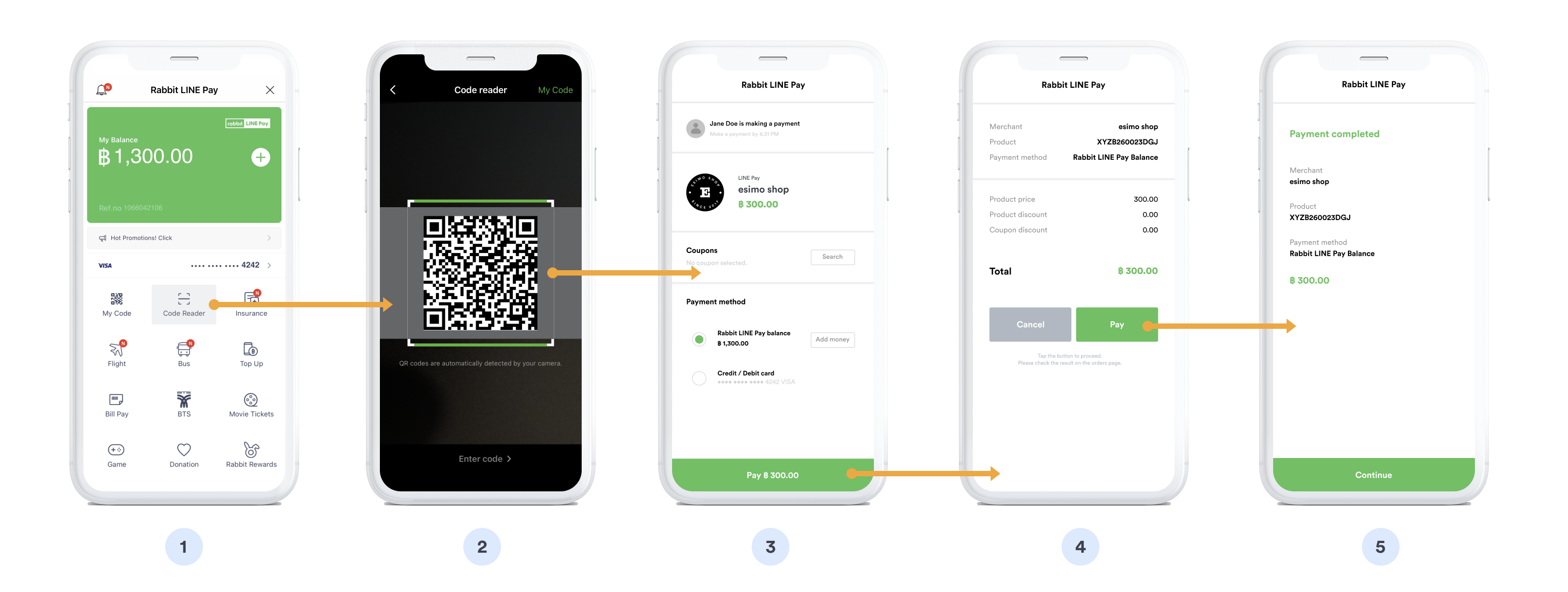
Desktop QR code scanning method:
- ❶ Select Rabbit LINE Pay - Customer chooses payment option
- ❷ QR code generated - System creates unique payment QR
- ❸ Open LINE app - Customer launches LINE on mobile device
- ❹ Scan QR - Use LINE's built-in QR scanner to capture code
- ❺ Payment details - Transaction info appears in LINE app
- ❻ Enter passcode - Authenticate with LINE Pay passcode
- ❼ Confirm payment - Tap to authorize transaction
- ❽ Earn Rabbit points - Rewards automatically credited
- ❾ Complete - Payment success, return to merchant
Login Flow - Step 1:
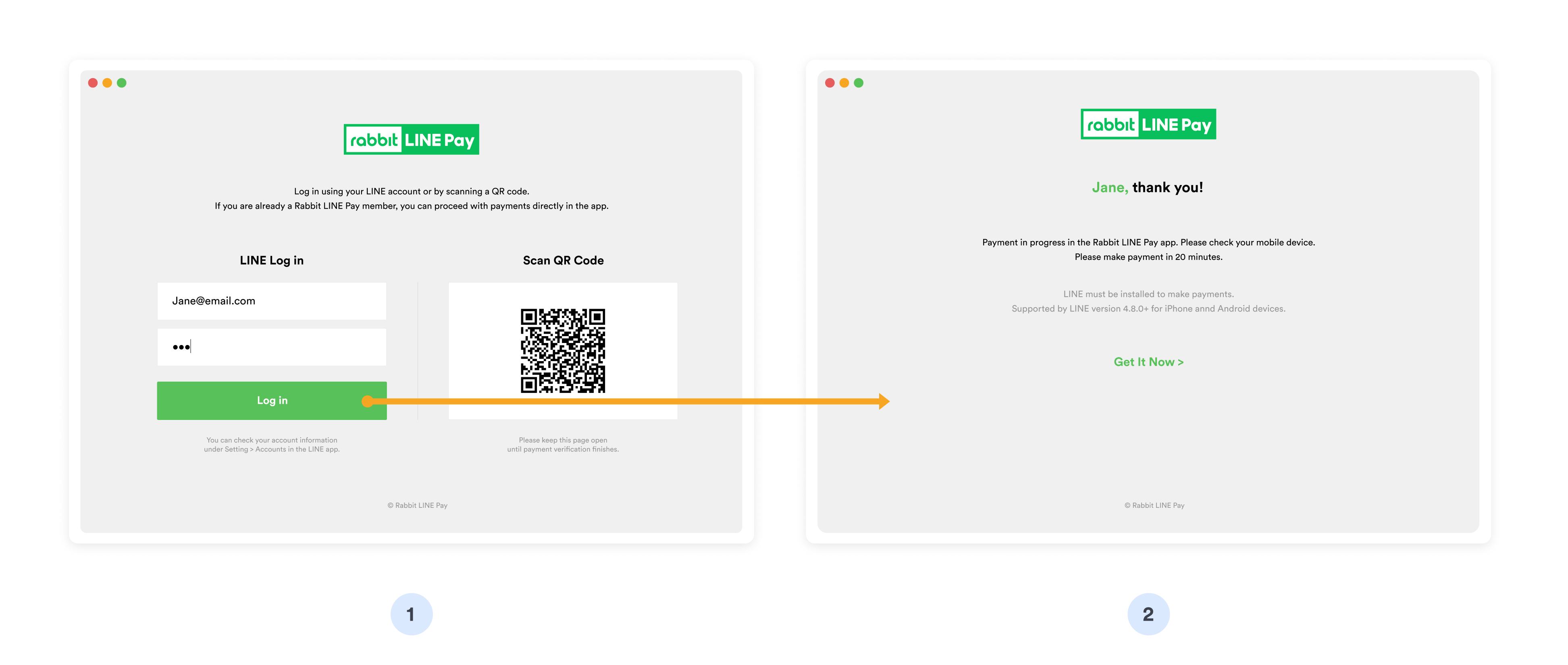
Web-based authentication (Part 1):
- ❶ Choose Rabbit LINE Pay - Customer selects at checkout
- ❷ Redirect to LINE - Navigate to LINE Pay authorization page
- ❸ Login prompt - Enter LINE account credentials
- ❹ Email/Phone - Input registered LINE email or phone number
- ❺ Password - Enter LINE account password
- ❻ 2FA verification - Complete two-factor authentication if enabled
Login Flow - Step 2:
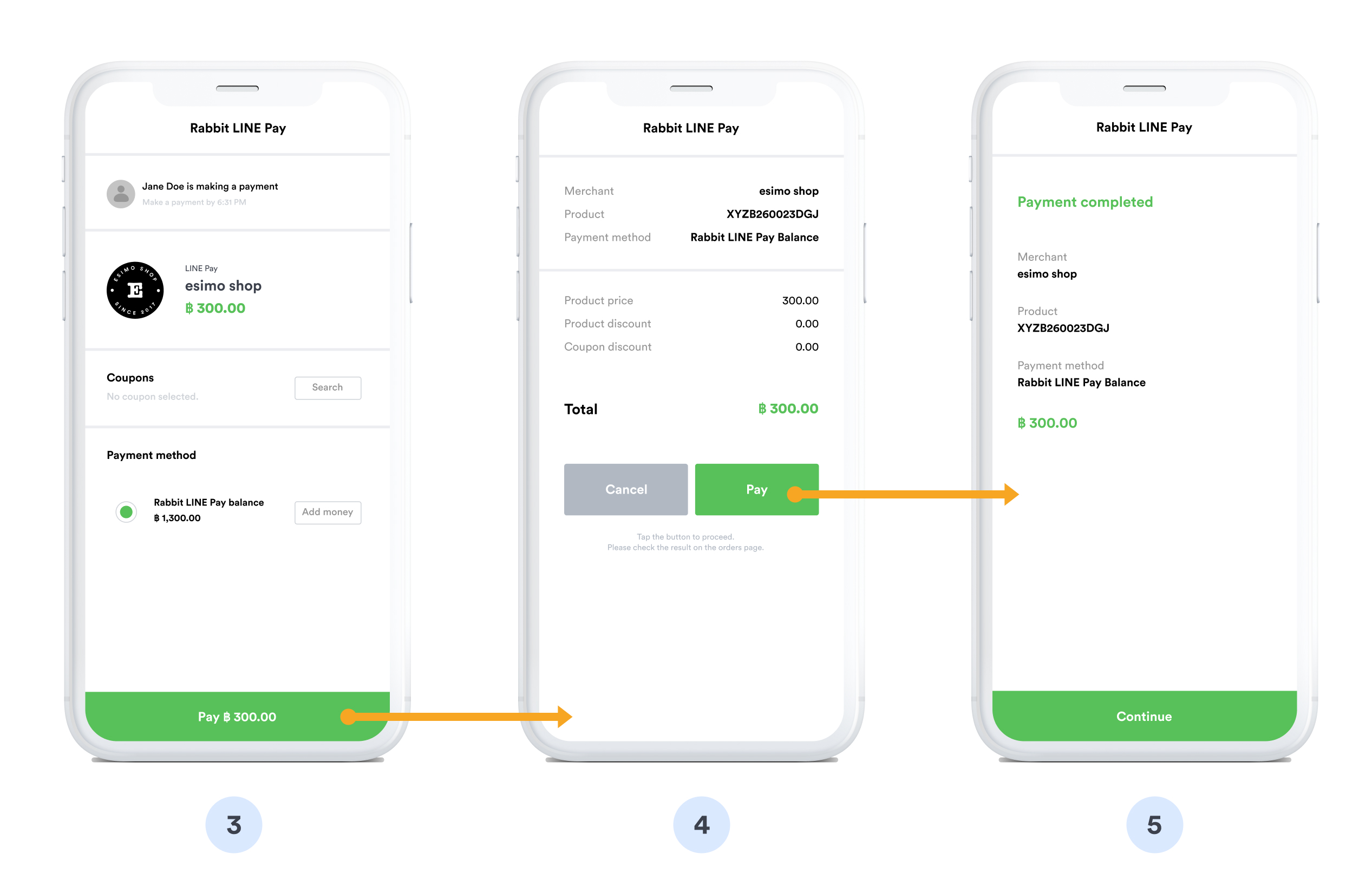
In-app authorization (Part 2):
- ❼ LINE app opens - Automatic redirect to LINE application
- ❽ Review payment - Merchant name, amount, and Rabbit points to earn
- ❾ Select payment source - Choose linked card or LINE Pay balance
- ❿ Authenticate - Confirm with passcode or biometric
- ⓫ Payment processed - Funds deducted, Rabbit Rewards credited
- ⓬ Success - Confirmation in LINE, return to merchant site
Implementation
Step 1: Create Rabbit LINE Pay Source
- cURL
- Node.js
- PHP
- Python
- Ruby
- Go
- Java
- C#
curl https://api.omise.co/sources \
  -u skey_test_YOUR_SECRET_KEY: \
  -d "type=rabbit_linepay" \
  -d "amount=100000" \
  -d "currency=THB"
const omise = require('omise')({
    secretKey: 'skey_test_YOUR_SECRET_KEY'
});

const source = await omise.sources.create({
    type: 'rabbit_linepay',
    amount: 100000,  // THB 1,000.00
    currency: 'THB'
});
<?php
$source = OmiseSource::create(array(
    'type' => 'rabbit_linepay',
    'amount' => 100000,
    'currency' => 'THB'
));
?>
import omise

omise.api_secret = 'skey_test_YOUR_SECRET_KEY'

source = omise.Source.create(
    type='rabbit_linepay',
    amount=100000,
    currency='THB'
)
require 'omise'

Omise.api_key = 'skey_test_YOUR_SECRET_KEY'

source = Omise::Source.create({
  type: 'rabbit_linepay',
  amount: 100000,
  currency: 'THB'
})
source, err := client.Sources().Create(&operations.CreateSource{
    Type:     "rabbit_linepay",
    Amount:   100000,
    Currency: "THB",
})
Source source = client.sources().create(new Source.CreateParams()
    .type("rabbit_linepay")
    .amount(100000L)
    .currency("THB"));
var source = await client.Sources.Create(new CreateSourceRequest
{
    Type = "rabbit_linepay",
    Amount = 100000,
    Currency = "THB"
});
Response:
{
  "object": "source",
  "id": "src_test_5rt6s9vah5lkvi1rh9c",
  "type": "rabbit_linepay",
  "flow": "redirect",
  "amount": 100000,
  "currency": "THB"
}
Step 2: Create Charge
curl https://api.omise.co/charges \
  -u skey_test_YOUR_SECRET_KEY: \
  -d "amount=100000" \
  -d "currency=THB" \
  -d "source=src_test_5rt6s9vah5lkvi1rh9c" \
  -d "return_uri=https://yourdomain.com/payment/callback"
Step 3: Redirect Customer
app.post('/checkout/rabbit-linepay', async (req, res) => {
    try {
        const { amount, order_id, customer_email } = req.body;

        // Validate amount
        if (amount < 100 || amount > 5000000) {
            return res.status(400).json({
                error: 'Amount must be between ฿1 and ฿50,000'
            });
        }

        // Create source
        const source = await omise.sources.create({
            type: 'rabbit_linepay',
            amount: amount,
            currency: 'THB'
        });

        // Create charge
        const charge = await omise.charges.create({
            amount: amount,
            currency: 'THB',
            source: source.id,
            return_uri: `${process.env.BASE_URL}/payment/callback`,
            metadata: {
                order_id: order_id,
                customer_email: customer_email
            }
        });

        // Redirect to Rabbit LINE Pay
        res.redirect(charge.authorize_uri);

    } catch (error) {
        console.error('Rabbit LINE Pay error:', error);
        res.status(500).json({ error: error.message });
    }
});
Step 4: Handle Return
app.get('/payment/callback', async (req, res) => {
    try {
        const chargeId = req.query.charge_id;
        const charge = await omise.charges.retrieve(chargeId);

        if (charge.status === 'successful') {
            await processOrder(charge.metadata.order_id);
            res.redirect('/payment-success?rewards=earned');
        } else if (charge.status === 'failed') {
            res.redirect('/payment-failed?reason=' + charge.failure_message);
        } else {
            res.redirect('/payment-pending');
        }
    } catch (error) {
        res.redirect('/payment-error');
    }
});
Step 5: Handle Webhook
app.post('/webhooks/omise', (req, res) => {
    const event = req.body;

    if (event.key === 'charge.complete' && event.data.source.type === 'rabbit_linepay') {
        const charge = event.data;

        if (charge.status === 'successful') {
            processOrder(charge.metadata.order_id);
            sendConfirmationEmail(charge.metadata.customer_email);

            // Log Rabbit Rewards earned (if available)
            console.log(`Payment successful. Customer earned Rabbit Rewards.`);
        } else if (charge.status === 'failed') {
            handleFailedPayment(charge.metadata.order_id);
        }
    }

    res.sendStatus(200);
});
Complete Implementation Example
// Express.js server
const express = require('express');
const omise = require('omise')({
    secretKey: process.env.OMISE_SECRET_KEY
});

const app = express();
app.use(express.json());

app.post('/checkout/rabbit-linepay', async (req, res) => {
    try {
        const { amount, order_id, customer_email, customer_name } = req.body;

        // Validate amount (฿1 - ฿50,000)
        if (amount < 100 || amount > 5000000) {
            return res.status(400).json({
                error: 'Amount must be between ฿1 and ฿50,000'
            });
        }

        // Calculate estimated Rabbit Rewards points (example: 1% of amount)
        const estimatedPoints = Math.floor(amount / 100);

        // Create source
        const source = await omise.sources.create({
            type: 'rabbit_linepay',
            amount: amount,
            currency: 'THB'
        });

        // Create charge
        const charge = await omise.charges.create({
            amount: amount,
            currency: 'THB',
            source: source.id,
            return_uri: `${process.env.BASE_URL}/payment/callback`,
            metadata: {
                order_id: order_id,
                customer_email: customer_email,
                customer_name: customer_name,
                payment_method: 'rabbit_linepay',
                estimated_rewards: estimatedPoints
            }
        });

        // Return authorization URL
        res.json({
            authorize_uri: charge.authorize_uri,
            charge_id: charge.id,
            estimated_rewards: estimatedPoints
        });

    } catch (error) {
        console.error('Rabbit LINE Pay error:', error);
        res.status(500).json({ error: error.message });
    }
});

// Callback handler
app.get('/payment/callback', async (req, res) => {
    try {
        const chargeId = req.query.charge_id;
        const charge = await omise.charges.retrieve(chargeId);

        if (charge.status === 'successful') {
            const rewards = charge.metadata.estimated_rewards || 0;
            res.redirect(`/order-success?order=${charge.metadata.order_id}&rewards=${rewards}`);
        } else {
            res.redirect(`/payment-failed?charge=${chargeId}`);
        }
    } catch (error) {
        res.redirect('/payment-error');
    }
});

// Webhook handler
app.post('/webhooks/omise', (req, res) => {
    const event = req.body;

    if (event.key === 'charge.complete') {
        const charge = event.data;

        if (charge.source.type === 'rabbit_linepay') {
            if (charge.status === 'successful') {
                updateOrderStatus(charge.metadata.order_id, 'paid');
                sendConfirmation(charge.metadata.customer_email, {
                    amount: charge.amount,
                    rewards: charge.metadata.estimated_rewards
                });
            } else {
                updateOrderStatus(charge.metadata.order_id, 'failed');
            }
        }
    }

    res.sendStatus(200);
});

// Helper functions
async function updateOrderStatus(orderId, status) {
    await db.orders.update({ id: orderId }, { status: status });
}

async function sendConfirmation(email, details) {
    // Send email with payment confirmation and Rabbit Rewards info
    // Implementation depends on email service
}

app.listen(3000);
Refund Support
Rabbit LINE Pay supports full refunds only within 30 days:
// Full refund only (no partial refunds)
const refund = await omise.charges.refund('chrg_test_...', {
    amount: 100000  // Must be full amount
});
- Full refunds only - Partial refunds are not supported
- 30-day window - Refunds must be requested within 30 days
- Rabbit Rewards - Points earned are automatically deducted upon refund
Common Issues & Troubleshooting
Issue: LINE app not installed
Cause: Customer doesn't have LINE app on their device
Solution:
function checkLINEApp() {
    const userAgent = navigator.userAgent;
    const isMobile = /Android|iPhone|iPad|iPod/i.test(userAgent);

    if (isMobile) {
        return `
            <div class="line-check">
                <p>This payment method requires LINE app.</p>
                <p>Please ensure you have LINE installed:</p>
                <a href="https://line.me/download">Download LINE</a>
            </div>
        `;
    }

    return ''; // Desktop users will use LINE web
}
Issue: Insufficient balance
Cause: Customer's Rabbit LINE Pay balance is too low
Solution:
<div class="payment-instructions">
    <h3>Before completing payment:</h3>
    <ol>
        <li>Check your Rabbit LINE Pay balance in LINE app</li>
        <li>If needed, top up your balance:
            <ul>
                <li>7-Eleven, FamilyMart (any convenience store)</li>
                <li>Credit/debit card</li>
                <li>Bank transfer</li>
                <li>Top up Rabbit Card at BTS stations</li>
            </ul>
        </li>
        <li>Return here to complete payment</li>
    </ol>
    <p><strong>Payment amount: ฿{{amount}}</strong></p>
</div>
Issue: Daily limit exceeded
Cause: Customer reached daily transaction limit
Solution:
function handleLimitExceeded() {
    return {
        error: 'Daily limit exceeded',
        message: 'You have reached your Rabbit LINE Pay daily limit.',
        suggestions: [
            'Wait until tomorrow to complete this transaction',
            'Upgrade to verified account for higher limits',
            'Use an alternative payment method'
        ],
        alternativeMethods: [
            'credit_card',
            'promptpay',
            'truemoney'
        ]
    };
}
Issue: Payment expired
Cause: Customer didn't complete payment within time limit
Solution:
// 10-minute payment timeout
const PAYMENT_TIMEOUT = 10 * 60 * 1000;

setTimeout(() => {
    if (!paymentConfirmed) {
        showMessage('Payment session expired. Please try again.');
        enableRetryButton();
    }
}, PAYMENT_TIMEOUT);

function enableRetryButton() {
    const retryBtn = document.getElementById('retry-payment');
    retryBtn.disabled = false;
    retryBtn.onclick = () => {
        window.location.href = '/checkout';
    };
}
Issue: Rabbit Rewards not showing
Cause: Rewards calculation or display issue
Solution:
// Calculate and display Rabbit Rewards
function displayRewardsEstimate(amount) {
    // Typical rate: 1 point per ฿100 spent
    const points = Math.floor(amount / 10000); // amount in satang

    return `
        <div class="rewards-estimate">
            <img src="/images/rabbit-icon.svg" alt="Rabbit Rewards" width="24">
            <p>Earn approximately <strong>${points} Rabbit Rewards points</strong></p>
            <p class="small">Points will be credited after successful payment</p>
        </div>
    `;
}
Best Practices
1. Display Rabbit Rewards Benefits
<div class="rabbit-linepay-benefits">
    <h3>Pay with Rabbit LINE Pay</h3>
    <ul class="benefits-list">
        <li>✓ Earn Rabbit Rewards points on every purchase</li>
        <li>✓ Use points for BTS/MRT rides</li>
        <li>✓ Fast payment through LINE app</li>
        <li>✓ Secure with LINE authentication</li>
    </ul>
    <p class="rewards-note">
        <img src="/images/rabbit-icon.svg" width="20">
        <strong>Earn {{points}} points</strong> with this purchase
    </p>
</div>
2. Provide Top-up Information
function displayTopUpInformation() {
    return `
        <div class="topup-info">
            <h4>Need to add funds?</h4>
            <p>Top up your Rabbit LINE Pay balance:</p>
            <ul>
                <li>🏪 Any 7-Eleven or FamilyMart</li>
                <li>💳 Credit/debit card in LINE app</li>
                <li>🏦 Bank transfer</li>
                <li>🚇 BTS Rabbit Card top-up machines</li>
            </ul>
            <a href="https://pay.line.me/topup" target="_blank">
                View top-up guide
            </a>
        </div>
    `;
}
3. Handle Mobile vs Desktop
function detectPlatform() {
    const isMobile = /Android|iPhone|iPad|iPod/i.test(navigator.userAgent);

    if (isMobile) {
        // Mobile: Deep link to LINE app
        return {
            platform: 'mobile',
            instructions: 'You will be redirected to the LINE app'
        };
    } else {
        // Desktop: LINE web interface
        return {
            platform: 'desktop',
            instructions: 'You will be redirected to LINE web. Please log in with your LINE account.'
        };
    }
}
4. Validate Amount Limits
function validateRabbitLINEPayAmount(amount, verificationLevel = 'basic') {
    const limits = {
        'basic': { min: 100, max: 5000000, daily: 5000000 },
        'verified': { min: 100, max: 5000000, daily: 10000000 }
    };

    const limit = limits[verificationLevel];

    if (amount < limit.min) {
        return `Minimum amount is ฿${limit.min / 100}`;
    }

    if (amount > limit.max) {
        return `Maximum amount per transaction is ฿${limit.max / 100}`;
    }

    return null; // Valid
}
5. Show Clear Instructions
<div class="rabbit-linepay-instructions">
    <h3>How to pay with Rabbit LINE Pay</h3>
    <div class="steps">
        <div class="step">
            <span class="step-number">1</span>
            <p>Click "Pay with Rabbit LINE Pay"</p>
        </div>
        <div class="step">
            <span class="step-number">2</span>
            <p>Open LINE app when prompted</p>
        </div>
        <div class="step">
            <span class="step-number">3</span>
            <p>Review payment details</p>
        </div>
        <div class="step">
            <span class="step-number">4</span>
            <p>Confirm to complete payment</p>
        </div>
        <div class="step">
            <span class="step-number">5</span>
            <p>Earn Rabbit Rewards automatically!</p>
        </div>
    </div>
</div>
6. Use Webhooks Reliably
// Webhook is primary notification method
app.post('/webhooks/omise', handleWebhook);

// Callback is backup
app.get('/payment/callback', handleCallback);

// Never rely solely on callback for order fulfillment
FAQ
What is Rabbit LINE Pay?
Rabbit LINE Pay is a digital payment service in Thailand that combines LINE messaging platform with Rabbit Card rewards system. Users can make payments through the LINE app and earn Rabbit Rewards points that can be used for BTS/MRT rides and purchases at participating merchants.
Do customers need both LINE and Rabbit Card?
Customers need the LINE app with Rabbit LINE Pay activated. They don't need a physical Rabbit Card, but having one allows additional top-up methods and integration with Bangkok's mass transit system.
What are the transaction limits?
- Minimum: ฿1.00 per transaction
- Maximum: ฿50,000 per transaction
- Daily limit: ฿50,000 (basic) or ฿100,000 (verified account)
Customers can increase limits by completing identity verification in the LINE app.
How do customers top up their Rabbit LINE Pay balance?
Customers can top up through:
- Convenience stores (7-Eleven, FamilyMart, etc.)
- Credit or debit card in LINE app
- Bank transfer
- Rabbit Card top-up machines at BTS stations
- Partner locations
Can I refund Rabbit LINE Pay payments?
Yes, but with limitations:
- Full refunds only - Partial refunds are not supported
- 30-day window - Must refund within 30 days of transaction
- Rabbit Rewards - Points earned by customer are automatically deducted
How long does settlement take?
Rabbit LINE Pay settlements typically occur within 2-3 business days after the transaction. Check your Omise dashboard for specific settlement schedules.
Do customers earn Rabbit Rewards on all purchases?
Yes, customers automatically earn Rabbit Rewards points on all successful Rabbit LINE Pay transactions. The exact points earned depend on Rabbit's current rewards program (typically 1 point per ฿100 spent). Points are credited after payment confirmation.
Is Rabbit LINE Pay available 24/7?
Yes, Rabbit LINE Pay is available 24/7 for transactions. However, top-up methods may have limited availability (e.g., convenience store top-ups only during store hours).
What happens if payment fails?
Common reasons for payment failure:
- Insufficient balance
- Daily limit exceeded
- Account not verified
- Technical issues with LINE app
Customers can retry the payment after addressing the issue or choose an alternative payment method.
Testing
Test Mode
Rabbit LINE Pay can be tested using your test API keys. In test mode:
Test Credentials:
- Use test API keys (skey_test_xxx)
- Currency: THB (Thai Baht)
- No actual Rabbit LINE Pay account required
Test Flow:
- Create source and charge with test API keys
- Customer redirects to test
authorize_uri - Test page simulates Rabbit LINE Pay flow
- Use Omise Dashboard Actions to mark charge as successful/failed
- Verify webhook and return_uri handling
Testing Implementation:
// Test Rabbit LINE Pay
const source = await omise.sources.create({
    type: 'rabbit_linepay',
    amount: 10000,  // ฿100.00
    currency: 'THB'
});

const charge = await omise.charges.create({
    amount: 10000,
    currency: 'THB',
    source: source.id,
    return_uri: 'https://example.com/callback'
});

console.log('Test authorize URL:', charge.authorize_uri);
Test Scenarios:
- Successful payment: Verify order completion
- Failed payment: Test error handling and retry
- Amount limits: Test ฿20 minimum and maximum amounts
- Mobile flow: Test deep-linking to LINE app
- Insufficient balance: Simulate low wallet balance
- Timeout: Test abandoned payments
- Webhook delivery: Verify all webhook notifications
Important Notes:
- Test mode doesn't connect to real Rabbit LINE Pay servers
- Use dashboard to simulate payment status changes
- Test mobile app flow (LINE integration)
- Verify webhook handling for all charge statuses
- Test amount validation and limits
For comprehensive testing guidelines, see the Testing Documentation.
Related Resources
- Digital Wallets Overview - All e-wallet options
- TrueMoney Wallet - Alternative Thai wallet
- PromptPay - QR code option
- Testing - Test Rabbit LINE Pay integration
- Refunds - Refund policies
- Webhooks - Handle payment notifications