KakaoPay
Accept payments from KakaoPay in Singapore and Thailand, an integrated payment wallet supporting multiple Southeast Asian markets.
Overview
KakaoPay is a digital wallet payment service that operates in Singapore and Thailand, providing customers with convenient mobile payment options integrated with e-commerce platforms.
Key Features:
- ✅ Multi-region - Available in Singapore and Thailand
- ✅ Fast confirmation - Near real-time payment verification (typically within seconds)
- ✅ Mobile-optimized - Seamless smartphone experience
- ✅ Quick checkout - Fast payment authorization
- ✅ E-commerce focus - Popular for online shopping
Supported Regions
| Region | Currency | Min Amount | Max Amount | API Version |
|---|---|---|---|---|
| Singapore | SGD | $1.00 | $20,000.00 | 2017-11-02 |
| Thailand | THB | ฿20.00 | ฿150,000.00 | 2017-11-02 |
How It Works
Customer Experience:
- Customer selects KakaoPay at checkout
- Redirected to KakaoPay authorization page
- KakaoTalk app opens automatically (deep link)
- Customer reviews payment in KakaoTalk
- Confirms with password/biometric/pattern
- Returns to merchant site
- Receives payment notification in KakaoTalk
Typical completion time: 30-90 seconds
Payment Flow Examples
Mobile Payment Flow:
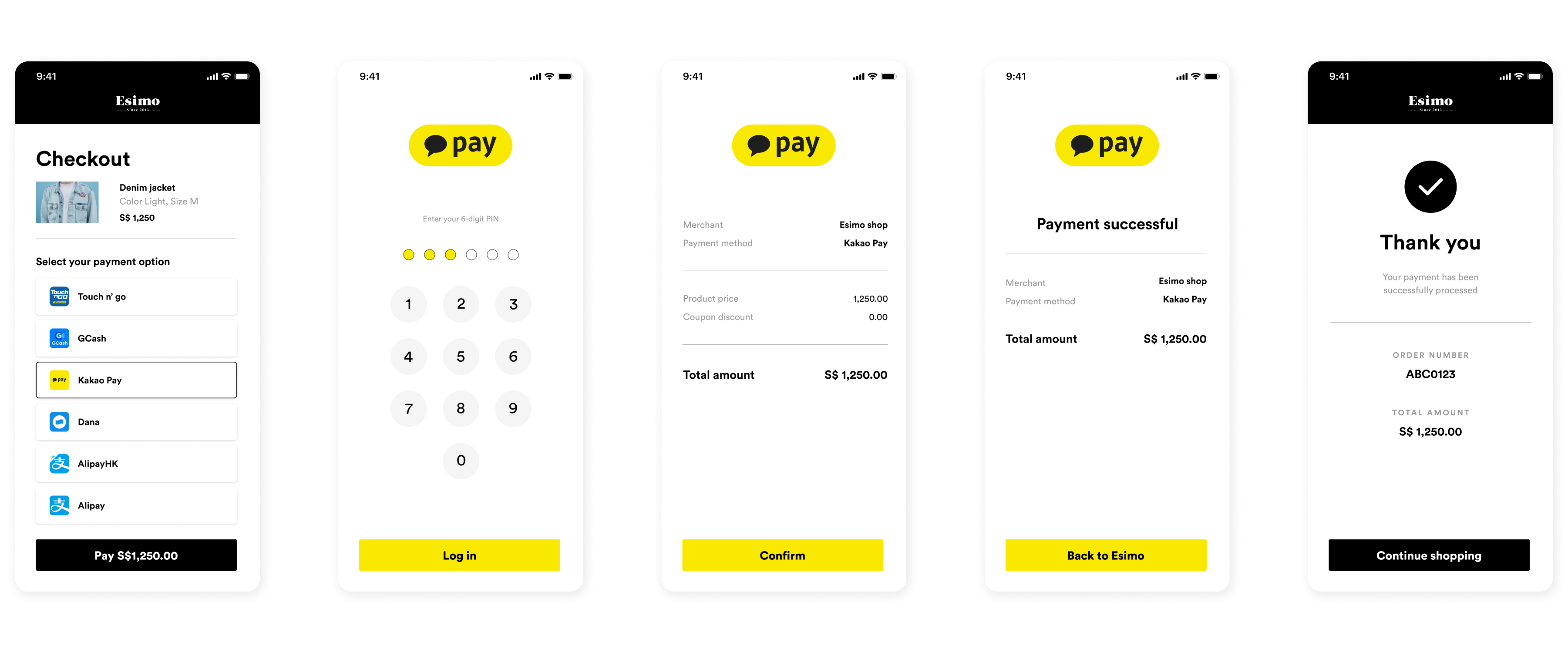
Lightning-fast mobile experience:
- ❶ Select KakaoPay - Customer chooses KakaoPay at checkout
- ❷ KakaoTalk opens - Deep link instantly launches KakaoTalk app
- ❸ Payment prompt - Transaction details appear in KakaoTalk
- ❹ Review details - Merchant name and payment amount shown
- ❺ Authenticate - Confirm with password, pattern, or biometric
- ❻ Payment complete - Instant processing (fastest in Asia - 20-40 seconds)
- ❼ Notification - Payment confirmation message in KakaoTalk
- ❽ Return - Automatic redirect to merchant
Desktop Payment Flow:
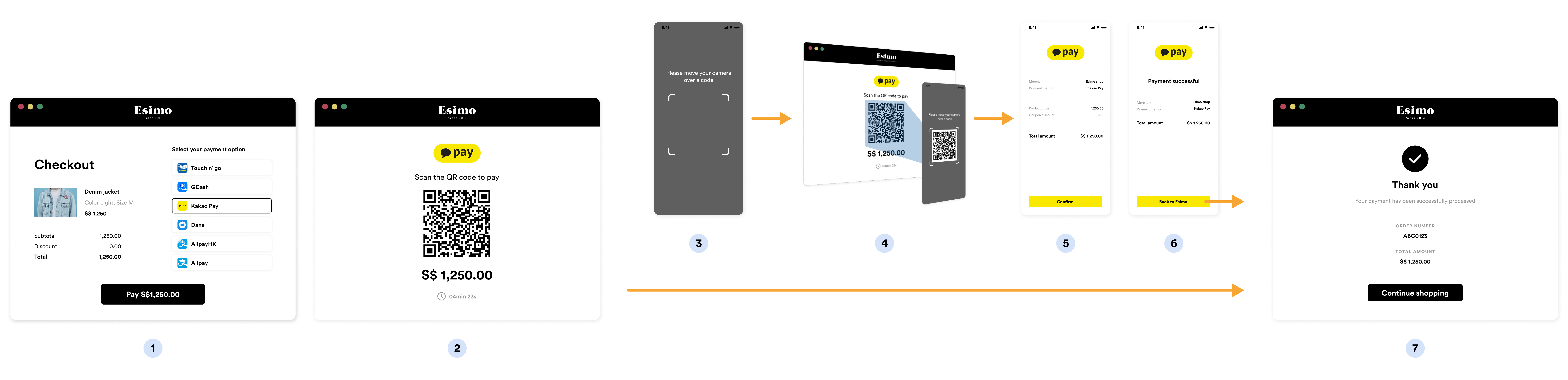
QR code method for desktop users:
- ❶ Choose KakaoPay - Customer selects KakaoPay on desktop
- ❷ Generate QR - System creates KakaoPay payment QR code
- ❸ Display QR - QR code shown prominently on screen
- ❹ Open KakaoTalk - Customer launches KakaoTalk on mobile
- ❺ Scan QR - Use KakaoTalk's built-in QR scanner
- ❻ Payment loaded - Transaction details auto-populate in app
- ❼ Authenticate - Quick biometric or password confirmation
- ❽ Success - Payment processed, desktop shows confirmation
Implementation
Step 1: Create KakaoPay Source
- cURL
- Node.js
- PHP
- Python
- Ruby
- Go
curl https://api.omise.co/sources \
  -u skey_test_YOUR_SECRET_KEY: \
  -d "type=kakaopay" \
  -d "amount=1000000" \
  -d "currency=KRW"
const omise = require('omise')({
    secretKey: 'skey_test_YOUR_SECRET_KEY'
});

const source = await omise.sources.create({
    type: 'kakaopay',
    amount: 1000000,  // ₩10,000
    currency: 'KRW'
});

console.log('KakaoPay source:', source.id);
<?php
$source = OmiseSource::create(array(
    'type' => 'kakaopay',
    'amount' => 1000000,
    'currency' => 'KRW'
));
?>
import omise

omise.api_secret = 'skey_test_YOUR_SECRET_KEY'

source = omise.Source.create(
    type='kakaopay',
    amount=1000000,
    currency='KRW'
)
require 'omise'

Omise.api_key = 'skey_test_YOUR_SECRET_KEY'

source = Omise::Source.create({
  type: 'kakaopay',
  amount: 1000000,
  currency: 'KRW'
})
source, err := client.Sources().Create(&operations.CreateSource{
    Type:     "kakaopay",
    Amount:   1000000,
    Currency: "KRW",
})
Response:
{
  "object": "source",
  "id": "src_test_5rt6s9vah5lkvi1rh9c",
  "type": "kakaopay",
  "flow": "redirect",
  "amount": 1000000,
  "currency": "KRW"
}
Step 2: Create Charge and Redirect
app.post('/checkout/kakaopay', async (req, res) => {
    try {
        const { amount, order_id, customer_email, customer_name } = req.body;

        // Validate amount
        if (amount < 10000) {  // ₩100 minimum
            return res.status(400).json({
                error: 'Minimum amount is ₩100'
            });
        }

        if (amount > 1000000000) {  // ₩10,000,000 maximum
            return res.status(400).json({
                error: 'Maximum amount is ₩10,000,000'
            });
        }

        // Create source
        const source = await omise.sources.create({
            type: 'kakaopay',
            amount: amount,
            currency: 'KRW'
        });

        // Create charge
        const charge = await omise.charges.create({
            amount: amount,
            currency: 'KRW',
            source: source.id,
            return_uri: `${process.env.BASE_URL}/payment/callback`,
            metadata: {
                order_id: order_id,
                customer_email: customer_email,
                customer_name: customer_name,
                payment_method: 'kakaopay'
            }
        });

        // Redirect to KakaoPay
        res.redirect(charge.authorize_uri);

    } catch (error) {
        console.error('KakaoPay error:', error);
        res.status(500).json({ error: error.message });
    }
});
Step 3: Handle Return Callback
app.get('/payment/callback', async (req, res) => {
    try {
        const chargeId = req.query.charge_id;
        const charge = await omise.charges.retrieve(chargeId);

        if (charge.status === 'successful') {
            await processOrder(charge.metadata.order_id);
            res.redirect(`/order-success?order=${charge.metadata.order_id}`);
        } else if (charge.status === 'failed') {
            res.redirect(`/payment-failed?reason=${charge.failure_message}`);
        } else {
            res.redirect('/payment-pending');
        }
    } catch (error) {
        res.redirect('/payment-error');
    }
});
Step 4: Handle Webhook
app.post('/webhooks/omise', async (req, res) => {
    const event = req.body;

    if (event.key === 'charge.complete') {
        const charge = event.data;

        if (charge.source.type === 'kakaopay') {
            if (charge.status === 'successful') {
                await fulfillOrder(charge.metadata.order_id);
                await sendConfirmationEmail(charge.metadata.customer_email);
            } else if (charge.status === 'failed') {
                await handleFailedPayment(charge.metadata.order_id);
            }
        }
    }

    res.sendStatus(200);
});
Complete Implementation Example
const express = require('express');
const omise = require('omise')({
    secretKey: process.env.OMISE_SECRET_KEY
});

const app = express();
app.use(express.json());

// KakaoPay configuration
const KAKAOPAY_CONFIG = {
    currency: 'KRW',
    minAmount: 10000,      // ₩100
    maxAmount: 1000000000, // ₩10,000,000
    displayName: 'KakaoPay',
    timeout: 10 * 60 * 1000 // 10 minutes
};

// Create KakaoPay payment
app.post('/checkout/kakaopay', async (req, res) => {
    try {
        const { amount, order_id, customer_email, customer_name, customer_phone } = req.body;

        // Validate currency
        if (req.body.currency && req.body.currency !== 'KRW') {
            return res.status(400).json({
                error: 'KakaoPay only supports KRW currency'
            });
        }

        // Validate amount
        if (amount < KAKAOPAY_CONFIG.minAmount) {
            return res.status(400).json({
                error: `Minimum amount is ₩${KAKAOPAY_CONFIG.minAmount / 100}`
            });
        }

        if (amount > KAKAOPAY_CONFIG.maxAmount) {
            return res.status(400).json({
                error: `Maximum amount is ₩${KAKAOPAY_CONFIG.maxAmount / 100}`
            });
        }

        // Create source
        const source = await omise.sources.create({
            type: 'kakaopay',
            amount: amount,
            currency: KAKAOPAY_CONFIG.currency
        });

        // Create charge
        const charge = await omise.charges.create({
            amount: amount,
            currency: KAKAOPAY_CONFIG.currency,
            source: source.id,
            return_uri: `${process.env.BASE_URL}/payment/callback`,
            metadata: {
                order_id: order_id,
                customer_email: customer_email,
                customer_name: customer_name,
                customer_phone: customer_phone,
                payment_method: 'kakaopay'
            }
        });

        // Log for tracking
        console.log(`KakaoPay payment initiated: ${charge.id} for order ${order_id}`);

        // Return authorization URL
        res.json({
            authorize_uri: charge.authorize_uri,
            charge_id: charge.id
        });

    } catch (error) {
        console.error('KakaoPay error:', error);
        res.status(500).json({ error: error.message });
    }
});

// Payment callback
app.get('/payment/callback', async (req, res) => {
    try {
        const charge = await omise.charges.retrieve(req.query.charge_id);

        if (charge.status === 'successful') {
            res.redirect(`/order-confirmation?order=${charge.metadata.order_id}`);
        } else {
            res.redirect(`/payment-failed?charge=${req.query.charge_id}`);
        }
    } catch (error) {
        res.redirect('/payment-error');
    }
});

// Webhook handler
app.post('/webhooks/omise', async (req, res) => {
    const event = req.body;

    if (event.key === 'charge.complete' && event.data.source.type === 'kakaopay') {
        const charge = event.data;

        if (charge.status === 'successful') {
            await fulfillOrder(charge.metadata.order_id);
            await sendReceipt(charge.metadata.customer_email, charge);
            console.log(`KakaoPay payment successful: ${charge.id}`);
        } else {
            await cancelOrder(charge.metadata.order_id);
            console.log(`KakaoPay payment failed: ${charge.id}`);
        }
    }

    res.sendStatus(200);
});

app.listen(3000);
Refund Support
KakaoPay supports full and partial refunds within 365 days:
// Full refund
const fullRefund = await omise.charges.refund('chrg_test_...', {
    amount: 1000000  // Full amount
});

// Partial refund
const partialRefund = await omise.charges.refund('chrg_test_...', {
    amount: 500000  // Partial amount
});

console.log('Refund status:', fullRefund.status);
Refunds are processed back to the customer's KakaoPay account within 3-5 business days.
Common Issues & Troubleshooting
Issue: Customer doesn't have KakaoTalk
Cause: Customer doesn't have KakaoTalk app (rare in South Korea)
Solution:
// Show KakaoTalk requirement
function checkKakaoTalk() {
    const isMobile = /iPhone|iPad|iPod|Android/i.test(navigator.userAgent);

    if (!isMobile) {
        alert('카카오페이는 모바일에서만 사용 가능합니다.');
        return false;
    }

    // Show app links
    const isAndroid = /Android/i.test(navigator.userAgent);
    const appLink = isAndroid
        ? 'https://play.google.com/store/apps/details?id=com.kakao.talk'
        : 'https://apps.apple.com/kr/app/kakaotalk/id362057947';

    showMessage(`카카오톡 앱이 필요합니다. <a href="${appLink}">다운로드</a>`);
    return true;
}
Issue: Payment method not linked
Error: No payment method linked to KakaoPay
Solution:
if (charge.failure_code === 'no_payment_method') {
    showMessage(
        '카카오페이에 결제수단이 등록되지 않았습니다. ' +
        '카카오톡에서 결제수단을 등록해주세요.'
    );
    showPaymentMethodSetupGuide();
}
Issue: Transaction limit exceeded
Error: Transaction exceeds account limit
Solution:
if (charge.failure_code === 'transaction_limit_exceeded') {
    showMessage(
        '거래 한도를 초과했습니다. ' +
        '본인 인증 후 한도를 늘리거나 다른 결제수단을 이용해주세요.'
    );
}
Issue: Payment timeout
Cause: Customer didn't complete payment within 10 minutes
Solution:
const TIMEOUT = 10 * 60 * 1000;

setTimeout(() => {
    if (!paymentCompleted) {
        showMessage('결제 시간이 초과되었습니다. 다시 시도해주세요.');
        enableRetry();
    }
}, TIMEOUT);
Best Practices
1. Display in Korean
<div class="kakaopay-payment">
    <h3>카카오페이로 결제</h3>
    <div class="logo">
        <img src="/icons/kakaopay-logo.svg" alt="카카오페이">
    </div>
    <div class="instructions">
        <ol>
            <li>카카오톡 앱이 설치되어 있어야 합니다</li>
            <li>카카오페이에 결제수단이 등록되어 있어야 합니다</li>
            <li>카카오톡 앱으로 자동 이동합니다</li>
            <li>비밀번호 또는 생체인증으로 결제를 승인합니다</li>
        </ol>
    </div>
    <p class="help-text">
        카카오페이가 처음이신가요?
        <a href="https://www.kakaopay.com" target="_blank">자세히 보기</a>
    </p>
</div>
2. Mobile-Only Detection
function validateKakaoPayPayment() {
    const userAgent = navigator.userAgent;
    const isMobile = /Android|iPhone|iPad|iPod/i.test(userAgent);

    if (!isMobile) {
        return {
            valid: false,
            message: '카카오페이는 모바일 기기에서만 사용할 수 있습니다'
        };
    }

    return { valid: true };
}
3. Handle Deep Links
function openKakaoTalkApp(authorizeUri) {
    // Redirect to KakaoPay
    window.location = authorizeUri;

    // Fallback if app doesn't open
    setTimeout(() => {
        if (!document.hidden) {
            showKakaoTalkInstallPrompt();
        }
    }, 2000);
}

function showKakaoTalkInstallPrompt() {
    const isAndroid = /Android/i.test(navigator.userAgent);
    const downloadUrl = isAndroid
        ? 'https://play.google.com/store/apps/details?id=com.kakao.talk'
        : 'https://apps.apple.com/kr/app/kakaotalk/id362057947';

    if (confirm('카카오톡 앱이 설치되지 않았습니다. 다운로드 하시겠습니까?')) {
        window.location = downloadUrl;
    }
}
4. Amount Formatting
function formatKRW(amount) {
    return new Intl.NumberFormat('ko-KR', {
        style: 'currency',
        currency: 'KRW',
        minimumFractionDigits: 0,
        maximumFractionDigits: 0
    }).format(amount / 100);
}

// Usage
const displayAmount = formatKRW(1000000); // "₩10,000"
5. Show Payment Method Setup
<div class="kakaopay-setup-guide">
    <h4>카카오페이 결제수단 등록 방법:</h4>
    <ol>
        <li>카카오톡 앱 실행</li>
        <li>우측 하단 점 3개 메뉴 선택</li>
        <li>페이 선택</li>
        <li>결제 선택</li>
        <li>결제수단 관리</li>
        <li>카드, 계좌, 또는 페이머니 등록</li>
    </ol>
</div>
Use Cases
E-commerce
- Perfect for Korean online shopping
- High conversion rates
- Fast checkout experience
Digital Content
- Music, videos, books
- Game items and subscriptions
- In-app purchases
Food Delivery
- Quick payment for orders
- Integrated with delivery apps
- Popular for restaurant payments
Services
- Transportation (taxi, bus, parking)
- Beauty and wellness bookings
- Event tickets and reservations
Testing
Test Credentials
Use Omise test mode credentials:
- Secret Key:
skey_test_YOUR_SECRET_KEY - Public Key:
pkey_test_YOUR_PUBLIC_KEY
Test Amounts
| Amount (KRW) | Expected Result |
|---|---|
| 10000 - 999999 | Success |
| 1000000 | Insufficient funds |
| 1000001 | Transaction declined |
Test Flow
- Create charge with test credentials
- Use test amounts above
- Complete payment in KakaoPay test environment
- Verify webhook received
- Check charge status
FAQ
What is KakaoPay?
KakaoPay is South Korea's leading mobile wallet with 30+ million users, integrated directly into KakaoTalk, the country's most popular messaging app used by over 90% of South Koreans.
Do customers need KakaoTalk?
Yes, KakaoPay is integrated into KakaoTalk, so customers must have the KakaoTalk app installed. This is standard in South Korea where KakaoTalk has 90%+ penetration.
What are the transaction limits?
- Minimum: ₩100
- Maximum: ₩10,000,000 per transaction
Limits depend on customer's account verification level (Basic, Verified, Plus).
How long does settlement take?
KakaoPay settlements typically occur within 1-3 business days. Check your Omise dashboard for specific settlement schedules.
Can I refund KakaoPay payments?
Yes, KakaoPay supports both full and partial refunds within 365 days of the original transaction.
What if customer has no payment method linked?
Customers need to add a payment method (credit card, bank account, or Kakao Money) in KakaoTalk before they can use KakaoPay. Direct them to KakaoTalk settings to add a payment method.
Does KakaoPay work on desktop?
No, KakaoPay requires the KakaoTalk mobile app. Desktop users should be shown alternative payment methods like credit cards or bank transfer.
Should I display instructions in Korean?
Yes! Since KakaoPay is South Korea-specific, displaying all instructions and messages in Korean (한국어) is essential for the best user experience.
Testing
Test Mode
KakaoPay can be tested using your test API keys. In test mode:
Test Credentials:
- Use test API keys (skey_test_xxx)
- Currency: KRW (Korean Won)
- No actual KakaoPay account required for testing
Test Flow:
- Create source and charge with test API keys
- Customer redirects to test
authorize_uri - Test page simulates KakaoPay authorization
- Use Omise Dashboard Actions to mark charge as successful/failed
- Verify webhook and return_uri handling
Testing Implementation:
// Test KakaoPay payment
const source = await omise.sources.create({
    type: 'kakaopay',
    amount: 10000,  // ₩10,000
    currency: 'KRW'
});

const charge = await omise.charges.create({
    amount: 10000,
    currency: 'KRW',
    source: source.id,
    return_uri: 'https://example.com/callback'
});

console.log('Test authorize URL:', charge.authorize_uri);
Test Scenarios:
- Successful payment: Verify order completion workflow
- Failed payment: Test error handling
- Amount limits: Test minimum and maximum amounts
- Mobile flow: Test deep-linking to KakaoTalk app
- Insufficient balance: Simulate low wallet balance
- Timeout: Test abandoned payment scenarios
- Webhook delivery: Verify all webhook notifications
Important Notes:
- Test mode doesn't connect to real KakaoPay servers
- Use dashboard to simulate payment outcomes
- Test mobile app flow (KakaoTalk integration)
- Verify webhook handling for all charge statuses
- Test amount validation for KRW currency
For comprehensive testing guidelines, see the Testing Documentation.
Related Resources
- Digital Wallets Overview - All wallet options
- Alipay+ - KakaoPay via Alipay+ network
- PayPay - Japan's similar wallet
- QR Payments - Alternative mobile payments
- Refunds - Refund policies
- Testing - Test KakaoPay integration
- Webhooks - Implement webhooks