DANA
Accept payments from DANA, Indonesia's leading digital wallet with over 150 million users and widespread acceptance across the archipelago.
Overview
DANA is one of Indonesia's largest and most popular digital wallets, backed by Ant Group (Alipay's parent company). It's widely used for everyday transactions from transportation and food delivery to e-commerce and bill payments.
Key Features:
- ✅ Massive reach - 150+ million users across Indonesia
- ✅ Fast confirmation - Near real-time payment verification (typically within seconds)
- ✅ High acceptance - Accepted at 10M+ merchants
- ✅ Mobile-first - Seamless smartphone experience
- ✅ Low friction - Quick authentication with PIN/biometric
- ✅ Wide use cases - E-commerce, services, transportation
Supported Region
| Region | Currency | Min Amount | Max Amount | API Version |
|---|---|---|---|---|
| Indonesia | IDR | Rp1,000 | Rp10,000,000 | 2017-11-02 |
Account Limits by Verification Level
| Verification Level | Balance Limit | Per Transaction | Monthly Limit |
|---|---|---|---|
| Basic (Phone only) | Rp 2,000,000 | Rp 2,000,000 | Rp 10,000,000 |
| Premium (ID verified) | Rp 10,000,000 | Rp 5,000,000 | Rp 30,000,000 |
| Priority (Premium + upgrade) | Rp 100,000,000 | Rp 10,000,000 | Unlimited |
How It Works
Customer Experience:
- Customer selects DANA at checkout
- Redirected to DANA authorization page
- DANA app opens automatically (deep link)
- Customer reviews payment details
- Enters PIN or uses biometric authentication
- Returns to merchant site
- Receives instant confirmation
Typical completion time: 30-90 seconds
Payment Flow Examples
Mobile Payment Flow:
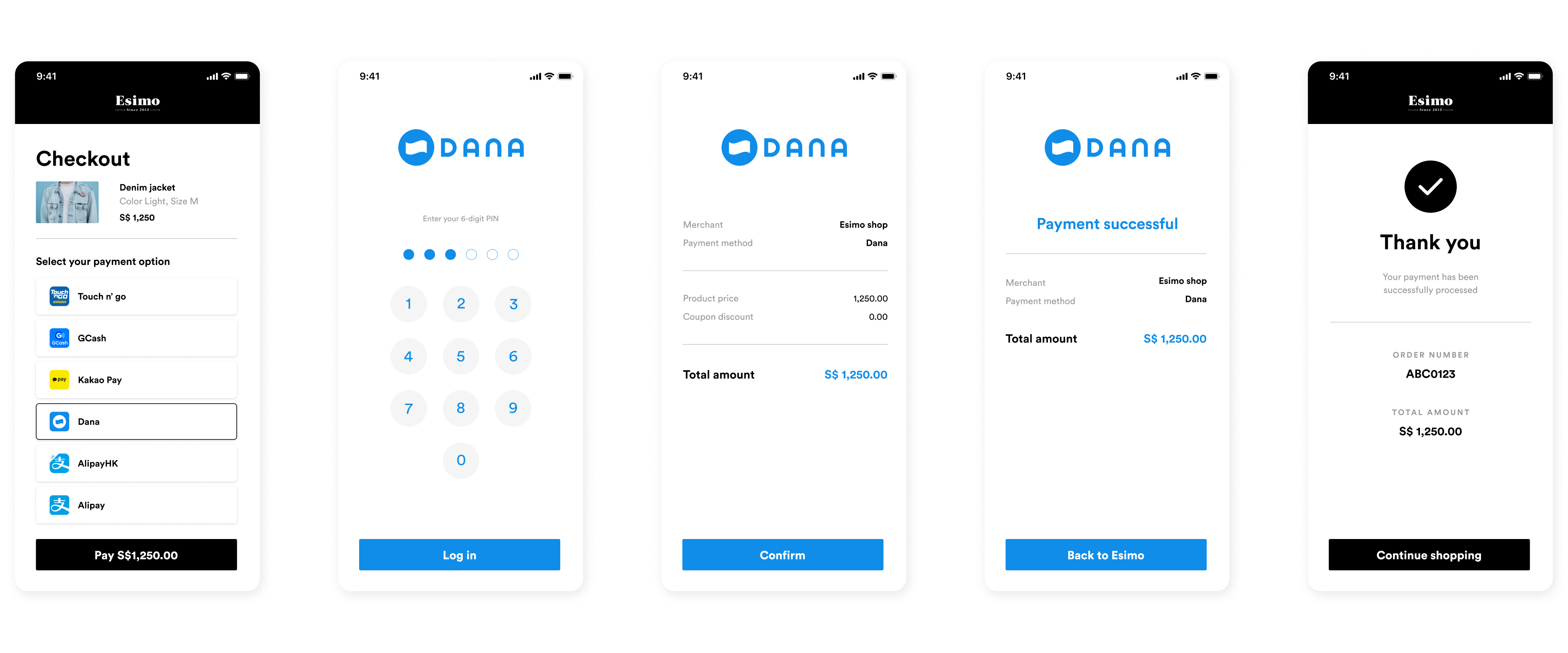
Seamless mobile app experience:
- ❶ Select DANA - Customer chooses DANA wallet at checkout
- ❷ Redirect to DANA - Deep link automatically opens DANA app
- ❸ Review payment - Transaction details shown (merchant, amount, order ID)
- ❹ Authenticate - Enter DANA PIN or use biometric authentication
- ❺ Confirm payment - Tap confirm button to authorize
- ❻ Payment complete - Funds deducted from DANA wallet, return to merchant
Desktop Payment Flow:
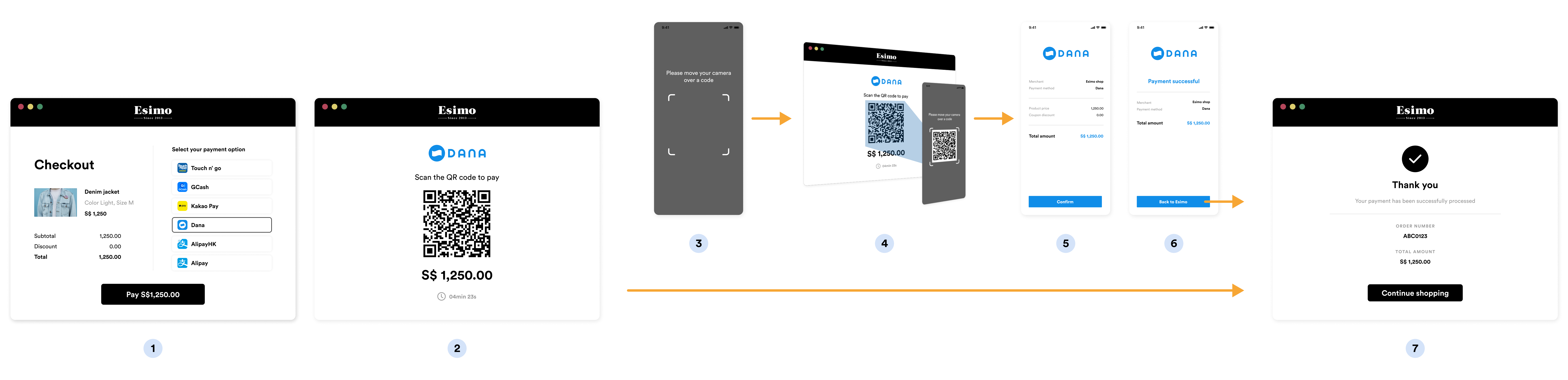
QR code scanning for desktop users:
- ❶ Initiate DANA payment - Customer selects DANA on desktop
- ❷ Generate QR code - System creates unique DANA payment QR
- ❸ Display QR - QR code shown prominently on screen
- ❹ Open DANA app - Customer launches DANA on mobile
- ❺ Scan QR - Use in-app QR scanner to capture code
- ❻ Review & confirm - Payment details appear, authenticate with PIN
- ❼ Success - Payment processed, desktop shows confirmation
Implementation
Step 1: Create DANA Source
- cURL
- Node.js
- PHP
- Python
- Ruby
- Go
curl https://api.omise.co/sources \
  -u skey_test_YOUR_SECRET_KEY: \
  -d "type=dana" \
  -d "amount=100000" \
  -d "currency=IDR"
const omise = require('omise')({
    secretKey: 'skey_test_YOUR_SECRET_KEY'
});

const source = await omise.sources.create({
    type: 'dana',
    amount: 100000,  // Rp 1,000
    currency: 'IDR'
});

console.log('DANA source:', source.id);
<?php
$source = OmiseSource::create(array(
    'type' => 'dana',
    'amount' => 100000,
    'currency' => 'IDR'
));
?>
import omise

omise.api_secret = 'skey_test_YOUR_SECRET_KEY'

source = omise.Source.create(
    type='dana',
    amount=100000,
    currency='IDR'
)
require 'omise'

Omise.api_key = 'skey_test_YOUR_SECRET_KEY'

source = Omise::Source.create({
  type: 'dana',
  amount: 100000,
  currency: 'IDR'
})
source, err := client.Sources().Create(&operations.CreateSource{
    Type:     "dana",
    Amount:   100000,
    Currency: "IDR",
})
Response:
{
  "object": "source",
  "id": "src_test_5rt6s9vah5lkvi1rh9c",
  "type": "dana",
  "flow": "redirect",
  "amount": 100000,
  "currency": "IDR"
}
Step 2: Create Charge and Redirect
app.post('/checkout/dana', async (req, res) => {
    try {
        const { amount, order_id, customer_email } = req.body;

        // Validate amount
        if (amount < 100000) {  // Rp 1,000 minimum
            return res.status(400).json({
                error: 'Minimum amount is Rp 1,000'
            });
        }

        if (amount > 1000000000) {  // Rp 10,000,000 maximum
            return res.status(400).json({
                error: 'Maximum amount is Rp 10,000,000'
            });
        }

        // Create source
        const source = await omise.sources.create({
            type: 'dana',
            amount: amount,
            currency: 'IDR'
        });

        // Create charge
        const charge = await omise.charges.create({
            amount: amount,
            currency: 'IDR',
            source: source.id,
            return_uri: `${process.env.BASE_URL}/payment/callback`,
            metadata: {
                order_id: order_id,
                customer_email: customer_email,
                payment_method: 'dana'
            }
        });

        // Redirect to DANA
        res.redirect(charge.authorize_uri);

    } catch (error) {
        console.error('DANA error:', error);
        res.status(500).json({ error: error.message });
    }
});
Step 3: Handle Return Callback
app.get('/payment/callback', async (req, res) => {
    try {
        const chargeId = req.query.charge_id;
        const charge = await omise.charges.retrieve(chargeId);

        if (charge.status === 'successful') {
            await processOrder(charge.metadata.order_id);
            res.redirect(`/order-success?order=${charge.metadata.order_id}`);
        } else if (charge.status === 'failed') {
            res.redirect(`/payment-failed?reason=${charge.failure_message}`);
        } else {
            res.redirect('/payment-pending');
        }
    } catch (error) {
        res.redirect('/payment-error');
    }
});
Step 4: Handle Webhook
app.post('/webhooks/omise', async (req, res) => {
    const event = req.body;

    if (event.key === 'charge.complete') {
        const charge = event.data;

        if (charge.source.type === 'dana') {
            if (charge.status === 'successful') {
                await fulfillOrder(charge.metadata.order_id);
                await sendConfirmationEmail(charge.metadata.customer_email);
            } else if (charge.status === 'failed') {
                await handleFailedPayment(charge.metadata.order_id);
            }
        }
    }

    res.sendStatus(200);
});
Complete Implementation Example
const express = require('express');
const omise = require('omise')({
    secretKey: process.env.OMISE_SECRET_KEY
});

const app = express();
app.use(express.json());

// DANA configuration
const DANA_CONFIG = {
    currency: 'IDR',
    minAmount: 100000,      // Rp 1,000
    maxAmount: 1000000000,  // Rp 10,000,000
    displayName: 'DANA',
    timeout: 15 * 60 * 1000 // 15 minutes
};

// Create DANA payment
app.post('/checkout/dana', async (req, res) => {
    try {
        const { amount, order_id, customer_email, customer_name } = req.body;

        // Validate amount
        if (amount < DANA_CONFIG.minAmount) {
            return res.status(400).json({
                error: `Minimum amount is Rp ${DANA_CONFIG.minAmount / 100}`
            });
        }

        if (amount > DANA_CONFIG.maxAmount) {
            return res.status(400).json({
                error: `Maximum amount is Rp ${DANA_CONFIG.maxAmount / 100}`
            });
        }

        // Create source
        const source = await omise.sources.create({
            type: 'dana',
            amount: amount,
            currency: DANA_CONFIG.currency
        });

        // Create charge
        const charge = await omise.charges.create({
            amount: amount,
            currency: DANA_CONFIG.currency,
            source: source.id,
            return_uri: `${process.env.BASE_URL}/payment/callback`,
            metadata: {
                order_id: order_id,
                customer_email: customer_email,
                customer_name: customer_name,
                payment_method: 'dana'
            }
        });

        // Log for tracking
        console.log(`DANA payment initiated: ${charge.id} for order ${order_id}`);

        // Return authorization URL
        res.json({
            authorize_uri: charge.authorize_uri,
            charge_id: charge.id
        });

    } catch (error) {
        console.error('DANA error:', error);
        res.status(500).json({ error: error.message });
    }
});

// Payment callback
app.get('/payment/callback', async (req, res) => {
    try {
        const charge = await omise.charges.retrieve(req.query.charge_id);

        if (charge.status === 'successful') {
            res.redirect(`/order-confirmation?order=${charge.metadata.order_id}`);
        } else {
            res.redirect(`/payment-failed?charge=${req.query.charge_id}`);
        }
    } catch (error) {
        res.redirect('/payment-error');
    }
});

// Webhook handler
app.post('/webhooks/omise', async (req, res) => {
    const event = req.body;

    if (event.key === 'charge.complete' && event.data.source.type === 'dana') {
        const charge = event.data;

        if (charge.status === 'successful') {
            await fulfillOrder(charge.metadata.order_id);
            await sendReceipt(charge.metadata.customer_email, charge);
            console.log(`DANA payment successful: ${charge.id}`);
        } else {
            await cancelOrder(charge.metadata.order_id);
            console.log(`DANA payment failed: ${charge.id}`);
        }
    }

    res.sendStatus(200);
});

app.listen(3000);
Refund Support
DANA supports full and partial refunds within 30 days:
// Full refund
const fullRefund = await omise.charges.refund('chrg_test_...', {
    amount: 100000  // Full amount
});

// Partial refund
const partialRefund = await omise.charges.refund('chrg_test_...', {
    amount: 50000  // Partial amount
});

console.log('Refund status:', fullRefund.status);
Refunds are processed back to the customer's DANA wallet within 3-7 business days.
Common Issues & Troubleshooting
Issue: Customer doesn't have DANA app
Cause: Customer selected DANA but doesn't have app installed
Solution:
// Detect mobile and show app requirement
function checkDANA() {
    const isMobile = /iPhone|iPad|iPod|Android/i.test(navigator.userAgent);

    if (!isMobile) {
        alert('DANA is only available on mobile devices. Please use a smartphone.');
        return false;
    }

    // Show installation prompt if needed
    showMessage('DANA app required. Download from:');
    showLinks({
        android: 'https://play.google.com/store/apps/details?id=id.dana',
        ios: 'https://apps.apple.com/id/app/dana-indonesia/id1388056324'
    });

    return true;
}
Issue: Insufficient balance
Error: Payment declined
Solution:
if (charge.failure_code === 'insufficient_balance') {
    showMessage('Saldo DANA tidak mencukupi. Silakan top up atau gunakan metode pembayaran lain.');
    showAlternativePaymentMethods();
}
Issue: Account limit exceeded
Error: Transaction limit exceeded
Solution:
if (charge.failure_code === 'transaction_limit_exceeded') {
    showMessage(
        'Transaksi melebihi batas akun DANA Anda. ' +
        'Tingkatkan verifikasi akun atau gunakan metode pembayaran lain.'
    );
}
Issue: Payment timeout
Cause: Customer didn't complete payment within 15 minutes
Solution:
const TIMEOUT = 15 * 60 * 1000;

setTimeout(() => {
    if (!paymentCompleted) {
        showMessage('Waktu pembayaran habis. Silakan coba lagi.');
        enableRetry();
    }
}, TIMEOUT);
Best Practices
1. Display in Indonesian
<div class="dana-payment">
    <h3>Bayar dengan DANA</h3>
    <div class="instructions">
        <ol>
            <li>Pastikan aplikasi DANA sudah terinstal</li>
            <li>Pastikan saldo DANA mencukupi</li>
            <li>Anda akan diarahkan ke aplikasi DANA</li>
            <li>Masukkan PIN DANA untuk konfirmasi</li>
        </ol>
    </div>
    <p class="help-text">
        Belum punya DANA?
        <a href="https://dana.id" target="_blank">Download di sini</a>
    </p>
</div>
2. Mobile-Only Detection
function validateDANAPayment() {
    const userAgent = navigator.userAgent;
    const isMobile = /Android|iPhone|iPad|iPod/i.test(userAgent);

    if (!isMobile) {
        return {
            valid: false,
            message: 'DANA hanya tersedia di perangkat mobile'
        };
    }

    // Check if Android or iOS
    const isAndroid = /Android/i.test(userAgent);
    const isIOS = /iPhone|iPad|iPod/i.test(userAgent);

    return {
        valid: true,
        platform: isAndroid ? 'android' : (isIOS ? 'ios' : 'unknown')
    };
}
3. Handle Deep Links
function openDANAApp(authorizeUri) {
    // Redirect to DANA
    window.location = authorizeUri;

    // Check if app opened (fallback)
    setTimeout(() => {
        if (!document.hidden) {
            // App didn't open
            showInstallPrompt();
        }
    }, 2500);
}

function showInstallPrompt() {
    const isAndroid = /Android/i.test(navigator.userAgent);
    const downloadUrl = isAndroid
        ? 'https://play.google.com/store/apps/details?id=id.dana'
        : 'https://apps.apple.com/id/app/dana-indonesia/id1388056324';

    const message = 'Aplikasi DANA belum terinstal. Download sekarang?';

    if (confirm(message)) {
        window.location = downloadUrl;
    }
}
4. Amount Formatting
function formatIDR(amount) {
    return new Intl.NumberFormat('id-ID', {
        style: 'currency',
        currency: 'IDR',
        minimumFractionDigits: 0,
        maximumFractionDigits: 0
    }).format(amount / 100);
}

// Usage
const displayAmount = formatIDR(100000); // "Rp 1.000"
5. Use Webhooks
// Webhook is primary source of truth
app.post('/webhooks/omise', handleWebhook);

// Callback is backup for user experience
app.get('/payment/callback', handleCallback);
Testing
Test Credentials
Use Omise test mode credentials:
- Secret Key:
skey_test_YOUR_SECRET_KEY - Public Key:
pkey_test_YOUR_PUBLIC_KEY
Test Amounts
| Amount (IDR) | Expected Result |
|---|---|
| 100000 - 999999 | Success |
| 1000000 | Insufficient balance |
| 1000001 | Transaction declined |
Test Flow
- Create charge with test credentials
- Use test amounts above
- Complete payment in DANA test environment
- Verify webhook received
- Check charge status
FAQ
What is DANA?
DANA is Indonesia's leading digital wallet with over 150 million users. It's backed by Ant Group (Alipay's parent company) and is widely accepted for e-commerce, transportation, and everyday transactions.
Do customers need a DANA account?
Yes, customers must have the DANA mobile app installed and an activated DANA account. The app is free and available on Android and iOS.
What are the transaction limits?
- Minimum: Rp 1,000
- Maximum: Rp 10,000,000 per transaction
Limits also depend on customer's account verification level (Basic, Premium, Priority).
How long does settlement take?
DANA settlements typically occur within 1-3 business days. Check your Omise dashboard for specific settlement schedules.
Can I refund DANA payments?
Yes, DANA supports both full and partial refunds within 30 days of the original transaction.
What if customer has insufficient balance?
The payment will be declined. Customers can top up their DANA wallet via:
- Bank transfer
- Convenience stores (Indomaret, Alfamart)
- ATMs
- Other linked payment methods
Provide clear error messages and offer alternative payment methods.
Does DANA work on desktop?
No, DANA requires the mobile app and is mobile-only. Desktop users should be shown alternative payment methods like credit cards or bank transfer.
Should I display instructions in Indonesian?
Yes! Since DANA is Indonesia-specific, it's highly recommended to display payment instructions in Bahasa Indonesia for better user experience.
Testing
Test Mode
DANA can be tested using your test API keys. In test mode:
Test Credentials:
- Use test API keys (skey_test_xxx)
- Currency: IDR (Indonesian Rupiah)
- No actual DANA account required for testing
Test Flow:
- Create source and charge with test API keys
- Customer redirects to test
authorize_uri - Test page simulates DANA authorization
- Use Omise Dashboard Actions to mark charge as successful/failed
- Verify webhook and return_uri handling
Testing Implementation:
// Test DANA payment
const source = await omise.sources.create({
    type: 'dana',
    amount: 10000,  // Rp10,000
    currency: 'IDR'
});

const charge = await omise.charges.create({
    amount: 10000,
    currency: 'IDR',
    source: source.id,
    return_uri: 'https://example.com/callback'
});

console.log('Test authorize URL:', charge.authorize_uri);
Test Scenarios:
- Successful payment: Verify order completion workflow
- Failed payment: Test error handling and messaging
- Amount limits: Test minimum and maximum amounts
- Mobile flow: Test deep-linking to DANA app
- Insufficient balance: Simulate low wallet balance
- Timeout: Test abandoned payment scenarios
- Webhook delivery: Verify all webhook notifications
Important Notes:
- Test mode doesn't connect to real DANA servers
- Use dashboard to simulate payment outcomes
- Test mobile app flow thoroughly
- Verify webhook handling for all charge statuses
- Test amount validation for IDR
For comprehensive testing guidelines, see the Testing Documentation.
Related Resources
- Digital Wallets Overview - All wallet options
- ShopeePay - Alternative Indonesia wallet
- QR Payments - QR-based payment methods
- Refunds - Refund policies
- Testing - Test DANA integration
- Webhooks - Implement webhooks