GCash
Accept payments from GCash, the Philippines' #1 digital wallet with over 86 million users and the country's most widely used cashless payment method.
Overview
User numbers are approximate and based on publicly available information. Actual active user counts may vary.
GCash is the leading mobile wallet in the Philippines, operated by Mynt (Globe Fintech Innovations). It's the go-to payment method for Filipinos, used for everything from bills and remittances to e-commerce and peer-to-peer transfers.
Key Features:
- ✅ Market leader - 86+ million users across the Philippines
- ✅ Fast confirmation - Near real-time payment verification (typically within seconds)
- ✅ High trust - Backed by Globe Telecom and Ant Group
- ✅ Wide adoption - Used by 60%+ of online shoppers
- ✅ Versatile - Bills, shopping, transfers, investments
- ✅ Low friction - Quick MPIN authentication
Supported Region
| Region | Currency | Min Amount | Max Amount | API Version |
|---|---|---|---|---|
| Philippines | PHP | ₱1.00 | ₱100,000.00 | 2017-11-02 |
Account Limits by Verification Level
| Verification Level | Wallet Limit | Per Transaction | Monthly Limit |
|---|---|---|---|
| Unverified | ₱100,000 | ₱8,000 | ₱100,000 |
| Semi-Verified (Phone + ID) | ₱100,000 | ₱50,000 | ₱100,000 |
| Fully Verified (KYC complete) | ₱500,000 | ₱100,000 | ₱500,000 |
| GSave/GInvest (Banking features) | Unlimited | ₱100,000 | Unlimited |
How It Works
Customer Experience:
- Customer selects GCash at checkout
- Redirected to GCash authorization page
- GCash app opens automatically (deep link on mobile)
- Customer reviews payment details
- Enters 4-digit MPIN to confirm
- Returns to merchant site
- Receives SMS confirmation from GCash
Typical completion time: 30-60 seconds
Payment Flow Examples
Mobile Payment Flow:
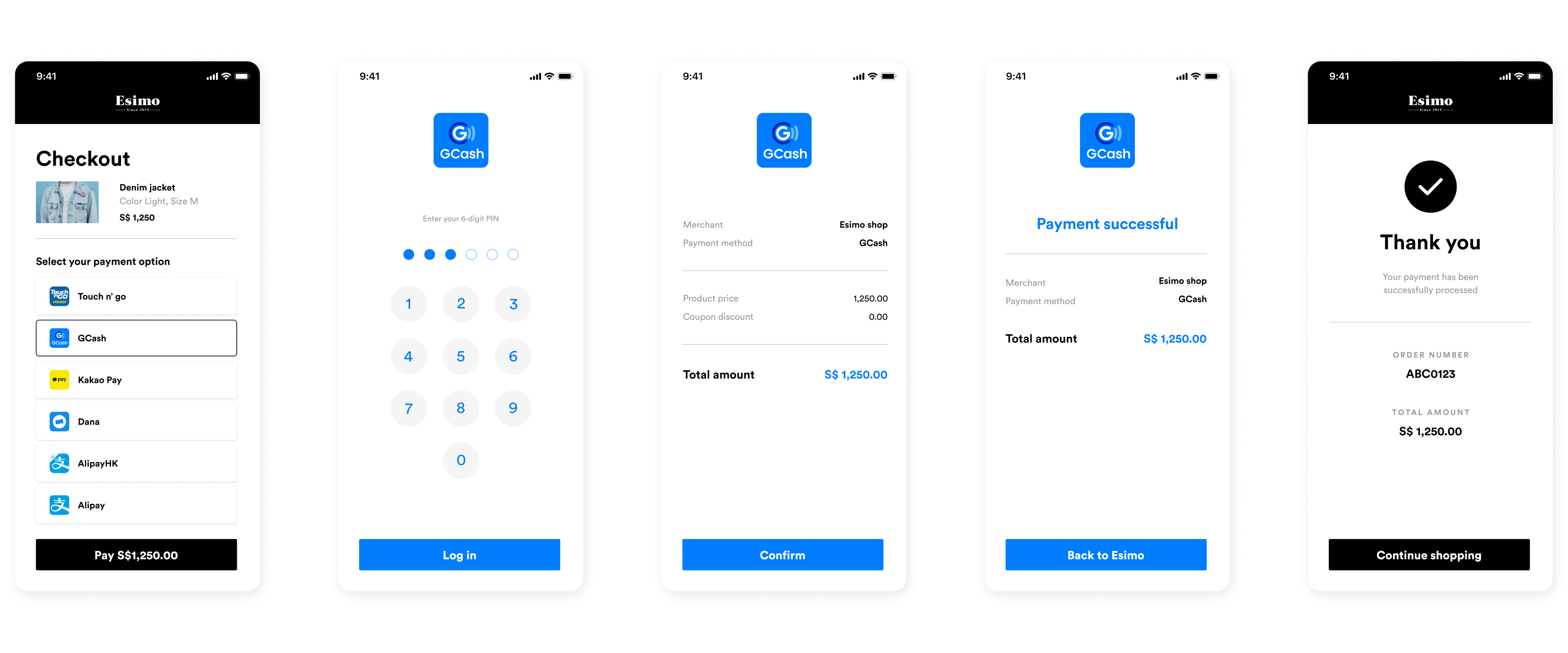
Seamless mobile wallet experience:
- ❶ Select GCash - Customer taps GCash at mobile checkout
- ❷ App redirect - Deep link automatically opens GCash app
- ❸ Review payment - Transaction details displayed (merchant, amount)
- ❹ Authenticate - Enter 4-digit MPIN to authorize
- ❺ Payment processed - Funds deducted from GCash wallet
- ❻ SMS confirmation - Receive transaction confirmation text
- ❼ Return to merchant - Redirect back to merchant success page
Desktop Payment Flow:
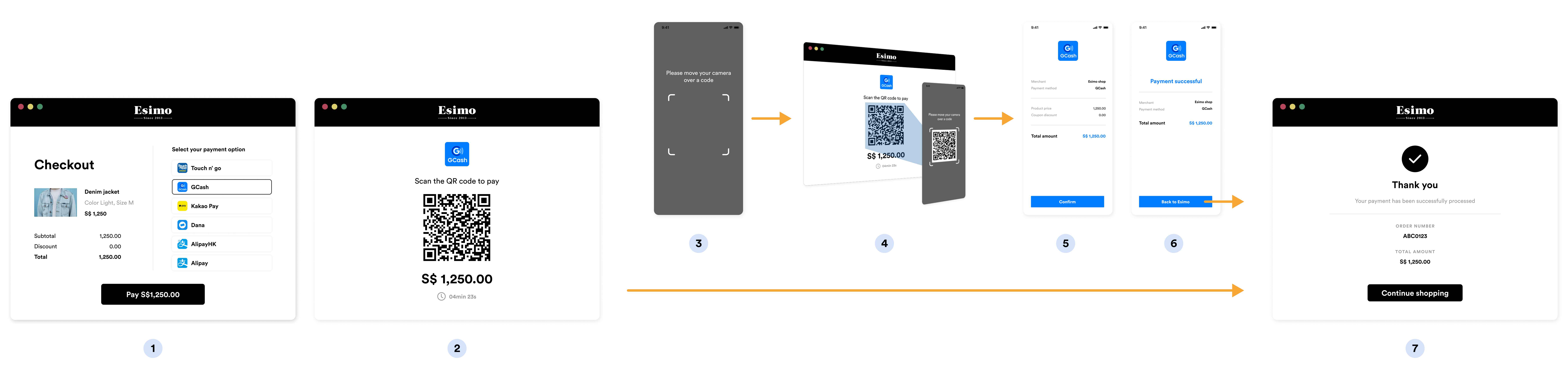
QR code scanning for desktop:
- ❶ Choose GCash - Customer selects GCash payment on desktop
- ❷ Generate QR - System creates unique GCash payment QR code
- ❸ Display QR - QR code shown on screen with payment details
- ❹ Open GCash app - Customer launches GCash on mobile device
- ❺ Scan QR - Use in-app scanner to capture QR code
- ❻ Verify details - Payment amount and merchant name shown
- ❼ Enter MPIN - Authenticate with 4-digit mobile PIN
- ❽ Confirm - Tap to authorize payment
- ❾ Success - Desktop shows confirmation, payment complete
Implementation
Step 1: Create GCash Source
- cURL
- Node.js
- PHP
- Python
- Ruby
- Go
curl https://api.omise.co/sources \
  -u skey_test_YOUR_SECRET_KEY: \
  -d "type=gcash" \
  -d "amount=50000" \
  -d "currency=PHP"
const omise = require('omise')({
    secretKey: 'skey_test_YOUR_SECRET_KEY'
});

const source = await omise.sources.create({
    type: 'gcash',
    amount: 50000,  // ₱500.00
    currency: 'PHP'
});

console.log('GCash source:', source.id);
<?php
$source = OmiseSource::create(array(
    'type' => 'gcash',
    'amount' => 50000,
    'currency' => 'PHP'
));
?>
import omise

omise.api_secret = 'skey_test_YOUR_SECRET_KEY'

source = omise.Source.create(
    type='gcash',
    amount=50000,
    currency='PHP'
)
require 'omise'

Omise.api_key = 'skey_test_YOUR_SECRET_KEY'

source = Omise::Source.create({
  type: 'gcash',
  amount: 50000,
  currency: 'PHP'
})
source, err := client.Sources().Create(&operations.CreateSource{
    Type:     "gcash",
    Amount:   50000,
    Currency: "PHP",
})
Response:
{
  "object": "source",
  "id": "src_test_5rt6s9vah5lkvi1rh9c",
  "type": "gcash",
  "flow": "redirect",
  "amount": 50000,
  "currency": "PHP"
}
Step 2: Create Charge and Redirect
app.post('/checkout/gcash', async (req, res) => {
    try {
        const { amount, order_id, customer_email, customer_mobile } = req.body;

        // Validate amount
        if (amount < 100) {  // ₱1.00 minimum
            return res.status(400).json({
                error: 'Minimum amount is ₱1.00'
            });
        }

        if (amount > 10000000) {  // ₱100,000 maximum
            return res.status(400).json({
                error: 'Maximum amount is ₱100,000'
            });
        }

        // Create source
        const source = await omise.sources.create({
            type: 'gcash',
            amount: amount,
            currency: 'PHP'
        });

        // Create charge
        const charge = await omise.charges.create({
            amount: amount,
            currency: 'PHP',
            source: source.id,
            return_uri: `${process.env.BASE_URL}/payment/callback`,
            metadata: {
                order_id: order_id,
                customer_email: customer_email,
                customer_mobile: customer_mobile,
                payment_method: 'gcash'
            }
        });

        // Redirect to GCash
        res.redirect(charge.authorize_uri);

    } catch (error) {
        console.error('GCash error:', error);
        res.status(500).json({ error: error.message });
    }
});
Step 3: Handle Return Callback
app.get('/payment/callback', async (req, res) => {
    try {
        const chargeId = req.query.charge_id;
        const charge = await omise.charges.retrieve(chargeId);

        if (charge.status === 'successful') {
            await processOrder(charge.metadata.order_id);
            res.redirect(`/order-success?order=${charge.metadata.order_id}`);
        } else if (charge.status === 'failed') {
            res.redirect(`/payment-failed?reason=${charge.failure_message}`);
        } else {
            res.redirect('/payment-pending');
        }
    } catch (error) {
        res.redirect('/payment-error');
    }
});
Step 4: Handle Webhook
app.post('/webhooks/omise', async (req, res) => {
    const event = req.body;

    if (event.key === 'charge.complete') {
        const charge = event.data;

        if (charge.source.type === 'gcash') {
            if (charge.status === 'successful') {
                await fulfillOrder(charge.metadata.order_id);
                await sendSMSConfirmation(charge.metadata.customer_mobile);
            } else if (charge.status === 'failed') {
                await handleFailedPayment(charge.metadata.order_id);
            }
        }
    }

    res.sendStatus(200);
});
Complete Implementation Example
const express = require('express');
const omise = require('omise')({
    secretKey: process.env.OMISE_SECRET_KEY
});

const app = express();
app.use(express.json());

// GCash configuration
const GCASH_CONFIG = {
    currency: 'PHP',
    minAmount: 100,        // ₱1.00
    maxAmount: 10000000,   // ₱100,000
    displayName: 'GCash',
    timeout: 15 * 60 * 1000 // 15 minutes
};

// Create GCash payment
app.post('/checkout/gcash', async (req, res) => {
    try {
        const { amount, order_id, customer_email, customer_mobile, customer_name } = req.body;

        // Validate currency
        if (req.body.currency && req.body.currency !== 'PHP') {
            return res.status(400).json({
                error: 'GCash only supports PHP currency'
            });
        }

        // Validate amount
        if (amount < GCASH_CONFIG.minAmount) {
            return res.status(400).json({
                error: `Minimum amount is ₱${GCASH_CONFIG.minAmount / 100}`
            });
        }

        if (amount > GCASH_CONFIG.maxAmount) {
            return res.status(400).json({
                error: `Maximum amount is ₱${GCASH_CONFIG.maxAmount / 100}`
            });
        }

        // Create source
        const source = await omise.sources.create({
            type: 'gcash',
            amount: amount,
            currency: GCASH_CONFIG.currency
        });

        // Create charge
        const charge = await omise.charges.create({
            amount: amount,
            currency: GCASH_CONFIG.currency,
            source: source.id,
            return_uri: `${process.env.BASE_URL}/payment/callback`,
            metadata: {
                order_id: order_id,
                customer_email: customer_email,
                customer_mobile: customer_mobile,
                customer_name: customer_name,
                payment_method: 'gcash'
            }
        });

        // Log for tracking
        console.log(`GCash payment initiated: ${charge.id} for order ${order_id}`);

        // Return authorization URL
        res.json({
            authorize_uri: charge.authorize_uri,
            charge_id: charge.id
        });

    } catch (error) {
        console.error('GCash error:', error);
        res.status(500).json({ error: error.message });
    }
});

// Payment callback
app.get('/payment/callback', async (req, res) => {
    try {
        const charge = await omise.charges.retrieve(req.query.charge_id);

        if (charge.status === 'successful') {
            res.redirect(`/order-confirmation?order=${charge.metadata.order_id}`);
        } else {
            res.redirect(`/payment-failed?charge=${req.query.charge_id}`);
        }
    } catch (error) {
        res.redirect('/payment-error');
    }
});

// Webhook handler
app.post('/webhooks/omise', async (req, res) => {
    const event = req.body;

    if (event.key === 'charge.complete' && event.data.source.type === 'gcash') {
        const charge = event.data;

        if (charge.status === 'successful') {
            await fulfillOrder(charge.metadata.order_id);
            await sendReceipt(charge.metadata.customer_email, charge);
            console.log(`GCash payment successful: ${charge.id}`);
        } else {
            await cancelOrder(charge.metadata.order_id);
            console.log(`GCash payment failed: ${charge.id}`);
        }
    }

    res.sendStatus(200);
});

app.listen(3000);
Refund Support
GCash supports full and partial refunds within 180 days:
// Full refund
const fullRefund = await omise.charges.refund('chrg_test_...', {
    amount: 50000  // Full amount
});

// Partial refund
const partialRefund = await omise.charges.refund('chrg_test_...', {
    amount: 25000  // Partial amount
});

console.log('Refund status:', fullRefund.status);
Refunds are processed back to the customer's GCash wallet within 5-7 business days.
Common Issues & Troubleshooting
Issue: Customer doesn't have GCash app
Cause: Customer selected GCash but doesn't have app installed
Solution:
// Display app requirement and download links
function checkGCashApp() {
    const isMobile = /iPhone|iPad|iPod|Android/i.test(navigator.userAgent);

    if (!isMobile) {
        alert('GCash is only available on mobile devices.');
        return false;
    }

    // Show app links
    const isAndroid = /Android/i.test(navigator.userAgent);
    const appLink = isAndroid
        ? 'https://play.google.com/store/apps/details?id=com.globe.gcash.android'
        : 'https://apps.apple.com/ph/app/gcash/id520020791';

    showMessage(`GCash app required. <a href="${appLink}">Download here</a>`);
    return true;
}
Issue: Insufficient balance
Error: Payment declined - insufficient funds
Solution:
if (charge.failure_code === 'insufficient_balance') {
    showMessage(
        'Kulang ang GCash balance. Mag-cash in muna o gumamit ng ibang payment method.'
    );
    showCashInOptions();
}
Issue: Transaction limit exceeded
Error: Transaction exceeds account limit
Solution:
if (charge.failure_code === 'transaction_limit_exceeded') {
    showMessage(
        'Lumampas sa limit ng iyong GCash account. ' +
        'I-verify ang account o gumamit ng ibang payment method.'
    );
    showVerificationLink();
}
Issue: Payment timeout
Cause: Customer didn't complete payment within 15 minutes
Solution:
const TIMEOUT = 15 * 60 * 1000;

setTimeout(() => {
    if (!paymentCompleted) {
        showMessage('Nag-timeout ang payment. Subukan ulit.');
        enableRetry();
    }
}, TIMEOUT);
Best Practices
1. Display in Filipino/Tagalog
<div class="gcash-payment">
    <h3>Magbayad gamit ang GCash</h3>
    <div class="instructions">
        <ol>
            <li>Siguruhing nakainstall ang GCash app</li>
            <li>May sapat na balance sa GCash wallet</li>
            <li>Ide-redirect ka sa GCash app</li>
            <li>I-enter ang iyong 4-digit MPIN</li>
        </ol>
    </div>
    <p class="help-text">
        Wala pang GCash?
        <a href="https://www.gcash.com" target="_blank">Mag-register dito</a>
    </p>
</div>
2. Mobile-Only Detection
function validateGCashPayment() {
    const userAgent = navigator.userAgent;
    const isMobile = /Android|iPhone|iPad|iPod/i.test(userAgent);

    if (!isMobile) {
        return {
            valid: false,
            message: 'GCash ay available lang sa mobile devices'
        };
    }

    return { valid: true };
}
3. Handle Deep Links
function openGCashApp(authorizeUri) {
    // Redirect to GCash
    window.location = authorizeUri;

    // Fallback if app doesn't open
    setTimeout(() => {
        if (!document.hidden) {
            showInstallPrompt();
        }
    }, 2500);
}

function showInstallPrompt() {
    const isAndroid = /Android/i.test(navigator.userAgent);
    const downloadUrl = isAndroid
        ? 'https://play.google.com/store/apps/details?id=com.globe.gcash.android'
        : 'https://apps.apple.com/ph/app/gcash/id520020791';

    if (confirm('GCash app hindi nakainstall. I-download ngayon?')) {
        window.location = downloadUrl;
    }
}
4. Amount Formatting
function formatPHP(amount) {
    return new Intl.NumberFormat('en-PH', {
        style: 'currency',
        currency: 'PHP',
        minimumFractionDigits: 2,
        maximumFractionDigits: 2
    }).format(amount / 100);
}

// Usage
const displayAmount = formatPHP(50000); // "₱500.00"
5. Show Cash-In Options
<div class="gcash-cash-in">
    <h4>Paano mag-cash in sa GCash:</h4>
    <ul>
        <li><strong>Bank Transfer</strong> - BPI, BDO, UnionBank, etc.</li>
        <li><strong>7-Eleven</strong> - CLiQQ Kiosk</li>
        <li><strong>Remittance</strong> - Cebuana, M Lhuillier, Palawan</li>
        <li><strong>Online Banking</strong> - Instapay, PESONet</li>
        <li><strong>GCash Padala</strong> - Bayad Centers nationwide</li>
    </ul>
</div>
Testing
Test Credentials
Use Omise test mode credentials:
- Secret Key:
skey_test_YOUR_SECRET_KEY - Public Key:
pkey_test_YOUR_PUBLIC_KEY
Test Amounts
| Amount (PHP) | Expected Result |
|---|---|
| 100 - 99999 | Success |
| 100000 | Insufficient balance |
| 100001 | Transaction declined |
Test Flow
- Create charge with test credentials
- Use test amounts above
- Complete payment in GCash test environment
- Verify webhook received
- Check charge status
FAQ
What is GCash?
GCash is the Philippines' leading mobile wallet with over 86 million users. It's operated by Mynt (Globe Fintech Innovations) and is the most widely used cashless payment method in the Philippines.
Do customers need a GCash account?
Yes, customers must have the GCash mobile app installed and an activated GCash account linked to their mobile number.
What are the transaction limits?
- Minimum: ₱1.00
- Maximum: ₱100,000 per transaction
Limits also depend on customer's account verification level (Unverified, Semi-Verified, Fully Verified).
How long does settlement take?
GCash settlements typically occur within 1-3 business days. Check your Omise dashboard for specific settlement schedules.
Can I refund GCash payments?
Yes, GCash supports both full and partial refunds within 180 days of the original transaction.
What if customer has insufficient balance?
The payment will be declined. Customers can cash in to their GCash wallet via:
- Bank transfer (BPI, BDO, UnionBank, etc.)
- 7-Eleven CLiQQ kiosks
- Remittance centers (Cebuana, M Lhuillier, Palawan)
- Online banking (Instapay, PESONet)
- GCash Padala centers nationwide
Does GCash work on desktop?
No, GCash requires the mobile app and is mobile-only. Desktop users should be shown alternative payment methods like credit cards or online banking.
Should I display instructions in Filipino/Tagalog?
Yes! Since GCash is Philippines-specific, displaying instructions in Filipino or Tagalog will significantly improve user experience and conversion rates.
Testing
Test Mode
GCash can be tested using your test API keys. In test mode:
Test Credentials:
- Use test API keys (skey_test_xxx)
- Currency: PHP (Philippine Peso)
- No actual GCash account required for testing
Test Flow:
- Create source and charge with test API keys
- Customer redirects to test
authorize_uri - Test page simulates GCash authorization
- Use Omise Dashboard Actions to mark charge as successful/failed
- Verify webhook and return_uri handling
Testing Implementation:
// Test GCash payment
const source = await omise.sources.create({
    type: 'gcash',
    amount: 10000,  // ₱100.00
    currency: 'PHP'
});

const charge = await omise.charges.create({
    amount: 10000,
    currency: 'PHP',
    source: source.id,
    return_uri: 'https://example.com/callback'
});

console.log('Test authorize URL:', charge.authorize_uri);
Test Scenarios:
- Successful payment: Verify order fulfillment workflow
- Failed payment: Test error handling
- Amount limits: Test minimum and maximum amounts
- Mobile flow: Test deep-linking to GCash app
- Insufficient balance: Simulate low wallet balance
- Timeout: Test abandoned payment scenarios
- Webhook delivery: Verify all webhook notifications
Important Notes:
- Test mode doesn't connect to real GCash servers
- Use dashboard to simulate payment outcomes
- Test mobile app flow thoroughly
- Verify webhook handling for all charge statuses
- Test amount validation for PHP currency
For comprehensive testing guidelines, see the Testing Documentation.
Related Resources
- Digital Wallets Overview - All wallet options
- Alipay+ - GCash via Alipay+ network
- QR Payments - Alternative mobile payments
- Refunds - Refund policies
- Testing - Test GCash integration
- Webhooks - Implement webhooks