TrueMoney QR
Accept offline QR code payments from TrueMoney's 30M+ users in Thailand. Customers scan the QR code with their TrueMoney app and choose from multiple payment sources.
Overview
TrueMoney QR is an offline payment method that generates a scannable QR code for customers to pay using the TrueMoney mobile app. Unlike the redirect flow, customers complete the payment on their phone by scanning the QR code displayed on your website or point-of-sale system.
Key Features:
- ✅ Offline payment - No redirect required, customers scan QR code
- ✅ Multiple funding sources - Wallet, cards, bank accounts, Pay Next
- ✅ Large user base - 30M+ TrueMoney users in Thailand
- ✅ Flexible minimums - As low as ฿0.01 for most payment methods
- ✅ Quick settlement - Faster than traditional banking
- ✅ POS compatible - Works for in-store and online payments
Supported Regions
| Region | Currency | Min Amount | Max Amount | API Version |
|---|---|---|---|---|
| Thailand | THB | ฿0.01 | ฿50,000.00 | 2017-11-02 |
Minimum Amount by Funding Source
Customers can choose their preferred payment method when scanning the QR code. Each method has different minimum requirements:
| Funding Source | Minimum Amount | Notes |
|---|---|---|
| Wallet Balance | ฿0.01 | TrueMoney Wallet funds |
| Credit/Debit Card | ฿0.01 | Card payments via TrueMoney |
| Pay Next (Full payment) | ฿0.01 | Buy now, pay later (full amount) |
| Pay Next Extra (Full payment) | ฿0.01 | Extended BNPL option (full amount) |
| Bank Account | Varies by bank | Minimum depends on issuing bank |
When customers scan the QR code, they choose their payment source within the TrueMoney app. The merchant does not control which funding source the customer selects. Ensure your minimum transaction amount accommodates all funding sources or clearly communicate minimum requirements.
How It Works
Payment Flow
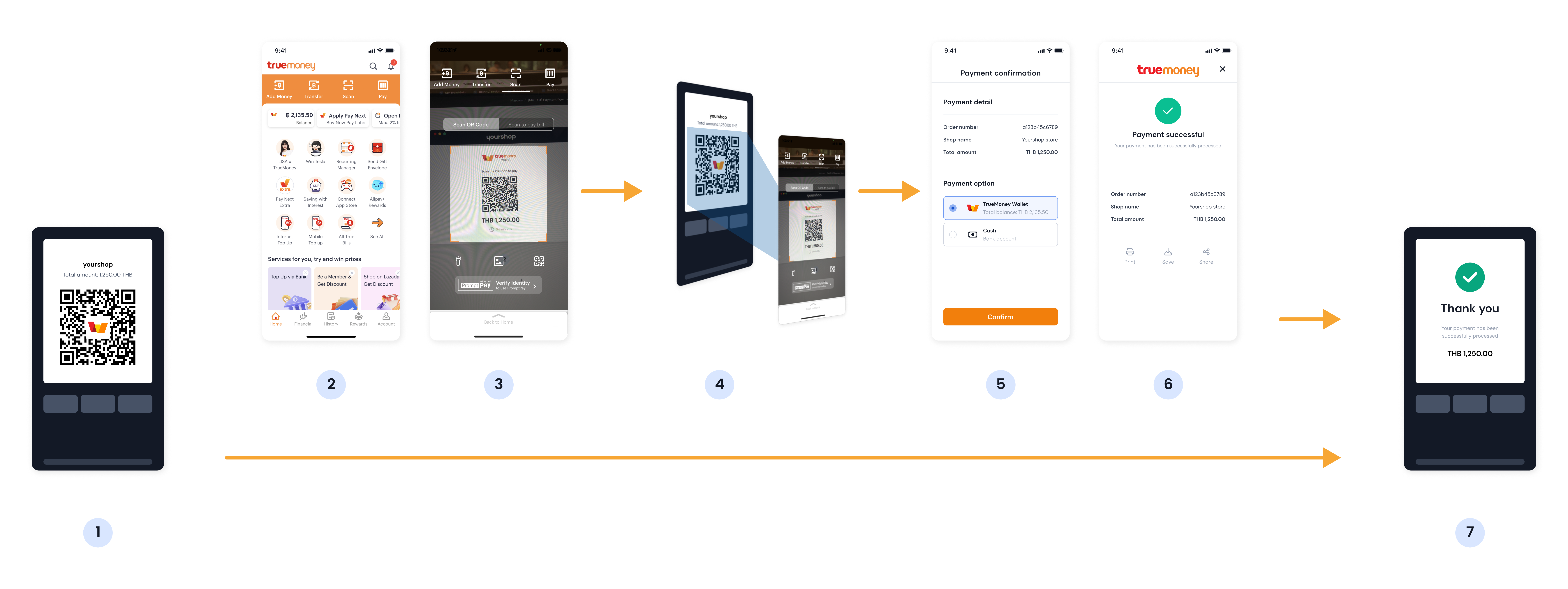
Customer Experience:
- Customer selects TrueMoney QR at checkout
- Merchant displays QR code on screen
- Customer opens TrueMoney app
- Customer scans the QR code
- Customer selects payment source (wallet/card/bank/Pay Next)
- Customer authorizes the payment
- Payment confirmed
Implementation
Step 1: Create TrueMoney QR Source
- cURL
- Node.js
- PHP
- Python
curl https://api.omise.co/sources \
  -u skey_test_YOUR_SECRET_KEY: \
  -d "type=truemoney_qr" \
  -d "amount=50000" \
  -d "currency=THB"
const omise = require('omise')({
    secretKey: 'skey_test_YOUR_SECRET_KEY'
});

const source = await omise.sources.create({
    type: 'truemoney_qr',
    amount: 50000,  // THB 500.00
    currency: 'THB'
});
<?php
$source = OmiseSource::create(array(
    'type' => 'truemoney_qr',
    'amount' => 50000,
    'currency' => 'THB'
));
?>
import omise

omise.api_secret = 'skey_test_YOUR_SECRET_KEY'

source = omise.Source.create(
    type='truemoney_qr',
    amount=50000,
    currency='THB'
)
Response:
{
  "object": "source",
  "id": "src_test_5rt6s9vah5lkvi1rh9c",
  "type": "truemoney_qr",
  "flow": "offline",
  "amount": 50000,
  "currency": "THB"
}
Step 2: Create Charge
curl https://api.omise.co/charges \
  -u skey_test_YOUR_SECRET_KEY: \
  -d "amount=50000" \
  -d "currency=THB" \
  -d "source=src_test_5rt6s9vah5lkvi1rh9c" \
  -d "return_uri=https://yourdomain.com/payment/callback"
Response includes QR code:
{
  "object": "charge",
  "id": "chrg_test_5rt6s9vah5lkvi1rh9d",
  "amount": 50000,
  "currency": "THB",
  "status": "pending",
  "source": {
    "object": "source",
    "type": "truemoney_qr",
    "flow": "offline",
    "scannable_code": {
      "object": "barcode",
      "type": "qr",
      "image": {
        "download_uri": "https://api.omise.co/charges/chrg_test_.../documents/docu_test_.../downloads/..."
      }
    }
  }
}
Step 3: Display QR Code
app.post('/create-truemoney-qr-payment', async (req, res) => {
    try {
        const { amount, order_id } = req.body;

        // Validate amount
        if (amount < 1 || amount > 5000000) {
            return res.status(400).json({
                error: 'Amount must be between ฿0.01 and ฿50,000'
            });
        }

        // Create source
        const source = await omise.sources.create({
            type: 'truemoney_qr',
            amount: amount,
            currency: 'THB'
        });

        // Create charge
        const charge = await omise.charges.create({
            amount: amount,
            currency: 'THB',
            source: source.id,
            return_uri: `${process.env.BASE_URL}/payment/callback`,
            metadata: {
                order_id: order_id
            }
        });

        // Get QR code image URL
        const qrCodeUrl = charge.source.scannable_code.image.download_uri;

        // Return to frontend
        res.json({
            charge_id: charge.id,
            qr_code_url: qrCodeUrl,
            amount: amount
        });

    } catch (error) {
        console.error('TrueMoney QR payment error:', error);
        res.status(500).json({ error: error.message });
    }
});
Frontend Display:
<div class="payment-container">
    <h2>Scan to Pay with TrueMoney</h2>
    <div class="qr-code-container">
        <img id="qrCode" src="" alt="TrueMoney QR Code" />
    </div>
    <p class="amount">Amount: <strong>฿<span id="amount"></span></strong></p>
    <div class="instructions">
        <h3>How to pay:</h3>
        <ol>
            <li>Open TrueMoney app on your phone</li>
            <li>Tap "Scan QR" button</li>
            <li>Scan the code above</li>
            <li>Select payment method (Wallet/Card/Bank/Pay Next)</li>
            <li>Authorize payment</li>
        </ol>
    </div>
</div>

<script>
async function createPayment(amount, orderId) {
    const response = await fetch('/create-truemoney-qr-payment', {
        method: 'POST',
        headers: { 'Content-Type': 'application/json' },
        body: JSON.stringify({ amount, order_id: orderId })
    });

    const data = await response.json();

    // Display QR code
    document.getElementById('qrCode').src = data.qr_code_url;
    document.getElementById('amount').textContent = (data.amount / 100).toFixed(2);

    // Start polling for payment status
    pollPaymentStatus(data.charge_id);
}

async function pollPaymentStatus(chargeId) {
    const interval = setInterval(async () => {
        const response = await fetch(`/check-payment-status/${chargeId}`);
        const data = await response.json();

        if (data.status === 'successful') {
            clearInterval(interval);
            window.location.href = '/payment-success';
        } else if (data.status === 'failed') {
            clearInterval(interval);
            window.location.href = '/payment-failed';
        }
    }, 3000); // Check every 3 seconds
}
</script>
Step 4: Handle Webhook
app.post('/webhooks/omise', (req, res) => {
    const event = req.body;

    if (event.key === 'charge.complete' && event.data.source.type === 'truemoney_qr') {
        const charge = event.data;

        if (charge.status === 'successful') {
            // Process order
            processOrder(charge.metadata.order_id);
            console.log(`TrueMoney QR payment successful: ${charge.id}`);
        } else if (charge.status === 'failed') {
            // Handle failure
            handleFailedPayment(charge.metadata.order_id, charge.failure_message);
        }
    }

    res.sendStatus(200);
});
Complete Implementation Example
// Express.js server with TrueMoney QR
const express = require('express');
const omise = require('omise')({
    secretKey: process.env.OMISE_SECRET_KEY
});

const app = express();
app.use(express.json());

// Create payment and get QR code
app.post('/checkout/truemoney-qr', async (req, res) => {
    try {
        const { amount, order_id } = req.body;

        // Validate amount
        if (amount < 1 || amount > 5000000) {
            return res.status(400).json({
                error: 'Amount must be between ฿0.01 and ฿50,000'
            });
        }

        // Create source
        const source = await omise.sources.create({
            type: 'truemoney_qr',
            amount: amount,
            currency: 'THB'
        });

        // Create charge
        const charge = await omise.charges.create({
            amount: amount,
            currency: 'THB',
            source: source.id,
            return_uri: `${process.env.BASE_URL}/payment/callback`,
            metadata: {
                order_id: order_id,
                created_at: new Date().toISOString()
            }
        });

        // Get QR code URL
        const qrCodeUrl = charge.source.scannable_code.image.download_uri;

        res.json({
            success: true,
            charge_id: charge.id,
            qr_code_url: qrCodeUrl,
            amount: amount
        });

    } catch (error) {
        console.error('TrueMoney QR error:', error);
        res.status(500).json({
            success: false,
            error: error.message
        });
    }
});

// Check payment status (for polling)
app.get('/check-payment-status/:chargeId', async (req, res) => {
    try {
        const charge = await omise.charges.retrieve(req.params.chargeId);
        res.json({
            status: charge.status,
            paid: charge.paid,
            amount: charge.amount
        });
    } catch (error) {
        res.status(500).json({ error: error.message });
    }
});

// Webhook handler (primary method)
app.post('/webhooks/omise', (req, res) => {
    const event = req.body;

    if (event.key === 'charge.complete') {
        const charge = event.data;

        if (charge.source.type === 'truemoney_qr') {
            if (charge.status === 'successful') {
                updateOrderStatus(charge.metadata.order_id, 'paid');
                sendConfirmation(charge.metadata.order_id);
            } else {
                updateOrderStatus(charge.metadata.order_id, 'failed');
            }
        }
    }

    res.sendStatus(200);
});

app.listen(3000);
Void and Refund Support
Voiding Charges
TrueMoney QR supports voiding on the same day only:
// Void same-day (full amount only)
const refund = await omise.charges.refund('chrg_test_...', {
    amount: 50000  // Must be full amount
});

if (refund.voided) {
    console.log('Charge was voided (same-day)');
}
Voids are only available on the same day the charge was created. After midnight, you must use refunds instead.
Refunds
Refunds available within 30 days. Support varies by funding source:
// Full refund (all payment methods)
const refund = await omise.charges.refund('chrg_test_...', {
    amount: 50000  // Full amount
});

// Partial refund (Wallet, Bank Account, Pay Next)
const partialRefund = await omise.charges.refund('chrg_test_...', {
    amount: 25000  // Half amount
});
Refund Support by Funding Source:
| Payment Method | Full Refund | Partial Refund | Timeframe |
|---|---|---|---|
| Wallet Balance | ✅ Yes | ✅ Yes | Within 30 days |
| Bank Account | ✅ Yes | ✅ Yes | Within 30 days |
| Pay Next | ✅ Yes | ✅ Yes | Within 30 days |
| Pay Next Extra | ✅ Yes | ✅ Yes | Within 30 days |
| Credit/Debit Card | ✅ Yes (next-day+) | ❌ No | Within 30 days |
Card payments only support full refunds and only after the transaction date (next day onwards). Same-day card refunds are not supported.
Common Issues & Troubleshooting
Issue: QR code not displaying
Causes:
- Invalid image URL
- CORS restrictions
- Network issues
Solution:
// Add error handling for QR code loading
<img
    src={qrCodeUrl}
    onError={(e) => {
        console.error('QR code load failed');
        e.target.src = '/images/qr-placeholder.png';
        showRetryButton();
    }}
    alt="TrueMoney QR Code"
/>
Issue: Payment timeout
Cause: Customer didn't scan QR code within timeout period
Solution:
// Set reasonable timeout and allow regeneration
setTimeout(() => {
    if (!paymentConfirmed) {
        showExpiredMessage();
        allowNewQRGeneration();
    }
}, 15 * 60 * 1000); // 15 minutes
Issue: Customer scanned but payment failed
Causes:
- Insufficient balance/credit
- Bank declined
- Daily limit exceeded
Solution:
- Display clear error messages
- Allow retry with different payment method
- Provide customer support contact
Issue: Webhook not received
Cause: Network issues or webhook configuration
Solution:
// Implement polling as backup
function pollPaymentStatus(chargeId) {
    const maxAttempts = 20; // 1 minute total
    let attempts = 0;

    const interval = setInterval(async () => {
        attempts++;
        const charge = await checkChargeStatus(chargeId);

        if (charge.status !== 'pending' || attempts >= maxAttempts) {
            clearInterval(interval);
            handlePaymentResult(charge);
        }
    }, 3000);
}
Best Practices
1. Display Clear QR Codes
.qr-code-container {
    background: white;
    padding: 20px;
    border-radius: 8px;
    box-shadow: 0 2px 8px rgba(0,0,0,0.1);
    text-align: center;
}

.qr-code-container img {
    max-width: 300px;
    width: 100%;
    height: auto;
}
2. Show Payment Instructions
<div class="payment-instructions">
    <h3>How to Pay</h3>
    <ol>
        <li>Open TrueMoney app</li>
        <li>Tap "Scan QR"</li>
        <li>Point camera at QR code</li>
        <li>Choose payment method</li>
        <li>Confirm payment</li>
    </ol>

    <div class="funding-sources">
        <p>You can pay with:</p>
        <ul>
            <li>💰 TrueMoney Wallet Balance</li>
            <li>💳 Credit/Debit Card</li>
            <li>🏦 Bank Account</li>
            <li>📆 Pay Next (BNPL)</li>
        </ul>
    </div>
</div>
3. Handle Payment Status
// Use both webhook and polling
class PaymentMonitor {
    constructor(chargeId) {
        this.chargeId = chargeId;
        this.resolved = false;
    }

    startMonitoring() {
        // Primary: webhook
        this.setupWebhookListener();

        // Backup: polling
        this.startPolling();

        // Timeout: expire after 15 minutes
        this.setupTimeout();
    }

    handleSuccess() {
        if (!this.resolved) {
            this.resolved = true;
            this.stopPolling();
            redirectToSuccess();
        }
    }
}
4. Validate Amount by Funding Source
// Inform users of minimum requirements
function displayMinimumAmounts() {
    return `
        <div class="minimum-info">
            <p>Minimum payment:</p>
            <ul>
                <li>Wallet/Card/Pay Next: ฿0.01</li>
                <li>Bank Account: Varies by bank</li>
            </ul>
        </div>
    `;
}
5. Implement Retry Logic
function createPaymentWithRetry(amount, orderId, maxRetries = 3) {
    let attempts = 0;

    async function attempt() {
        attempts++;
        try {
            return await createTrueMoneyQRPayment(amount, orderId);
        } catch (error) {
            if (attempts < maxRetries && error.recoverable) {
                await delay(2000 * attempts); // Exponential backoff
                return attempt();
            }
            throw error;
        }
    }

    return attempt();
}
FAQ
What is TrueMoney QR?
TrueMoney QR is an offline payment method where customers scan a QR code with the TrueMoney app to complete payment. Unlike the redirect method, the payment happens entirely within the customer's mobile app.
What's the difference between TrueMoney QR and TrueMoney Wallet?
- TrueMoney QR: Offline, QR code-based, customer scans code with app
- TrueMoney Wallet: Online redirect, phone number + OTP authentication
Both access the same TrueMoney ecosystem but use different payment flows.
Which funding sources support partial refunds?
Wallet Balance, Bank Account, Pay Next, and Pay Next Extra support partial refunds. Credit/Debit Cards only support full refunds (next-day onwards).
How long does the QR code remain valid?
QR codes typically expire after 15-20 minutes of inactivity. Generate a new QR code if the customer needs more time.
Can I use TrueMoney QR for in-store payments?
Yes! TrueMoney QR works great for point-of-sale systems. Display the QR code on your POS screen or print it on a receipt for customers to scan.
What happens if the customer's bank account has insufficient funds?
The payment will fail. The customer can:
- Top up their TrueMoney Wallet
- Use a different funding source (card, different bank account)
- Try Pay Next if eligible
Testing
Test Mode
TrueMoney QR can be tested in test mode using your test API keys:
Test Flow:
- Create source and charge using test API keys
- You'll receive a test QR code URL
- In test mode, manually mark charges as successful/failed in dashboard
- Webhooks will be triggered based on status changes
Testing Status Changes:
// Create test charge
const charge = await omise.charges.create({
    amount: 50000,
    currency: 'THB',
    source: testSourceId,
    return_uri: 'https://example.com/callback'
});

// Get test QR code
console.log(charge.source.scannable_code.image.download_uri);

// In test mode, use Omise Dashboard to:
// 1. Navigate to the charge
// 2. Use "Actions" menu to mark as successful or failed
// 3. Verify webhook handling
Test Scenarios:
- Successful payment: Verify order fulfillment workflow
- Failed payment: Test error handling and retry logic
- Timeout: Test expired QR code scenarios
- Webhook delivery: Ensure all webhooks are properly received
- Refunds: Test full and partial refund flows
Important Notes:
- Test QR codes are for testing integration only
- Test charges don't connect to real TrueMoney servers
- Use the dashboard to simulate payment completion
- Always test webhook handling before going live
For comprehensive testing guidelines, see the Testing Documentation.
Related Resources
- Digital Wallets Overview - All wallet options
- TrueMoney Wallet - Redirect-based payments
- GrabPay - Alternative wallet
- Rabbit LINE Pay - Another Thai wallet
- Refunds - Refund policies
- Testing - Test TrueMoney QR integration