PayNow QR
Accept instant QR code payments through PayNow, Singapore's national peer-to-peer fast payment system with 4+ million registered users and backed by all major banks.
Payment Flow Examples
Desktop Browser Flow:
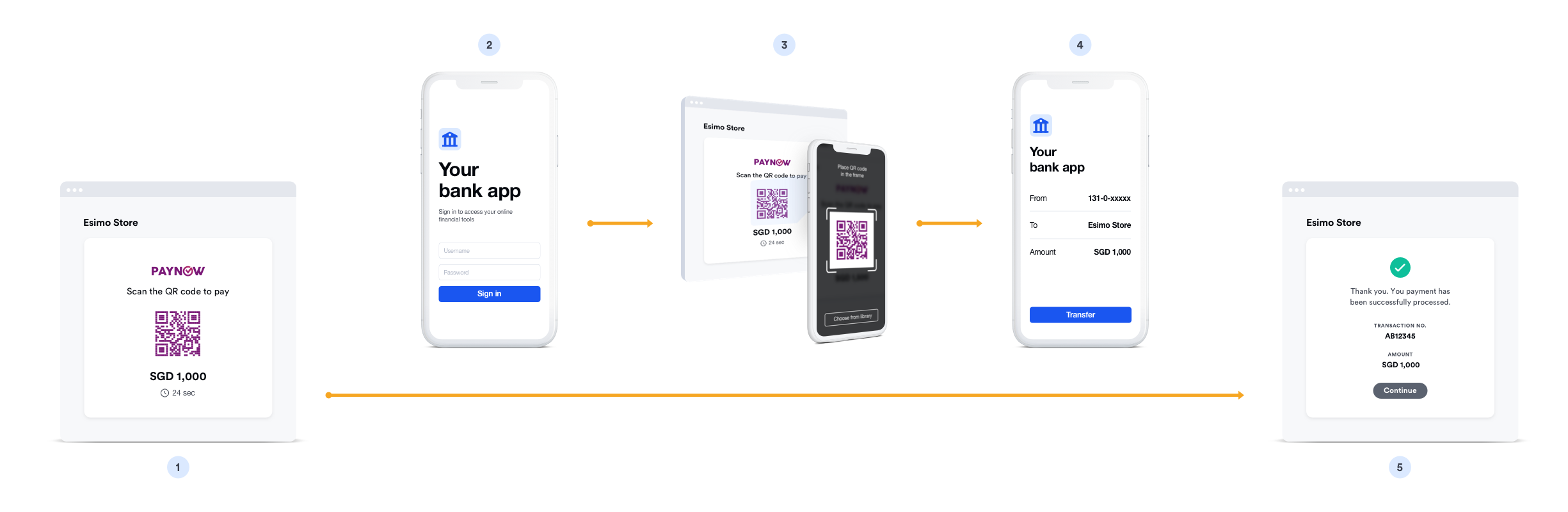
The desktop payment process:
- ❶ Initiate payment - Customer clicks "Pay with PayNow" at checkout
- ❷ Generate QR code - System generates unique PayNow QR code
- ❸ Display QR - QR code shown on screen with payment amount
- ❹ Scan with mobile - Customer scans using any Singapore banking app
- ❺ Open banking app - QR automatically launches the banking app
- ❻ Verify details - Customer reviews merchant name and amount
- ❼ Authenticate - Confirm with PIN, fingerprint, or Face ID
- ❽ Complete - Instant confirmation, return to merchant website
Mobile Browser Flow:
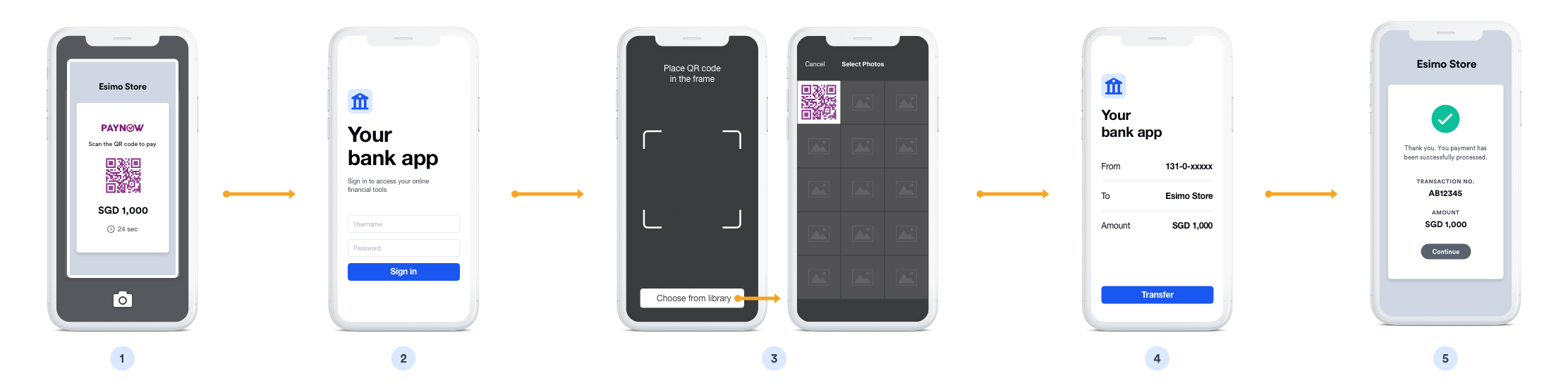
Optimized mobile experience:
- ❶ Select PayNow - Customer chooses PayNow payment method
- ❷ QR displayed - PayNow QR code appears on mobile screen
- ❸ Switch to bank app - Customer taps to open banking app
- ❹ Auto-scan - Banking app automatically reads payment details
- ❺ Review payment - Pre-populated transaction information
- ❻ Confirm - Single tap to authorize with biometric/PIN
- ❼ Success - Immediate confirmation and redirect
Overview
PayNow is Singapore's national real-time payment infrastructure operated by the Banking Computer Services (BCS). It enables instant fund transfers between bank accounts using mobile numbers, NRIC/FIN, or QR codes. Customers scan a QR code to pay directly from their bank accounts.
Key Features:
- ✅ National system - All major Singapore banks supported
- ✅ Fast confirmation - Near real-time payment verification (typically within seconds)
- ✅ 4+ million users - Wide adoption across Singapore
- ✅ QR code payment - No app downloads required
- ✅ Bank-to-bank - Direct transfer from customer's bank account
- ✅ High security - Bank-level authentication
- ✅ 24/7 availability - Works anytime, including holidays
Supported Regions
| Region | Currency | Min Amount | Max Amount | API Version |
|---|---|---|---|---|
| Singapore | SGD | $1.00 | $20,000.00 | 2017-11-02 |
Supported Banks
All major Singapore banks support PayNow:
- DBS/POSB
- OCBC Bank
- UOB
- Standard Chartered
- Citibank
- HSBC
- Maybank
- ANZ
- And more...
How It Works
Customer Experience:
- Customer selects "PayNow" at checkout
- QR code is displayed on screen
- Customer opens their bank's mobile app
- Scans the QR code
- Reviews and confirms payment in banking app
- Payment completed instantly
- Returns to merchant site
Typical completion time: 30 seconds - 2 minutes
Implementation
Step 1: Create PayNow Source
- cURL
- Node.js
- PHP
- Python
- Ruby
- Go
- Java
- C#
curl https://api.omise.co/sources \
  -u skey_test_YOUR_SECRET_KEY: \
  -d "type=paynow" \
  -d "amount=10000" \
  -d "currency=SGD"
const omise = require('omise')({
    secretKey: 'skey_test_YOUR_SECRET_KEY'
});

const source = await omise.sources.create({
    type: 'paynow',
    amount: 10000,  // SGD 100.00
    currency: 'SGD'
});
<?php
$source = OmiseSource::create(array(
    'type' => 'paynow',
    'amount' => 10000,
    'currency' => 'SGD'
));
?>
import omise

omise.api_secret = 'skey_test_YOUR_SECRET_KEY'

source = omise.Source.create(
    type='paynow',
    amount=10000,
    currency='SGD'
)
require 'omise'

Omise.api_key = 'skey_test_YOUR_SECRET_KEY'

source = Omise::Source.create({
  type: 'paynow',
  amount: 10000,
  currency: 'SGD'
})
source, err := client.Sources().Create(&operations.CreateSource{
    Type:     "paynow",
    Amount:   10000,
    Currency: "SGD",
})
Source source = client.sources().create(new Source.CreateParams()
    .type("paynow")
    .amount(10000L)
    .currency("SGD"));
var source = await client.Sources.Create(new CreateSourceRequest
{
    Type = "paynow",
    Amount = 10000,
    Currency = "SGD"
});
Response:
{
  "object": "source",
  "id": "src_test_5rt6s9vah5lkvi1rh9c",
  "type": "paynow",
  "flow": "offline",
  "amount": 10000,
  "currency": "SGD",
  "scannable_code": {
    "type": "qr",
    "image": {
      "download_uri": "https://api.omise.co/charges/.../documents/qr_code.png"
    }
  }
}
Step 2: Display QR Code
app.post('/checkout/paynow', async (req, res) => {
    try {
        const { amount, order_id } = req.body;

        // Validate amount
        if (amount < 50 || amount > 20000000) {
            return res.status(400).json({
                error: 'Amount must be between $0.50 and $200,000'
            });
        }

        // Create source
        const source = await omise.sources.create({
            type: 'paynow',
            amount: amount,
            currency: 'SGD'
        });

        // Create charge
        const charge = await omise.charges.create({
            amount: amount,
            currency: 'SGD',
            source: source.id,
            metadata: {
                order_id: order_id
            }
        });

        // Return QR code URL
        res.json({
            qr_code_url: source.scannable_code.image.download_uri,
            charge_id: charge.id,
            expires_at: new Date(Date.now() + 15 * 60 * 1000) // 15 min
        });

    } catch (error) {
        console.error('PayNow error:', error);
        res.status(500).json({ error: error.message });
    }
});
Step 3: Frontend Display
<!DOCTYPE html>
<html>
<head>
    <title>Pay with PayNow</title>
    <style>
        .paynow-container {
            max-width: 500px;
            margin: 50px auto;
            text-align: center;
            padding: 30px;
            border: 1px solid #ddd;
            border-radius: 8px;
        }
        .qr-code {
            width: 300px;
            height: 300px;
            margin: 20px auto;
            border: 2px solid #0052CC;
            padding: 10px;
            background: white;
        }
        .timer {
            font-size: 24px;
            color: #d32f2f;
            margin: 20px 0;
        }
        .instructions {
            text-align: left;
            margin: 20px 0;
        }
    </style>
</head>
<body>
    <div class="paynow-container">
        <h2>Scan to Pay with PayNow</h2>
        <p class="amount">Amount: $<span id="amount">100.00</span></p>

        <img id="qr-code" class="qr-code" alt="PayNow QR Code" />

        <div class="timer">
            Time remaining: <span id="countdown">15:00</span>
        </div>

        <div class="instructions">
            <h3>How to pay:</h3>
            <ol>
                <li>Open your bank's mobile app</li>
                <li>Select "PayNow" or "Scan to Pay"</li>
                <li>Scan the QR code above</li>
                <li>Confirm the payment amount</li>
                <li>Authorize with your PIN/biometric</li>
            </ol>
        </div>

        <p id="status">Waiting for payment...</p>
    </div>

    <script>
        // Initialize payment
        async function initPayment() {
            const response = await fetch('/checkout/paynow', {
                method: 'POST',
                headers: { 'Content-Type': 'application/json' },
                body: JSON.stringify({
                    amount: 10000, // $100.00
                    order_id: '12345'
                })
            });

            const data = await response.json();

            // Display QR code
            document.getElementById('qr-code').src = data.qr_code_url;

            // Start countdown
            startCountdown(15 * 60); // 15 minutes

            // Poll for payment status
            pollPaymentStatus(data.charge_id);
        }

        // Countdown timer
        function startCountdown(seconds) {
            const countdownEl = document.getElementById('countdown');

            const interval = setInterval(() => {
                const mins = Math.floor(seconds / 60);
                const secs = seconds % 60;
                countdownEl.textContent =
                    `${mins}:${secs.toString().padStart(2, '0')}`;

                if (seconds <= 0) {
                    clearInterval(interval);
                    showExpired();
                }

                seconds--;
            }, 1000);
        }

        // Poll payment status
        async function pollPaymentStatus(chargeId) {
            const interval = setInterval(async () => {
                const response = await fetch(`/charge-status/${chargeId}`);
                const charge = await response.json();

                if (charge.status === 'successful') {
                    clearInterval(interval);
                    showSuccess();
                } else if (charge.status === 'failed') {
                    clearInterval(interval);
                    showFailed();
                }
            }, 3000); // Poll every 3 seconds
        }

        function showSuccess() {
            document.getElementById('status').innerHTML =
                '<span style="color: green;">✓ Payment successful!</span>';
            setTimeout(() => {
                window.location = '/payment-success';
            }, 2000);
        }

        function showFailed() {
            document.getElementById('status').innerHTML =
                '<span style="color: red;">✗ Payment failed. Please try again.</span>';
        }

        function showExpired() {
            document.getElementById('status').innerHTML =
                '<span style="color: orange;">⏱ Payment expired. Please create a new payment.</span>';
        }

        // Initialize on page load
        initPayment();
    </script>
</body>
</html>
Step 4: Status Polling
// Backend endpoint for checking charge status
app.get('/charge-status/:chargeId', async (req, res) => {
    try {
        const charge = await omise.charges.retrieve(req.params.chargeId);
        res.json({
            status: charge.status,
            paid: charge.paid
        });
    } catch (error) {
        res.status(500).json({ error: error.message });
    }
});
Step 5: Handle Webhook
app.post('/webhooks/omise', (req, res) => {
    const event = req.body;

    if (event.key === 'charge.complete' && event.data.source.type === 'paynow') {
        const charge = event.data;

        if (charge.status === 'successful') {
            // Payment confirmed
            processOrder(charge.metadata.order_id);
            sendConfirmationEmail(charge.metadata.customer_email);
        } else if (charge.status === 'failed') {
            // Payment failed
            handleFailedPayment(charge.metadata.order_id);
        }
    }

    res.sendStatus(200);
});
Complete Implementation Example
// Express.js server
const express = require('express');
const omise = require('omise')({
    secretKey: process.env.OMISE_SECRET_KEY
});

const app = express();
app.use(express.json());
app.use(express.static('public'));

// Create PayNow payment
app.post('/checkout/paynow', async (req, res) => {
    try {
        const { amount, order_id, customer_email } = req.body;

        // Validate amount
        if (amount < 50 || amount > 20000000) {
            return res.status(400).json({
                error: 'Amount must be between $0.50 and $200,000'
            });
        }

        // Create source
        const source = await omise.sources.create({
            type: 'paynow',
            amount: amount,
            currency: 'SGD'
        });

        // Create charge
        const charge = await omise.charges.create({
            amount: amount,
            currency: 'SGD',
            source: source.id,
            metadata: {
                order_id: order_id,
                customer_email: customer_email
            }
        });

        // Return payment details
        res.json({
            charge_id: charge.id,
            qr_code_url: source.scannable_code.image.download_uri,
            expires_at: new Date(Date.now() + 15 * 60 * 1000).toISOString()
        });

    } catch (error) {
        console.error('PayNow error:', error);
        res.status(500).json({ error: error.message });
    }
});

// Check charge status
app.get('/charge-status/:chargeId', async (req, res) => {
    try {
        const charge = await omise.charges.retrieve(req.params.chargeId);
        res.json({
            status: charge.status,
            paid: charge.paid,
            amount: charge.amount
        });
    } catch (error) {
        res.status(500).json({ error: error.message });
    }
});

// Webhook handler
app.post('/webhooks/omise', (req, res) => {
    const event = req.body;

    if (event.key === 'charge.complete') {
        const charge = event.data;

        if (charge.source.type === 'paynow') {
            if (charge.status === 'successful') {
                updateOrderStatus(charge.metadata.order_id, 'paid');
                sendPaymentConfirmation(charge.metadata.customer_email);
            } else {
                updateOrderStatus(charge.metadata.order_id, 'failed');
            }
        }
    }

    res.sendStatus(200);
});

app.listen(3000);
Refund Support
PayNow does NOT support refunds. Once a payment is completed, it cannot be refunded through the PayNow system. You must process refunds manually via bank transfer if needed.
Common Issues & Troubleshooting
Issue: QR code not displaying
Causes:
- Invalid QR code URL
- Image loading error
- CORS policy blocking
Solution:
// Add error handling
document.getElementById('qr-code').onerror = function() {
    console.error('Failed to load QR code');
    alert('Unable to load QR code. Please refresh the page.');
};
Issue: Payment timeout
Cause: Customer didn't scan QR within 15 minutes
Solution:
// Allow retry with new QR code
function retryPayment() {
    initPayment(); // Generate new QR code
}
Issue: Customer scanned but didn't confirm
Cause: Customer scanned QR but cancelled in banking app
Solution:
- Show clear instructions
- Display countdown timer
- Allow multiple scan attempts
Best Practices
1. Display Clear Instructions
<div class="paynow-instructions">
    <h3>How to pay with PayNow:</h3>
    <ol>
        <li>Open your bank's mobile app (DBS, OCBC, UOB, etc.)</li>
        <li>Find "PayNow" or "Scan & Pay" option</li>
        <li>Scan the QR code shown above</li>
        <li>Verify the amount matches</li>
        <li>Confirm with PIN or biometric</li>
        <li>Wait for confirmation</li>
    </ol>
    <p><strong>Payment expires in 15 minutes</strong></p>
</div>
2. Implement Countdown Timer
function startCountdown(duration) {
    let timer = duration;
    const display = document.getElementById('countdown');

    const interval = setInterval(() => {
        const minutes = Math.floor(timer / 60);
        const seconds = timer % 60;

        display.textContent =
            minutes + ":" + (seconds < 10 ? "0" : "") + seconds;

        if (--timer < 0) {
            clearInterval(interval);
            handleExpiry();
        }
    }, 1000);
}
3. Poll for Status Updates
async function pollStatus(chargeId) {
    const maxAttempts = 100; // 5 minutes (3s * 100)
    let attempts = 0;

    const interval = setInterval(async () => {
        const status = await checkChargeStatus(chargeId);

        if (status === 'successful' || status === 'failed') {
            clearInterval(interval);
            handlePaymentComplete(status);
        }

        if (++attempts >= maxAttempts) {
            clearInterval(interval);
            handleTimeout();
        }
    }, 3000);
}
4. Mobile-Responsive QR Code
.qr-code {
    width: 100%;
    max-width: 300px;
    height: auto;
    margin: 20px auto;
}

@media (max-width: 600px) {
    .qr-code {
        max-width: 250px;
    }
}
5. Validate Amount
function validatePayNowAmount(amount) {
    const MIN = 50;  // $0.50
    const MAX = 20000000;  // $200,000

    if (amount < MIN) {
        return 'Minimum amount is $0.50';
    }

    if (amount > MAX) {
        return 'Maximum amount is $200,000';
    }

    return null;
}
FAQ
What is PayNow?
PayNow is Singapore's national fast payment system that enables instant bank-to-bank transfers using mobile numbers, NRIC/FIN, or QR codes. All major Singapore banks support PayNow.
Do customers need a PayNow account?
No separate PayNow account is needed. Customers only need a Singapore bank account with any participating bank and their mobile banking app.
What banks support PayNow?
All major Singapore banks including DBS/POSB, OCBC, UOB, Standard Chartered, Citibank, HSBC, Maybank, and more.
How long is the QR code valid?
PayNow QR codes expire after 15 minutes. Generate a new QR code if payment is not completed within this time.
Can I refund PayNow payments?
No, PayNow does not support automated refunds. Refunds must be processed manually via bank transfer if needed.
What are the transaction limits?
- Minimum: $0.50
- Maximum: $200,000 per transaction
- No daily limit (subject to bank's own limits)
How long does payment confirmation take?
PayNow payments are confirmed instantly, typically within seconds after the customer confirms in their banking app.
Testing
Test Mode
PayNow can be tested using your test API keys. In test mode:
Test Credentials:
- Use test API keys (skey_test_xxx)
- Currency: SGD (Singapore Dollar)
- No actual bank account or PayNow registration required
Test Flow:
- Create source and charge with test API keys
- QR code is generated in test mode
- Test QR code displays but won't connect to real PayNow network
- Use Omise Dashboard Actions to mark charge as successful/failed
- Verify webhook handling and status polling
Testing Implementation:
// Test PayNow payment
const source = await omise.sources.create({
    type: 'paynow',
    amount: 5000,  // $50.00
    currency: 'SGD'
});

const charge = await omise.charges.create({
    amount: 5000,
    currency: 'SGD',
    source: source.id
});

console.log('Test QR code URL:', charge.source.scannable_code.image.download_uri);

// Test status polling
async function pollPaymentStatus() {
    const charge = await omise.charges.retrieve(chargeId);
    console.log('Payment status:', charge.status);
}
Test Scenarios:
- Successful payment: Verify order completion workflow
- Failed payment: Test error handling
- QR code display: Test QR rendering on desktop and mobile
- Amount limits: Test $1 minimum and maximum amounts
- QR expiration: Test timeout handling (30 minutes default)
- Status polling: Verify polling mechanism works correctly
- Webhook delivery: Verify all webhook notifications
- Mobile vs Desktop: Test both user experiences
Important Notes:
- Test mode QR codes won't scan with real banking apps
- Use Omise Dashboard to simulate payment completion
- Test status polling intervals (recommended: every 3-5 seconds)
- Verify webhook handling for all charge statuses
- Test QR code expiration and regeneration flow
- Test both successful and timeout scenarios
For comprehensive testing guidelines, see the Testing Documentation.
Related Resources
- QR Payments Overview - All QR payment options
- PromptPay - Thailand's QR payment
- DuitNow QR - Malaysia's QR payment
- Testing - Test PayNow integration
- Webhooks - Handle payment notifications