ฟอร์มการชำระเงินสำเร็จรูป
ใช้
OmiseCardสำหรับฟอร์มการชำระเงินที่พร้อมใช้งานอย่างมืออาชีพที่จัดการ UI, validation และการสร้าง token โดยอัตโนมัติ
ภาพรวม
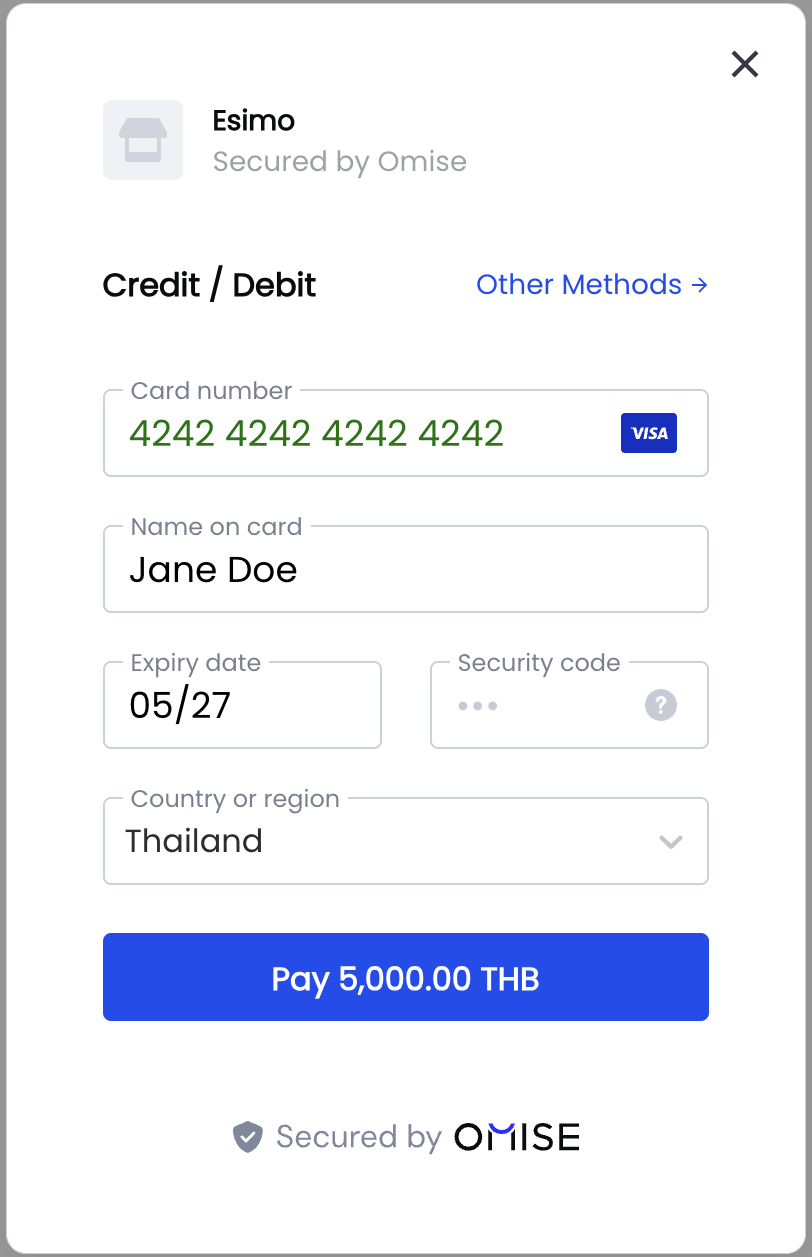
ฟอร์มการชำระเงินสำเร็จรูป (OmiseCard) เป็นวิธีที่เร็วที่สุดในการรับชำระเงิน มีส่วนต่อประสานการชำระเงินแบบ modal dialog ที่สมบูรณ์พร้อม:
- ✅ UI สำเร็จรูป - การออกแบบที่เป็นมืออาชีพทันที
- ✅ วิธีการชำระเงิน 50+ แบบ - บัตร, กระเป๋าเงิน, QR, ธนาคาร
- ✅ การตรวจสอบในตัว - การตรวจสอบฟิลด์แบบเรียลไทม์
- ✅ เหมาะสำหรับมือถือ - การออกแบบที่ตอบสนอง
- ✅ หลายภาษา - อังกฤษ, ไทย, ญี่ปุ่น
- ✅ เป็นไปตาม PCI - ปลอดภัยโดยค่าเริ่มต้น
เหมาะสำหรับ:
- การผสานรวมที่รวดเร็ว
- UX ที่สม่ำเสมอในทุกวิธีการชำระเงิน
- ทีมที่ไม่มีทรัพยากรด้านการออกแบบ
- การชำระเงินที่เหมาะสำหรับมือถือ
เริ่มต้นอย่างรวดเร็ว
การใช้งานเบื้องต้น
<!DOCTYPE html>
<html>
<head>
    <title>Checkout</title>
</head>
<body>
    <h1>Checkout</h1>
    <p>Total: ฿100.25</p>

    <button id="pay-button">Pay Now</button>

    <script src="https://cdn.omise.co/omise.js"></script>
    <script>
        // กำหนดค่า OmiseCard
        OmiseCard.configure({
            publicKey: "pkey_test_YOUR_PUBLIC_KEY",
            amount: 10025, // จำนวนเงินในหน่วยที่เล็กที่สุด (สตางค์/cents)
            currency: "THB",
            defaultPaymentMethod: "credit_card",
            onCreateTokenSuccess: (nonce) => {
                console.log('Token/Source created:', nonce);
                // ส่งไปยังเซิร์ฟเวอร์ของคุณ
                submitPayment(nonce);
            },
            onFormClosed: () => {
                console.log('Payment form closed');
            }
        });

        // เปิดฟอร์มเมื่อคลิกปุ่ม
        document.getElementById('pay-button').addEventListener('click', () => {
            OmiseCard.open();
        });

        function submitPayment(nonce) {
            fetch('/api/charge', {
                method: 'POST',
                headers: { 'Content-Type': 'application/json' },
                body: JSON.stringify({
                    token: nonce,
                    amount: 10025
                })
            })
            .then(response => response.json())
            .then(data => {
                if (data.authorize_uri) {
                    // เปลี่ยนเส้นทางสำหรับ 3D Secure หรือการทำธุรกรรมให้เสร็จสมบูรณ์
                    window.location.href = data.authorize_uri;
                } else {
                    // การชำระเงินสำเร็จ
                    window.location.href = '/success';
                }
            });
        }
    </script>
</body>
</html>
วิธี Data Attributes
สำหรับการผสานรวมที่เรียบง่าย ใช้ data attributes:
<form>
    <script
        src="https://cdn.omise.co/omise.js"
        data-key="pkey_test_YOUR_PUBLIC_KEY"
        data-amount="10025"
        data-currency="THB"
        data-default-payment-method="credit_card"
        data-button-label="Pay ฿100.25"
        data-submit-label="Submit Payment"
        data-location="no">
    </script>
</form>
การกำหนดค่า Options
ตัวเลือกที่จำเป็น
OmiseCard.configure({
    // Required
    publicKey: "pkey_test_YOUR_PUBLIC_KEY",
    amount: 10025,
    currency: "THB",

    // Callbacks
    onCreateTokenSuccess: (nonce) => {
        // Handle token/source creation
    }
});
ตัวเลือกทั้งหมด
OmiseCard.configure({
    // ===== Required =====
    publicKey: "pkey_test_YOUR_PUBLIC_KEY",
    amount: 10025,                         // Amount in smallest unit
    currency: "THB",                       // THB, JPY, SGD, MYR

    // ===== Payment Methods =====
    defaultPaymentMethod: "credit_card",   // Default selected method
    otherPaymentMethods: [                 // Available methods
        "promptpay",
        "truemoney",
        "rabbit_linepay",
        "mobile_banking_scb",
        "mobile_banking_kbank",
        "paynow",
        "grabpay",
        "shopeepay",
        "fpx",
        "duitnow_qr",
        "boost",
        "touch_n_go",
        "alipay",
        "wechat_pay",
        "installment_bay",
        "installment_first_choice",
        "installment_kbank",
        "installment_ktc",
        "installment_scb"
    ],

    // ===== UI Customization =====
    frameLabel: "Your Company Name",       // Company name shown in form
    frameDescription: "Invoice #1234",     // Description/reference
    submitLabel: "Pay Now",                // Submit button text
    buttonLabel: "Pay with Card",          // Trigger button text (data-attribute)
    locale: "en",                          // en, th, ja
    image: "https://example.com/logo.png", // Company logo URL

    // ===== Customer Data =====
    name: "John Doe",                      // Pre-fill customer name
    email: "john@example.com",             // Pre-fill email
    phoneNumber: "+66876543210",           // Pre-fill phone (for TrueMoney, etc.)

    // ===== Location =====
    location: "yes",                       // Ask for billing address (yes/no)

    // ===== Callbacks =====
    onCreateTokenSuccess: (nonce) => {
        // Called when token/source created
        // nonce is token ID (tokn_...) or source ID (src_...)
    },
    onFormClosed: () => {
        // Called when user closes the form
    },

    // ===== Metadata =====
    metadata: {                            // Optional metadata
        order_id: "ORD-1234",
        customer_id: "CUST-5678"
    }
});
การกำหนดค่าวิธีการชำระเงิน
Credit/Debit Cards
OmiseCard.configure({
    publicKey: "pkey_test_YOUR_PUBLIC_KEY",
    amount: 50000,
    currency: "THB",
    defaultPaymentMethod: "credit_card",
    location: "yes", // Recommended for cards
    onCreateTokenSuccess: (token) => {
        console.log('Card token:', token); // tokn_test_...
    }
});
PromptPay (QR Code)
OmiseCard.configure({
    publicKey: "pkey_test_YOUR_PUBLIC_KEY",
    amount: 50000,
    currency: "THB",
    defaultPaymentMethod: "promptpay",
    onCreateTokenSuccess: (source) => {
        console.log('PromptPay source:', source); // src_test_...
        // Redirect to authorize_uri to show QR code
    }
});
TrueMoney Wallet
OmiseCard.configure({
    publicKey: "pkey_test_YOUR_PUBLIC_KEY",
    amount: 50000,
    currency: "THB",
    defaultPaymentMethod: "truemoney",
    phoneNumber: "+66876543210", // Pre-fill phone
    onCreateTokenSuccess: (source) => {
        console.log('TrueMoney source:', source);
    }
});
Mobile Banking
OmiseCard.configure({
    publicKey: "pkey_test_YOUR_PUBLIC_KEY",
    amount: 50000,
    currency: "THB",
    defaultPaymentMethod: "mobile_banking_scb",
    otherPaymentMethods: [
        "mobile_banking_kbank",
        "mobile_banking_bay",
        "mobile_banking_ktb"
    ],
    onCreateTokenSuccess: (source) => {
        console.log('Mobile banking source:', source);
    }
});
Multiple Payment Methods
OmiseCard.configure({
    publicKey: "pkey_test_YOUR_PUBLIC_KEY",
    amount: 50000,
    currency: "THB",
    frameLabel: "ACME Store",
    frameDescription: "Order #12345",
    defaultPaymentMethod: "credit_card",
    otherPaymentMethods: [
        "promptpay",
        "truemoney",
        "rabbit_linepay",
        "mobile_banking_scb",
        "mobile_banking_kbank",
        "shopeepay",
        "grabpay"
    ],
    onCreateTokenSuccess: (nonce) => {
        if (nonce.startsWith('tokn_')) {
            console.log('Card token:', nonce);
        } else {
            console.log('Source created:', nonce);
        }
        submitPayment(nonce);
    }
});
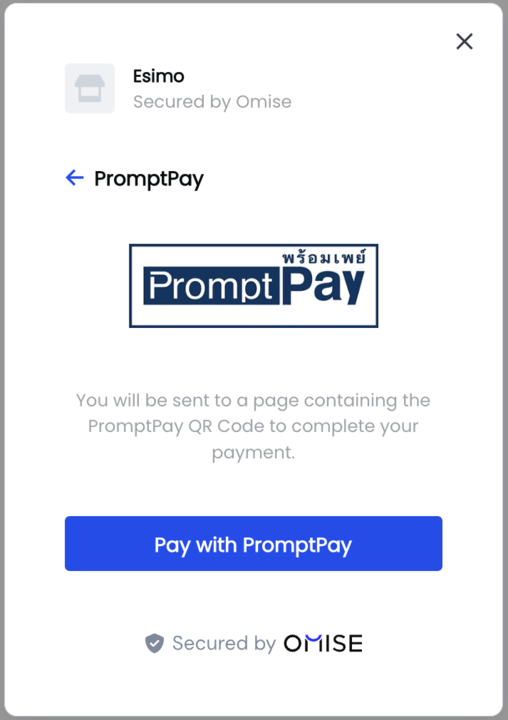
ฟอร์มการชำระเงินรองรับวิธีการชำระเงินทางเลือกที่หลากหลายที่ได้รับความนิยมในประเทศไทยและเอเชียตะวันออกเฉียงใต้:
การเปิดและปิด
เปิดฟอร์มด้วยโปรแกรม
// Configure first
OmiseCard.configure({ /* options */ });

// Open on button click
document.getElementById('pay-button').addEventListener('click', () => {
    OmiseCard.open();
});

// Or open immediately
OmiseCard.open();
ปิดฟอร์มด้วยโปรแกรม
// Close the form
OmiseCard.close();
จัดการเหตุการณ์ปิดฟอร์ม
OmiseCard.configure({
    // ... other options
    onFormClosed: () => {
        console.log('User closed payment form');
        // Optional: Show message or redirect
    }
});
การจัดการการตอบกลับ
Token เทียบกับ Source
Callback จะได้รับ token (สำหรับบัตร) หรือ source (สำหรับวิธีอื่นๆ):
onCreateTokenSuccess: (nonce) => {
    if (nonce.startsWith('tokn_')) {
        // Card token - charge immediately
        console.log('Card token:', nonce);
        chargeCard(nonce);
    } else if (nonce.startsWith('src_')) {
        // Source - redirect for completion
        console.log('Source:', nonce);
        createCharge(nonce);
    }
}
การประมวลผลการชำระเงิน
async function submitPayment(nonce) {
    try {
        const response = await fetch('/api/charge', {
            method: 'POST',
            headers: { 'Content-Type': 'application/json' },
            body: JSON.stringify({
                token: nonce,
                amount: 10025,
                currency: 'THB'
            })
        });

        const data = await response.json();

        if (data.authorize_uri) {
            // Redirect for 3D Secure or payment completion
            window.location.href = data.authorize_uri;
        } else if (data.status === 'successful') {
            // Payment successful
            window.location.href = '/success?charge=' + data.id;
        } else if (data.status === 'failed') {
            // Payment failed
            alert('Payment failed: ' + data.failure_message);
        } else {
            // Pending status - wait for webhook
            window.location.href = '/pending';
        }
    } catch (error) {
        console.error('Error:', error);
        alert('Payment error. Please try again.');
    }
}
การผสานรวมกับ Framework
React
import { useEffect } from 'react';

function CheckoutPage({ amount, currency, orderId }) {
    useEffect(() => {
        // Configure OmiseCard
        window.OmiseCard.configure({
            publicKey: process.env.REACT_APP_OMISE_PUBLIC_KEY,
            amount: amount,
            currency: currency,
            frameLabel: "ACME Store",
            frameDescription: `Order #${orderId}`,
            defaultPaymentMethod: "credit_card",
            onCreateTokenSuccess: handleTokenSuccess,
            onFormClosed: () => console.log('Form closed')
        });
    }, [amount, currency, orderId]);

    const handleTokenSuccess = async (nonce) => {
        try {
            const response = await fetch('/api/charge', {
                method: 'POST',
                headers: { 'Content-Type': 'application/json' },
                body: JSON.stringify({ token: nonce, amount, currency })
            });

            const data = await response.json();

            if (data.authorize_uri) {
                window.location.href = data.authorize_uri;
            } else {
                window.location.href = '/success';
            }
        } catch (error) {
            console.error('Payment error:', error);
        }
    };

    const openPaymentForm = () => {
        window.OmiseCard.open();
    };

    return (
        <div>
            <h1>Checkout</h1>
            <p>Total: {currency} {(amount / 100).toFixed(2)}</p>
            <button onClick={openPaymentForm}>
                Pay Now
            </button>
        </div>
    );
}
Vue.js
<template>
    <div>
        <h1>Checkout</h1>
        <p>Total: {{ currency }} {{ (amount / 100).toFixed(2) }}</p>
        <button @click="openPaymentForm">Pay Now</button>
    </div>
</template>

<script>
export default {
    props: ['amount', 'currency', 'orderId'],
    mounted() {
        window.OmiseCard.configure({
            publicKey: import.meta.env.VITE_OMISE_PUBLIC_KEY,
            amount: this.amount,
            currency: this.currency,
            frameLabel: "ACME Store",
            frameDescription: `Order #${this.orderId}`,
            defaultPaymentMethod: "credit_card",
            onCreateTokenSuccess: this.handleTokenSuccess,
            onFormClosed: () => console.log('Form closed')
        });
    },
    methods: {
        openPaymentForm() {
            window.OmiseCard.open();
        },
        async handleTokenSuccess(nonce) {
            const response = await fetch('/api/charge', {
                method: 'POST',
                headers: { 'Content-Type': 'application/json' },
                body: JSON.stringify({
                    token: nonce,
                    amount: this.amount,
                    currency: this.currency
                })
            });

            const data = await response.json();

            if (data.authorize_uri) {
                window.location.href = data.authorize_uri;
            } else {
                window.location.href = '/success';
            }
        }
    }
};
</script>
การปรับแต่ง
การแปลเป็นภาษาท้องถิ่น
OmiseCard.configure({
    // ... other options
    locale: "th", // en (English), th (Thai), ja (Japanese)
});
การปรับแต่งแบรนด์
OmiseCard.configure({
    // ... other options
    frameLabel: "Your Company Name",
    frameDescription: "Invoice #1234",
    image: "https://yourcompany.com/logo.png", // Square logo recommended
    submitLabel: "Complete Payment"
});
การจัดรูปแบบปุ่ม
<style>
    #pay-button {
        background: #1e3a8a;
        color: white;
        padding: 12px 32px;
        border: none;
        border-radius: 6px;
        font-size: 16px;
        font-weight: 600;
        cursor: pointer;
        transition: background 0.3s;
    }

    #pay-button:hover {
        background: #1864ab;
    }

    #pay-button:disabled {
        background: #ccc;
        cursor: not-allowed;
    }
</style>

<button id="pay-button">Pay ฿100.25</button>
การทดสอบ
หมายเลขบัตรทดสอบ
OmiseCard.configure({
    publicKey: "pkey_test_YOUR_PUBLIC_KEY", // Test mode key
    amount: 10000,
    currency: "THB",
    defaultPaymentMethod: "credit_card",
    onCreateTokenSuccess: (token) => {
        console.log('Test token:', token);
    }
});

// Use test card:
// Number: 4242 4242 4242 4242
// Expiry: Any future date
// CVV: Any 3 digits
ปัญหาที่พบบ่อยและการแก้ไข
ปัญหา: ฟอร์มไม่เปิด
สาเหตุ:
- ยังไม่ได้กำหนดค่า OmiseCard
- Script ยังไม่โหลด
- เรียกก่อนการกำหนดค่า
แก้ไข:
// Ensure configuration before opening
OmiseCard.configure({ /* options */ });

// Then open
OmiseCard.open();
ปัญหา: Callback ไม่ทำงาน
สาเหตุ: พิมพ์ชื่อ callback ผิด
แก้ไข:
// ✅ CORRECT
onCreateTokenSuccess: (nonce) => { /* ... */ }

// ❌ WRONG
onTokenCreated: (nonce) => { /* ... */ } // Wrong name!
ปัญหา: "Amount is required"
สาเหตุ: ขาดจำนวนเงินหรือจำนวนเงินไม่ถูกต้อง
แก้ไข:
// ✅ CORRECT - Amount in smallest unit
amount: 10025, // ฿100.25

// ❌ WRONG
amount: 100.25, // Don't use decimal
amount: "10025", // Don't use string
ปัญหา: วิธีการชำระเงินไม่แสดง
สาเหตุ: สกุลเงินไม่ตรงกัน
แก้ไข:
// PromptPay only works with THB
OmiseCard.configure({
    currency: "THB", // Must be THB for PromptPay
    defaultPaymentMethod: "promptpay"
});

// PayNow only works with SGD
OmiseCard.configure({
    currency: "SGD", // Must be SGD for PayNow
    defaultPaymentMethod: "paynow"
});
คำถามที่พบบ่อย
ฉันสามารถปรับแต่งรูปลักษณ์ของฟอร์มได้หรือไม่?
ฟอร์มสำเร็จรูปมีการปรับแต่งที่จำกัด (โลโก้, ป้ายกำกับ, ภาษา) หากต้องการควบคุมการจัดรูปแบบอย่างเต็มที่ ใช้วิธีการผสานรวมแบบกำหนดเอง
ฟอร์มทำงานบนมือถือได้หรือไม่?
ได้! ฟอร์มตอบสนองได้อย่างสมบูรณ์และเหมาะสำหรับอุปกรณ์มือถือพร้อมตัวควบคุมที่เหมาะกับการสัมผัสและประเภทคีย์บอร์ดที่เหมาะสม
ฉันสามารถกรอกข้อมูลลูกค้าล่วงหน้าได้หรือไม่?
ได้! ใช้ตัวเลือก name, email และ phoneNumber:
OmiseCard.configure({
    name: "John Doe",
    email: "john@example.com",
    phoneNumber: "+66876543210"
});
ฉันจะแสดงเฉพาะวิธีการชำระเงินที่ต้องการได้อย่างไร?
ใช้ defaultPaymentMethod และ otherPaymentMethods:
OmiseCard.configure({
    defaultPaymentMethod: "credit_card",
    otherPaymentMethods: ["promptpay", "truemoney"]
    // Only these 3 methods will be available
});
ความแตกต่างระหว่าง token และ source คืออะไร?
- Token (
tokn_...): สร้างสำหรับการชำระเงินด้วยบัตร ใช้ครั้งเดียวเพื่อสร้าง charge - Source (
src_...): สร้างสำหรับการชำระเงินที่ไม่ใช่บัตร (กระเป๋าเงิน, QR, ธนาคาร) รวม redirect URL
ทั้งสองจัดการใน callback onCreateTokenSuccess
ฉันสามารถใช้กับการชำระเงินแบบสมาชิกได้หรือไม่?
ได้! สำหรับการชำระเงินแบบรายงวด สร้างลูกค้าและแนบ token เพื่อบันทึกบัตร ดู การชำระเงินแบบรายงวด
ทรัพยากรที่เกี่ยวข้อง
- คู่มือการติดตั้ง - ตั้งค่า Omise.js
- การผสานรวมแบบกำหนดเอง - สร้าง UI แบบกำหนดเอง
- API Reference - เอกสารเมธอดแบบสมบูรณ์
- คู่มือการทดสอบ - ทดสอบวิธีการชำระเงิน
- วิธีการชำระเงิน - เรียกดูวิธีที่รองรับ
ขั้นตอนถัดไป
- ติดตั้ง Omise.js
- ✅ กำหนดค่าฟอร์มการชำระเงิน (คุณอยู่ที่นี่!)
- จัดการ charge ฝั่ง server
- ทดสอบด้วยบัตรทดสอบ
- จัดการ 3D Secure
- เปิดใช้งานจริง