Pre-Built Payment Form
Use
OmiseCardfor a professional, ready-to-use payment form that handles UI, validation, and tokenization automatically.
Overview
The pre-built payment form (OmiseCard) is the fastest way to accept payments. It provides a complete payment UI as a modal dialog with:
- ✅ Pre-built UI - Professional design out of the box
- ✅ 50+ payment methods - Cards, wallets, QR, banking
- ✅ Built-in validation - Real-time field validation
- ✅ Mobile optimized - Responsive design
- ✅ Multi-language - English, Thai, Japanese
- ✅ PCI compliant - Secure by default
Perfect for:
- Quick integrations
- Consistent UX across payment methods
- Teams without design resources
- Mobile-optimized checkout
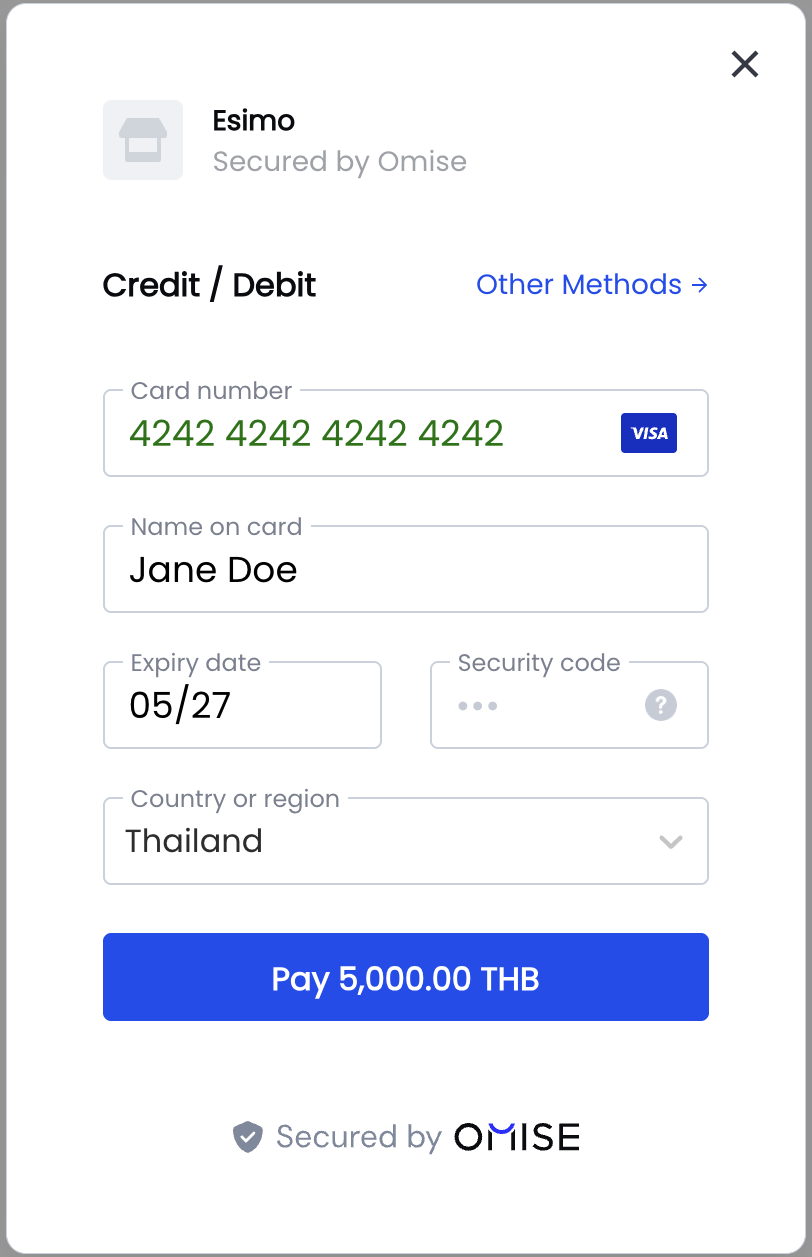
Quick Start
Basic Implementation
<!DOCTYPE html>
<html>
<head>
    <title>Checkout</title>
</head>
<body>
    <h1>Checkout</h1>
    <p>Total: ฿100.25</p>

    <button id="pay-button">Pay Now</button>

    <script src="https://cdn.omise.co/omise.js"></script>
    <script>
        // Configure OmiseCard
        OmiseCard.configure({
            publicKey: "pkey_test_YOUR_PUBLIC_KEY",
            amount: 10025, // Amount in smallest unit (satangs/cents)
            currency: "THB",
            defaultPaymentMethod: "credit_card",
            onCreateTokenSuccess: (nonce) => {
                console.log('Token/Source created:', nonce);
                // Send to your server
                submitPayment(nonce);
            },
            onFormClosed: () => {
                console.log('Payment form closed');
            }
        });

        // Open form on button click
        document.getElementById('pay-button').addEventListener('click', () => {
            OmiseCard.open();
        });

        function submitPayment(nonce) {
            fetch('/api/charge', {
                method: 'POST',
                headers: { 'Content-Type': 'application/json' },
                body: JSON.stringify({
                    token: nonce,
                    amount: 10025
                })
            })
            .then(response => response.json())
            .then(data => {
                if (data.authorize_uri) {
                    // Redirect for 3D Secure or payment completion
                    window.location.href = data.authorize_uri;
                } else {
                    // Payment successful
                    window.location.href = '/success';
                }
            });
        }
    </script>
</body>
</html>
Data Attributes Method
For simple integrations, use data attributes:
<form>
    <script
        src="https://cdn.omise.co/omise.js"
        data-key="pkey_test_YOUR_PUBLIC_KEY"
        data-amount="10025"
        data-currency="THB"
        data-default-payment-method="credit_card"
        data-button-label="Pay ฿100.25"
        data-submit-label="Submit Payment"
        data-location="no">
    </script>
</form>
Configuration Options
Required Options
OmiseCard.configure({
    // Required
    publicKey: "pkey_test_YOUR_PUBLIC_KEY",
    amount: 10025,
    currency: "THB",

    // Callbacks
    onCreateTokenSuccess: (nonce) => {
        // Handle token/source creation
    }
});
All Options
OmiseCard.configure({
    // ===== Required =====
    publicKey: "pkey_test_YOUR_PUBLIC_KEY",
    amount: 10025,                         // Amount in smallest unit
    currency: "THB",                       // THB, JPY, SGD, MYR

    // ===== Payment Methods =====
    defaultPaymentMethod: "credit_card",   // Default selected method
    otherPaymentMethods: [                 // Available methods
        "promptpay",
        "truemoney",
        "rabbit_linepay",
        "mobile_banking_scb",
        "mobile_banking_kbank",
        "paynow",
        "grabpay",
        "shopeepay",
        "fpx",
        "duitnow_qr",
        "boost",
        "touch_n_go",
        "alipay",
        "wechat_pay",
        "installment_bay",
        "installment_first_choice",
        "installment_kbank",
        "installment_ktc",
        "installment_scb"
    ],

    // ===== UI Customization =====
    frameLabel: "Your Company Name",       // Company name shown in form
    frameDescription: "Invoice #1234",     // Description/reference
    submitLabel: "Pay Now",                // Submit button text
    buttonLabel: "Pay with Card",          // Trigger button text (data-attribute)
    locale: "en",                          // en, th, ja
    image: "https://example.com/logo.png", // Company logo URL

    // ===== Customer Data =====
    name: "John Doe",                      // Pre-fill customer name
    email: "john@example.com",             // Pre-fill email
    phoneNumber: "+66876543210",           // Pre-fill phone (for TrueMoney, etc.)

    // ===== Location =====
    location: "yes",                       // Ask for billing address (yes/no)

    // ===== Callbacks =====
    onCreateTokenSuccess: (nonce) => {
        // Called when token/source created
        // nonce is token ID (tokn_...) or source ID (src_...)
    },
    onFormClosed: () => {
        // Called when user closes the form
    },

    // ===== Metadata =====
    metadata: {                            // Optional metadata
        order_id: "ORD-1234",
        customer_id: "CUST-5678"
    }
});
Payment Method Configuration
Credit/Debit Cards
OmiseCard.configure({
    publicKey: "pkey_test_YOUR_PUBLIC_KEY",
    amount: 50000,
    currency: "THB",
    defaultPaymentMethod: "credit_card",
    location: "yes", // Recommended for cards
    onCreateTokenSuccess: (token) => {
        console.log('Card token:', token); // tokn_test_...
    }
});
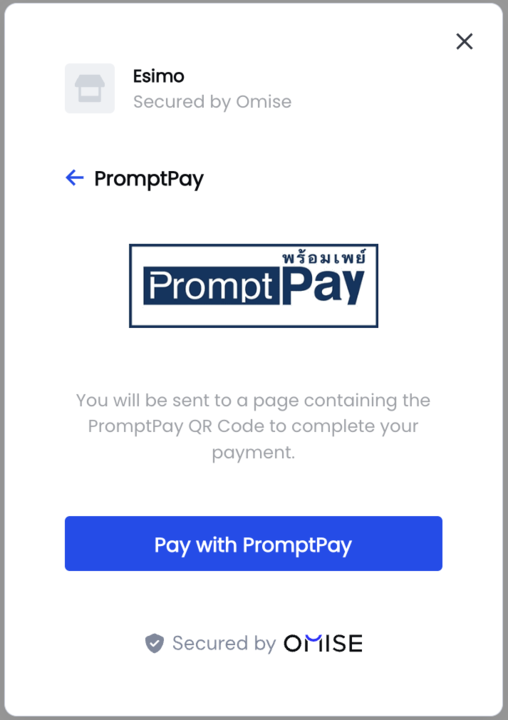
PromptPay (QR Code)
OmiseCard.configure({
    publicKey: "pkey_test_YOUR_PUBLIC_KEY",
    amount: 50000,
    currency: "THB",
    defaultPaymentMethod: "promptpay",
    onCreateTokenSuccess: (source) => {
        console.log('PromptPay source:', source); // src_test_...
        // Redirect to authorize_uri to show QR code
    }
});
TrueMoney Wallet
OmiseCard.configure({
    publicKey: "pkey_test_YOUR_PUBLIC_KEY",
    amount: 50000,
    currency: "THB",
    defaultPaymentMethod: "truemoney",
    phoneNumber: "+66876543210", // Pre-fill phone
    onCreateTokenSuccess: (source) => {
        console.log('TrueMoney source:', source);
    }
});
Mobile Banking
OmiseCard.configure({
    publicKey: "pkey_test_YOUR_PUBLIC_KEY",
    amount: 50000,
    currency: "THB",
    defaultPaymentMethod: "mobile_banking_scb",
    otherPaymentMethods: [
        "mobile_banking_kbank",
        "mobile_banking_bay",
        "mobile_banking_ktb"
    ],
    onCreateTokenSuccess: (source) => {
        console.log('Mobile banking source:', source);
    }
});
Multiple Payment Methods
OmiseCard.configure({
    publicKey: "pkey_test_YOUR_PUBLIC_KEY",
    amount: 50000,
    currency: "THB",
    frameLabel: "ACME Store",
    frameDescription: "Order #12345",
    defaultPaymentMethod: "credit_card",
    otherPaymentMethods: [
        "promptpay",
        "truemoney",
        "rabbit_linepay",
        "mobile_banking_scb",
        "mobile_banking_kbank",
        "shopeepay",
        "grabpay"
    ],
    onCreateTokenSuccess: (nonce) => {
        if (nonce.startsWith('tokn_')) {
            console.log('Card token:', nonce);
        } else {
            console.log('Source created:', nonce);
        }
        submitPayment(nonce);
    }
});
The payment form supports a wide range of alternative payment methods popular in Thailand and Southeast Asia:
Opening and Closing
Open Form Programmatically
// Configure first
OmiseCard.configure({ /* options */ });

// Open on button click
document.getElementById('pay-button').addEventListener('click', () => {
    OmiseCard.open();
});

// Or open immediately
OmiseCard.open();
Close Form Programmatically
// Close the form
OmiseCard.close();
Handle Form Close Event
OmiseCard.configure({
    // ... other options
    onFormClosed: () => {
        console.log('User closed payment form');
        // Optional: Show message or redirect
    }
});
Handling Responses
Token vs Source
The callback receives either a token (for cards) or source (for other methods):
onCreateTokenSuccess: (nonce) => {
    if (nonce.startsWith('tokn_')) {
        // Card token - charge immediately
        console.log('Card token:', nonce);
        chargeCard(nonce);
    } else if (nonce.startsWith('src_')) {
        // Source - redirect for completion
        console.log('Source:', nonce);
        createCharge(nonce);
    }
}
Processing Payments
async function submitPayment(nonce) {
    try {
        const response = await fetch('/api/charge', {
            method: 'POST',
            headers: { 'Content-Type': 'application/json' },
            body: JSON.stringify({
                token: nonce,
                amount: 10025,
                currency: 'THB'
            })
        });

        const data = await response.json();

        if (data.authorize_uri) {
            // Redirect for 3D Secure or payment completion
            window.location.href = data.authorize_uri;
        } else if (data.status === 'successful') {
            // Payment successful
            window.location.href = '/success?charge=' + data.id;
        } else if (data.status === 'failed') {
            // Payment failed
            alert('Payment failed: ' + data.failure_message);
        } else {
            // Pending status - wait for webhook
            window.location.href = '/pending';
        }
    } catch (error) {
        console.error('Error:', error);
        alert('Payment error. Please try again.');
    }
}
Framework Integration
React
import { useEffect } from 'react';

function CheckoutPage({ amount, currency, orderId }) {
    useEffect(() => {
        // Configure OmiseCard
        window.OmiseCard.configure({
            publicKey: process.env.REACT_APP_OMISE_PUBLIC_KEY,
            amount: amount,
            currency: currency,
            frameLabel: "ACME Store",
            frameDescription: `Order #${orderId}`,
            defaultPaymentMethod: "credit_card",
            onCreateTokenSuccess: handleTokenSuccess,
            onFormClosed: () => console.log('Form closed')
        });
    }, [amount, currency, orderId]);

    const handleTokenSuccess = async (nonce) => {
        try {
            const response = await fetch('/api/charge', {
                method: 'POST',
                headers: { 'Content-Type': 'application/json' },
                body: JSON.stringify({ token: nonce, amount, currency })
            });

            const data = await response.json();

            if (data.authorize_uri) {
                window.location.href = data.authorize_uri;
            } else {
                window.location.href = '/success';
            }
        } catch (error) {
            console.error('Payment error:', error);
        }
    };

    const openPaymentForm = () => {
        window.OmiseCard.open();
    };

    return (
        <div>
            <h1>Checkout</h1>
            <p>Total: {currency} {(amount / 100).toFixed(2)}</p>
            <button onClick={openPaymentForm}>
                Pay Now
            </button>
        </div>
    );
}
Vue.js
<template>
    <div>
        <h1>Checkout</h1>
        <p>Total: {{ currency }} {{ (amount / 100).toFixed(2) }}</p>
        <button @click="openPaymentForm">Pay Now</button>
    </div>
</template>

<script>
export default {
    props: ['amount', 'currency', 'orderId'],
    mounted() {
        window.OmiseCard.configure({
            publicKey: import.meta.env.VITE_OMISE_PUBLIC_KEY,
            amount: this.amount,
            currency: this.currency,
            frameLabel: "ACME Store",
            frameDescription: `Order #${this.orderId}`,
            defaultPaymentMethod: "credit_card",
            onCreateTokenSuccess: this.handleTokenSuccess,
            onFormClosed: () => console.log('Form closed')
        });
    },
    methods: {
        openPaymentForm() {
            window.OmiseCard.open();
        },
        async handleTokenSuccess(nonce) {
            const response = await fetch('/api/charge', {
                method: 'POST',
                headers: { 'Content-Type': 'application/json' },
                body: JSON.stringify({
                    token: nonce,
                    amount: this.amount,
                    currency: this.currency
                })
            });

            const data = await response.json();

            if (data.authorize_uri) {
                window.location.href = data.authorize_uri;
            } else {
                window.location.href = '/success';
            }
        }
    }
};
</script>
Customization
Localization
OmiseCard.configure({
    // ... other options
    locale: "th", // en (English), th (Thai), ja (Japanese)
});
Custom Branding
OmiseCard.configure({
    // ... other options
    frameLabel: "Your Company Name",
    frameDescription: "Invoice #1234",
    image: "https://yourcompany.com/logo.png", // Square logo recommended
    submitLabel: "Complete Payment"
});
Button Styling
<style>
    #pay-button {
        background: #1e3a8a;
        color: white;
        padding: 12px 32px;
        border: none;
        border-radius: 6px;
        font-size: 16px;
        font-weight: 600;
        cursor: pointer;
        transition: background 0.3s;
    }

    #pay-button:hover {
        background: #1864ab;
    }

    #pay-button:disabled {
        background: #ccc;
        cursor: not-allowed;
    }
</style>

<button id="pay-button">Pay ฿100.25</button>
Testing
Test Card Numbers
OmiseCard.configure({
    publicKey: "pkey_test_YOUR_PUBLIC_KEY", // Test mode key
    amount: 10000,
    currency: "THB",
    defaultPaymentMethod: "credit_card",
    onCreateTokenSuccess: (token) => {
        console.log('Test token:', token);
    }
});

// Use test card:
// Number: 4242 4242 4242 4242
// Expiry: Any future date
// CVV: Any 3 digits
Common Issues & Troubleshooting
Issue: Form doesn't open
Causes:
- OmiseCard not configured
- Script not loaded
- Called before configuration
Solution:
// Ensure configuration before opening
OmiseCard.configure({ /* options */ });

// Then open
OmiseCard.open();
Issue: Callback not firing
Cause: Typo in callback name
Solution:
// ✅ CORRECT
onCreateTokenSuccess: (nonce) => { /* ... */ }

// ❌ WRONG
onTokenCreated: (nonce) => { /* ... */ } // Wrong name!
Issue: "Amount is required"
Cause: Missing or invalid amount
Solution:
// ✅ CORRECT - Amount in smallest unit
amount: 10025, // ฿100.25

// ❌ WRONG
amount: 100.25, // Don't use decimal
amount: "10025", // Don't use string
Issue: Payment method not showing
Cause: Currency mismatch
Solution:
// PromptPay only works with THB
OmiseCard.configure({
    currency: "THB", // Must be THB for PromptPay
    defaultPaymentMethod: "promptpay"
});

// PayNow only works with SGD
OmiseCard.configure({
    currency: "SGD", // Must be SGD for PayNow
    defaultPaymentMethod: "paynow"
});
FAQ
Can I customize the form's appearance?
The pre-built form has limited customization (logo, labels, locale). For full control over styling, use the custom integration method.
Does the form work on mobile?
Yes! The form is fully responsive and optimized for mobile devices with touch-friendly controls and appropriate keyboard types.
Can I pre-fill customer information?
Yes! Use the name, email, and phoneNumber options:
OmiseCard.configure({
    name: "John Doe",
    email: "john@example.com",
    phoneNumber: "+66876543210"
});
How do I show only specific payment methods?
Use defaultPaymentMethod and otherPaymentMethods:
OmiseCard.configure({
    defaultPaymentMethod: "credit_card",
    otherPaymentMethods: ["promptpay", "truemoney"]
    // Only these 3 methods will be available
});
What's the difference between token and source?
- Token (
tokn_...): Created for card payments, used once to create a charge - Source (
src_...): Created for non-card payments (wallets, QR, banking), includes redirect URL
Both are handled in onCreateTokenSuccess callback.
Can I use it with subscription payments?
Yes! For recurring payments, create a customer and attach the token to save the card. See Recurring Payments.
Related Resources
- Installation Guide - Set up Omise.js
- Custom Integration - Build custom UI
- API Reference - Complete method documentation
- Testing Guide - Test payment methods
- Payment Methods - Browse supported methods
Next Steps
- Install Omise.js
- ✅ Configure payment form (you're here!)
- Handle server-side charge
- Test with test cards
- Handle 3D Secure
- Go live