事前構築済み決済フォーム
UI、バリデーション、トークン化を自動的に処理するプロフェッショナルなすぐに使える決済フォームには
OmiseCardを使用します。
概要
事前構築済み決済フォーム(OmiseCard)は、決済を受け付ける最速の方法です。モーダルダイアログとして完全な決済UIを提供します:
- ✅ 事前構築済みUI - すぐに使えるプロフェッショナルなデザイン
- ✅ 50以上の決済方法 - カード、ウォレット、QR、バンキング
- ✅ 組み込みバリデーション - リアルタイムフィールドバリデーション
- ✅ モバイル最適化 - レスポンシブデザイン
- ✅ 多言語対応 - 英語、タイ語、日本語
- ✅ PCI準拠 - デフォルトで安全
最適な用途:
- クイック統合
- 決済方法間で一貫したUX
- デザインリソースのないチーム
- モバイル最適化されたチェックアウト
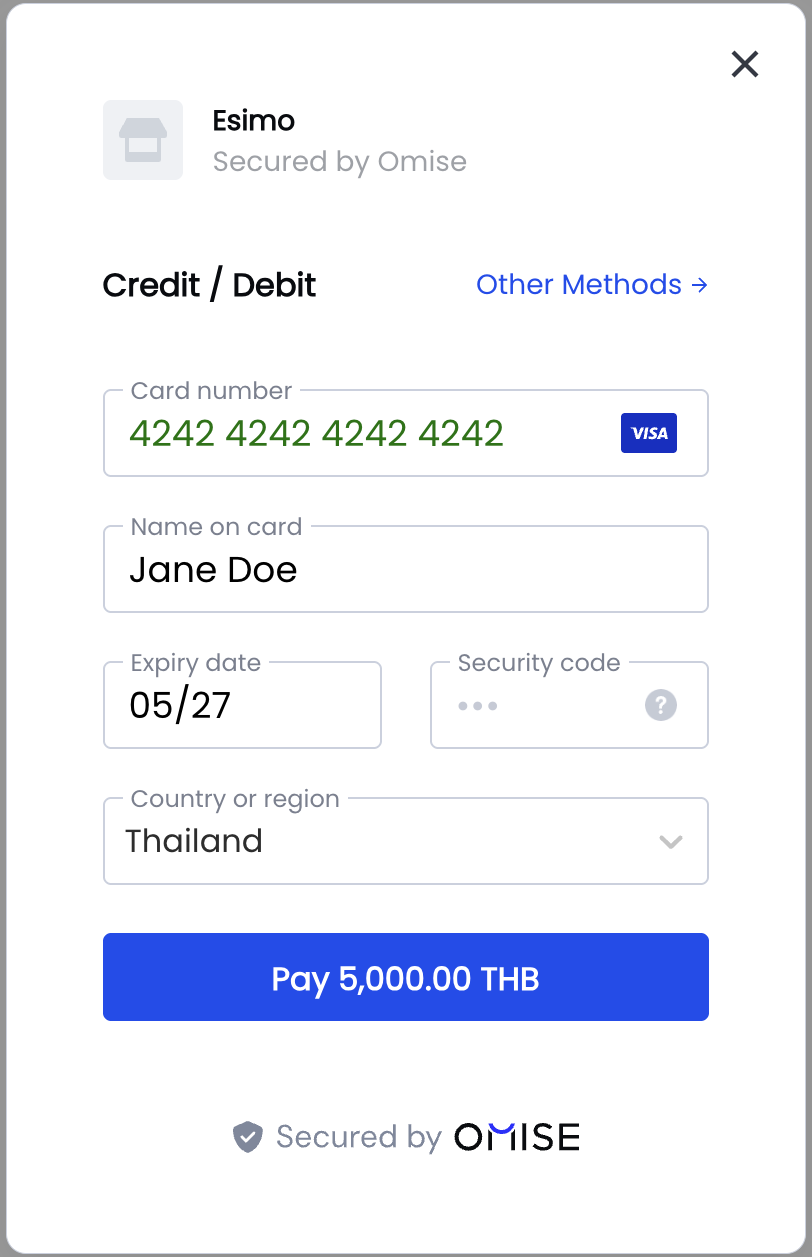
クイックスタート
基本的な実装
<!DOCTYPE html>
<html>
<head>
    <title>Checkout</title>
</head>
<body>
    <h1>Checkout</h1>
    <p>Total: ฿100.25</p>

    <button id="pay-button">Pay Now</button>

    <script src="https://cdn.omise.co/omise.js"></script>
    <script>
        // Configure OmiseCard
        OmiseCard.configure({
            publicKey: "pkey_test_YOUR_PUBLIC_KEY",
            amount: 10025, // Amount in smallest unit (satangs/cents)
            currency: "THB",
            defaultPaymentMethod: "credit_card",
            onCreateTokenSuccess: (nonce) => {
                console.log('Token/Source created:', nonce);
                // Send to your server
                submitPayment(nonce);
            },
            onFormClosed: () => {
                console.log('Payment form closed');
            }
        });

        // Open form on button click
        document.getElementById('pay-button').addEventListener('click', () => {
            OmiseCard.open();
        });

        function submitPayment(nonce) {
            fetch('/api/charge', {
                method: 'POST',
                headers: { 'Content-Type': 'application/json' },
                body: JSON.stringify({
                    token: nonce,
                    amount: 10025
                })
            })
            .then(response => response.json())
            .then(data => {
                if (data.authorize_uri) {
                    // Redirect for 3D Secure or payment completion
                    window.location.href = data.authorize_uri;
                } else {
                    // Payment successful
                    window.location.href = '/success';
                }
            });
        }
    </script>
</body>
</html>
データ属性メソッド
For simple integrations, use data attributes:
<form>
    <script
        src="https://cdn.omise.co/omise.js"
        data-key="pkey_test_YOUR_PUBLIC_KEY"
        data-amount="10025"
        data-currency="THB"
        data-default-payment-method="credit_card"
        data-button-label="Pay ฿100.25"
        data-submit-label="Submit Payment"
        data-location="no">
    </script>
</form>
設定オプション
必須オプション
OmiseCard.configure({
    // Required
    publicKey: "pkey_test_YOUR_PUBLIC_KEY",
    amount: 10025,
    currency: "THB",

    // Callbacks
    onCreateTokenSuccess: (nonce) => {
        // Handle token/source creation
    }
});
すべてのオプション
OmiseCard.configure({
    // ===== Required =====
    publicKey: "pkey_test_YOUR_PUBLIC_KEY",
    amount: 10025,                         // Amount in smallest unit
    currency: "THB",                       // THB, JPY, SGD, MYR

    // ===== Payment Methods =====
    defaultPaymentMethod: "credit_card",   // Default selected method
    otherPaymentMethods: [                 // Available methods
        "promptpay",
        "truemoney",
        "rabbit_linepay",
        "mobile_banking_scb",
        "mobile_banking_kbank",
        "paynow",
        "grabpay",
        "shopeepay",
        "fpx",
        "duitnow_qr",
        "boost",
        "touch_n_go",
        "alipay",
        "wechat_pay",
        "installment_bay",
        "installment_first_choice",
        "installment_kbank",
        "installment_ktc",
        "installment_scb"
    ],

    // ===== UI Customization =====
    frameLabel: "Your Company Name",       // Company name shown in form
    frameDescription: "Invoice #1234",     // Description/reference
    submitLabel: "Pay Now",                // Submit button text
    buttonLabel: "Pay with Card",          // Trigger button text (data-attribute)
    locale: "en",                          // en, th, ja
    image: "https://example.com/logo.png", // Company logo URL

    // ===== Customer Data =====
    name: "John Doe",                      // Pre-fill customer name
    email: "john@example.com",             // Pre-fill email
    phoneNumber: "+66876543210",           // Pre-fill phone (for TrueMoney, etc.)

    // ===== Location =====
    location: "yes",                       // Ask for billing address (yes/no)

    // ===== Callbacks =====
    onCreateTokenSuccess: (nonce) => {
        // Called when token/source created
        // nonce is token ID (tokn_...) or source ID (src_...)
    },
    onFormClosed: () => {
        // Called when user closes the form
    },

    // ===== Metadata =====
    metadata: {                            // Optional metadata
        order_id: "ORD-1234",
        customer_id: "CUST-5678"
    }
});
決済方法の設定
クレジット/デビットカード
OmiseCard.configure({
    publicKey: "pkey_test_YOUR_PUBLIC_KEY",
    amount: 50000,
    currency: "THB",
    defaultPaymentMethod: "credit_card",
    location: "yes", // Recommended for cards
    onCreateTokenSuccess: (token) => {
        console.log('Card token:', token); // tokn_test_...
    }
});
PromptPay (QR Code)
OmiseCard.configure({
    publicKey: "pkey_test_YOUR_PUBLIC_KEY",
    amount: 50000,
    currency: "THB",
    defaultPaymentMethod: "promptpay",
    onCreateTokenSuccess: (source) => {
        console.log('PromptPay source:', source); // src_test_...
        // Redirect to authorize_uri to show QR code
    }
});
TrueMoneyウォレット
OmiseCard.configure({
    publicKey: "pkey_test_YOUR_PUBLIC_KEY",
    amount: 50000,
    currency: "THB",
    defaultPaymentMethod: "truemoney",
    phoneNumber: "+66876543210", // Pre-fill phone
    onCreateTokenSuccess: (source) => {
        console.log('TrueMoney source:', source);
    }
});
Mobile Banking
OmiseCard.configure({
    publicKey: "pkey_test_YOUR_PUBLIC_KEY",
    amount: 50000,
    currency: "THB",
    defaultPaymentMethod: "mobile_banking_scb",
    otherPaymentMethods: [
        "mobile_banking_kbank",
        "mobile_banking_bay",
        "mobile_banking_ktb"
    ],
    onCreateTokenSuccess: (source) => {
        console.log('Mobile banking source:', source);
    }
});
複数の決済方法
OmiseCard.configure({
    publicKey: "pkey_test_YOUR_PUBLIC_KEY",
    amount: 50000,
    currency: "THB",
    frameLabel: "ACME Store",
    frameDescription: "Order #12345",
    defaultPaymentMethod: "credit_card",
    otherPaymentMethods: [
        "promptpay",
        "truemoney",
        "rabbit_linepay",
        "mobile_banking_scb",
        "mobile_banking_kbank",
        "shopeepay",
        "grabpay"
    ],
    onCreateTokenSuccess: (nonce) => {
        if (nonce.startsWith('tokn_')) {
            console.log('Card token:', nonce);
        } else {
            console.log('Source created:', nonce);
        }
        submitPayment(nonce);
    }
});
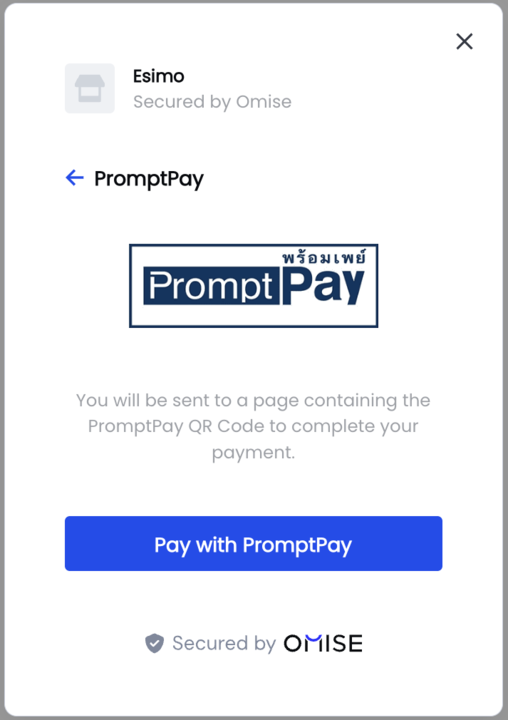
決済フォームは、タイと東南アジアで人気のある幅広い代替決済方法をサポートしています:
開閉
プログラムでフォームを開く
// Configure first
OmiseCard.configure({ /* options */ });

// Open on button click
document.getElementById('pay-button').addEventListener('click', () => {
    OmiseCard.open();
});

// Or open immediately
OmiseCard.open();
プログラムでフォームを閉じる
// フォームを閉じる
OmiseCard.close();
フォーム閉じるイベントを処理
OmiseCard.configure({
    // ... other options
    onFormClosed: () => {
        console.log('User closed payment form');
        // Optional: Show message or redirect
    }
});
レスポンスの処理
トークン vs ソース
コールバックはトークン(カード用)またはソース(その他の方法用)のいずれかを受け取ります:
onCreateTokenSuccess: (nonce) => {
    if (nonce.startsWith('tokn_')) {
        // Card token - charge immediately
        console.log('Card token:', nonce);
        chargeCard(nonce);
    } else if (nonce.startsWith('src_')) {
        // Source - redirect for completion
        console.log('Source:', nonce);
        createCharge(nonce);
    }
}
決済の処理
async function submitPayment(nonce) {
    try {
        const response = await fetch('/api/charge', {
            method: 'POST',
            headers: { 'Content-Type': 'application/json' },
            body: JSON.stringify({
                token: nonce,
                amount: 10025,
                currency: 'THB'
            })
        });

        const data = await response.json();

        if (data.authorize_uri) {
            // Redirect for 3D Secure or payment completion
            window.location.href = data.authorize_uri;
        } else if (data.status === 'successful') {
            // Payment successful
            window.location.href = '/success?charge=' + data.id;
        } else if (data.status === 'failed') {
            // Payment failed
            alert('Payment failed: ' + data.failure_message);
        } else {
            // Pending status - wait for webhook
            window.location.href = '/pending';
        }
    } catch (error) {
        console.error('Error:', error);
        alert('Payment error. Please try again.');
    }
}
フレームワーク統合
React
import { useEffect } from 'react';

function CheckoutPage({ amount, currency, orderId }) {
    useEffect(() => {
        // Configure OmiseCard
        window.OmiseCard.configure({
            publicKey: process.env.REACT_APP_OMISE_PUBLIC_KEY,
            amount: amount,
            currency: currency,
            frameLabel: "ACME Store",
            frameDescription: `Order #${orderId}`,
            defaultPaymentMethod: "credit_card",
            onCreateTokenSuccess: handleTokenSuccess,
            onFormClosed: () => console.log('Form closed')
        });
    }, [amount, currency, orderId]);

    const handleTokenSuccess = async (nonce) => {
        try {
            const response = await fetch('/api/charge', {
                method: 'POST',
                headers: { 'Content-Type': 'application/json' },
                body: JSON.stringify({ token: nonce, amount, currency })
            });

            const data = await response.json();

            if (data.authorize_uri) {
                window.location.href = data.authorize_uri;
            } else {
                window.location.href = '/success';
            }
        } catch (error) {
            console.error('Payment error:', error);
        }
    };

    const openPaymentForm = () => {
        window.OmiseCard.open();
    };

    return (
        <div>
            <h1>Checkout</h1>
            <p>Total: {currency} {(amount / 100).toFixed(2)}</p>
            <button onClick={openPaymentForm}>
                Pay Now
            </button>
        </div>
    );
}
Vue.js
<template>
    <div>
        <h1>Checkout</h1>
        <p>Total: {{ currency }} {{ (amount / 100).toFixed(2) }}</p>
        <button @click="openPaymentForm">Pay Now</button>
    </div>
</template>

<script>
export default {
    props: ['amount', 'currency', 'orderId'],
    mounted() {
        window.OmiseCard.configure({
            publicKey: import.meta.env.VITE_OMISE_PUBLIC_KEY,
            amount: this.amount,
            currency: this.currency,
            frameLabel: "ACME Store",
            frameDescription: `Order #${this.orderId}`,
            defaultPaymentMethod: "credit_card",
            onCreateTokenSuccess: this.handleTokenSuccess,
            onFormClosed: () => console.log('Form closed')
        });
    },
    methods: {
        openPaymentForm() {
            window.OmiseCard.open();
        },
        async handleTokenSuccess(nonce) {
            const response = await fetch('/api/charge', {
                method: 'POST',
                headers: { 'Content-Type': 'application/json' },
                body: JSON.stringify({
                    token: nonce,
                    amount: this.amount,
                    currency: this.currency
                })
            });

            const data = await response.json();

            if (data.authorize_uri) {
                window.location.href = data.authorize_uri;
            } else {
                window.location.href = '/success';
            }
        }
    }
};
</script>
カスタマイゼーション
ローカライゼーション
OmiseCard.configure({
    // ... other options
    locale: "th", // en (English), th (Thai), ja (Japanese)
});
カスタムブランディング
OmiseCard.configure({
    // ... other options
    frameLabel: "Your Company Name",
    frameDescription: "Invoice #1234",
    image: "https://yourcompany.com/logo.png", // Square logo recommended
    submitLabel: "Complete Payment"
});
ボタンのスタイリング
<style>
    #pay-button {
        background: #1e3a8a;
        color: white;
        padding: 12px 32px;
        border: none;
        border-radius: 6px;
        font-size: 16px;
        font-weight: 600;
        cursor: pointer;
        transition: background 0.3s;
    }

    #pay-button:hover {
        background: #1864ab;
    }

    #pay-button:disabled {
        background: #ccc;
        cursor: not-allowed;
    }
</style>

<button id="pay-button">Pay ฿100.25</button>
テスト
テストカード番号
OmiseCard.configure({
    publicKey: "pkey_test_YOUR_PUBLIC_KEY", // Test mode key
    amount: 10000,
    currency: "THB",
    defaultPaymentMethod: "credit_card",
    onCreateTokenSuccess: (token) => {
        console.log('Test token:', token);
    }
});

// Use test card:
// Number: 4242 4242 4242 4242
// Expiry: Any future date
// CVV: Any 3 digits
よくある問題とトラブルシューティング
問題: フォームが開かない
原因:
- OmiseCardが設定されていない
- スクリプトが読み込まれていない
- 設定前に呼び出された
解決策:
// Ensure configuration before opening
OmiseCard.configure({ /* options */ });

// Then open
OmiseCard.open();
Issue: Callback not firing
Cause: Typo in callback name
Solution:
// ✅ CORRECT
onCreateTokenSuccess: (nonce) => { /* ... */ }

// ❌ WRONG
onTokenCreated: (nonce) => { /* ... */ } // Wrong name!
Issue: "Amount is required"
Cause: Missing or invalid amount
Solution:
// ✅ CORRECT - Amount in smallest unit
amount: 10025, // ฿100.25

// ❌ WRONG
amount: 100.25, // Don't use decimal
amount: "10025", // Don't use string
Issue: Payment method not showing
Cause: Currency mismatch
Solution:
// PromptPay only works with THB
OmiseCard.configure({
    currency: "THB", // Must be THB for PromptPay
    defaultPaymentMethod: "promptpay"
});

// PayNow only works with SGD
OmiseCard.configure({
    currency: "SGD", // Must be SGD for PayNow
    defaultPaymentMethod: "paynow"
});
よくある質問
Can I customize the form's appearance?
The pre-built form has limited customization (logo, labels, locale). For full control over styling, use the custom integration method.
Does the form work on mobile?
Yes! The form is fully responsive and optimized for mobile devices with touch-friendly controls and appropriate keyboard types.
Can I pre-fill customer information?
Yes! Use the name, email, and phoneNumber options:
OmiseCard.configure({
    name: "John Doe",
    email: "john@example.com",
    phoneNumber: "+66876543210"
});
How do I show only specific payment methods?
Use defaultPaymentMethod and otherPaymentMethods:
OmiseCard.configure({
    defaultPaymentMethod: "credit_card",
    otherPaymentMethods: ["promptpay", "truemoney"]
    // Only these 3 methods will be available
});
What's the difference between token and source?
- Token (
tokn_...): Created for card payments, used once to create a charge - Source (
src_...): Created for non-card payments (wallets, QR, banking), includes redirect URL
Both are handled in onCreateTokenSuccess callback.
Can I use it with subscription payments?
Yes! For recurring payments, create a customer and attach the token to save the card. See Recurring Payments.
関連リソース
- インストール Guide - Set up Omise.js
- Custom Integration - Build custom UI
- API Reference - Complete method documentation
- テスト Guide - Test payment methods
- Payment Methods - Browse supported methods
次のステップ
- Install Omise.js
- ✅ Configure payment form (you're here!)
- Handle server-side charge
- Test with test cards
- Handle 3D Secure
- Go live