การผสานรวมแบบกำหนดเอง
สร้าง UI การชำระเงินของคุณเองพร้อมการควบคุมการออกแบบและประสบการณ์ผู้ใช้อย่างสมบูรณ์โดยใช้ Omise.js low-level API
ภาพรวม
การผสานรวมแบบกำหนดเองให้คุณควบคุม UI การชำระเงินได้อย่างเต็มที่ในขณะที่ Omise.js จัดการการสร้าง token อย่างปลอดภัย เหมาะสำหรับ:
- แบรนด์แบบกำหนดเอง - จับคู่การออกแบบของไซต์คุณได้อย่างสมบูรณ์แบบ
- ขั้นตอนการชำระเงินที่ซับซ้อน - การชำระเงินแบบหลายขั้นตอน, การชำระเงินแบบหน้าเดียว
- การทดสอบ A/B - ทดสอบ UI หลายรูปแบบ
- การผสานรวม framework - คอมโพเนนต์ React, Vue, Angular
- แอพมือถือ - การผสานรวม WebView
ข้อดีข้อเสีย:
- ✅ ควบคุมการออกแบบได้อย่างสมบูรณ์
- ✅ ตรรกะการตรวจสอบแบบกำหนดเอง
- ✅ เป็นมิตรกับ framework
- ❌ ใช้เวลาพัฒนามากขึ้น
- ❌ คุณต้องจัดการ UI/UX
- ❌ คุณต้องจัดการข้อความแสดงข้อผิดพลาด
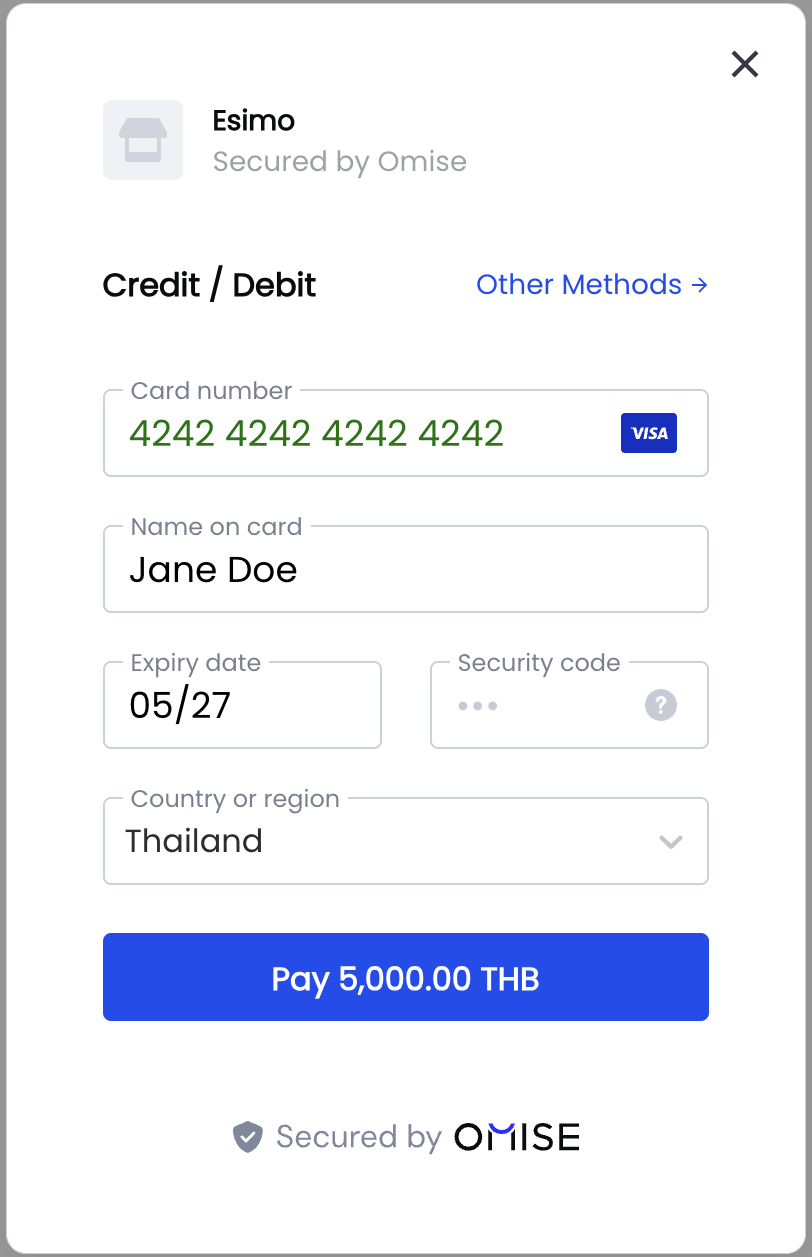
ตัวอย่างฟอร์มการชำระเงินแบบกำหนดเอง
นี่คือตัวอย่างฟอร์มการชำระเงินด้วยบัตรเครดิตที่ออกแบบแบบกำหนดเอง:
แนวคิดหลัก
1. กระบวนการสร้าง Token
2. อย่าส่งข้อมูลบัตรไปยังเซิร์ฟเวอร์ของคุณ
// ❌ WRONG - Never do this!
fetch('/checkout', {
    body: JSON.stringify({
        cardNumber: '4242424242424242',
        cvv: '123',
        expiry: '12/25'
    })
});

// ✅ CORRECT - Only send tokens
Omise.createToken('card', cardData, (statusCode, response) => {
    if (statusCode === 200) {
        fetch('/checkout', {
            body: JSON.stringify({
                token: response.id // Only send token!
            })
        });
    }
});
การใช้งานเบื้องต้น
ฟอร์ม HTML
<!DOCTYPE html>
<html>
<head>
    <title>Custom Checkout</title>
    <style>
        .payment-form {
            max-width: 400px;
            margin: 50px auto;
            padding: 30px;
            border: 1px solid #e0e0e0;
            border-radius: 8px;
            font-family: system-ui, -apple-system, sans-serif;
        }

        .form-group {
            margin-bottom: 20px;
        }

        .form-group label {
            display: block;
            margin-bottom: 8px;
            font-weight: 600;
            color: #333;
        }

        .form-group input {
            width: 100%;
            padding: 12px;
            border: 1px solid #ccc;
            border-radius: 4px;
            font-size: 16px;
            box-sizing: border-box;
        }

        .form-group input:focus {
            outline: none;
            border-color: #1e3a8a;
            box-shadow: 0 0 0 3px rgba(28, 126, 214, 0.1);
        }

        .form-group input.error {
            border-color: #c92a2a;
        }

        .error-message {
            color: #c92a2a;
            font-size: 14px;
            margin-top: 5px;
        }

        .form-row {
            display: flex;
            gap: 15px;
        }

        .form-row .form-group {
            flex: 1;
        }

        .btn-pay {
            width: 100%;
            padding: 14px;
            background: #1e3a8a;
            color: white;
            border: none;
            border-radius: 4px;
            font-size: 16px;
            font-weight: 600;
            cursor: pointer;
            transition: background 0.2s;
        }

        .btn-pay:hover {
            background: #1864ab;
        }

        .btn-pay:disabled {
            background: #adb5bd;
            cursor: not-allowed;
        }

        .card-icons {
            display: flex;
            gap: 8px;
            margin-top: 8px;
        }

        .card-icons img {
            height: 24px;
        }
    </style>
</head>
<body>
    <div class="payment-form">
        <h2>Payment Details</h2>
        <p style="color: #666; margin-bottom: 30px;">Amount: <strong>฿100.25</strong></p>

        <form id="payment-form">
            <div class="form-group">
                <label for="card-name">Cardholder Name</label>
                <input
                    type="text"
                    id="card-name"
                    name="card-name"
                    placeholder="John Doe"
                    autocomplete="cc-name"
                    required
                />
                <div class="error-message" id="name-error"></div>
            </div>

            <div class="form-group">
                <label for="card-number">Card Number</label>
                <input
                    type="text"
                    id="card-number"
                    name="card-number"
                    placeholder="4242 4242 4242 4242"
                    autocomplete="cc-number"
                    maxlength="19"
                    required
                />
                <div class="card-icons">
                    <img src="/images/visa.svg" alt="Visa" />
                    <img src="/images/mastercard.svg" alt="Mastercard" />
                    <img src="/images/jcb.svg" alt="JCB" />
                </div>
                <div class="error-message" id="number-error"></div>
            </div>

            <div class="form-row">
                <div class="form-group">
                    <label for="expiry-month">Expiry Date</label>
                    <div style="display: flex; gap: 10px;">
                        <input
                            type="text"
                            id="expiry-month"
                            name="expiry-month"
                            placeholder="MM"
                            autocomplete="cc-exp-month"
                            maxlength="2"
                            style="width: 60px;"
                            required
                        />
                        <span style="align-self: center;">/</span>
                        <input
                            type="text"
                            id="expiry-year"
                            name="expiry-year"
                            placeholder="YYYY"
                            autocomplete="cc-exp-year"
                            maxlength="4"
                            style="width: 80px;"
                            required
                        />
                    </div>
                    <div class="error-message" id="expiry-error"></div>
                </div>

                <div class="form-group">
                    <label for="cvv">CVV</label>
                    <input
                        type="text"
                        id="cvv"
                        name="cvv"
                        placeholder="123"
                        autocomplete="cc-csc"
                        maxlength="4"
                        required
                    />
                    <div class="error-message" id="cvv-error"></div>
                </div>
            </div>

            <div class="form-group" style="margin-bottom: 0;">
                <button type="submit" class="btn-pay" id="pay-button">
                    Pay ฿100.25
                </button>
            </div>
        </form>
    </div>

    <script src="https://cdn.omise.co/omise.js"></script>
    <script src="/js/payment.js"></script>
</body>
</html>
การใช้งาน JavaScript
// payment.js

// เริ่มต้น Omise.js
Omise.setPublicKey("pkey_test_YOUR_PUBLIC_KEY");

const form = document.getElementById('payment-form');
const payButton = document.getElementById('pay-button');

// การจัดรูปแบบหมายเลขบัตร
document.getElementById('card-number').addEventListener('input', (e) => {
    let value = e.target.value.replace(/\s/g, '');
    let formatted = value.match(/.{1,4}/g)?.join(' ') || value;
    e.target.value = formatted;
});

// Month input validation
document.getElementById('expiry-month').addEventListener('input', (e) => {
    let value = e.target.value.replace(/\D/g, '');
    if (value.length > 0) {
        value = Math.min(parseInt(value), 12).toString().padStart(2, '0');
    }
    e.target.value = value;
});

// Year input validation
document.getElementById('expiry-year').addEventListener('input', (e) => {
    e.target.value = e.target.value.replace(/\D/g, '');
});

// CVV input validation
document.getElementById('cvv').addEventListener('input', (e) => {
    e.target.value = e.target.value.replace(/\D/g, '');
});

// การส่งฟอร์ม
form.addEventListener('submit', async (e) => {
    e.preventDefault();

    // ลบข้อผิดพลาดก่อนหน้า
    clearErrors();

    // ตรวจสอบฟอร์ม
    if (!validateForm()) {
        return;
    }

    // ปิดการใช้งานปุ่ม
    payButton.disabled = true;
    payButton.textContent = 'กำลังประมวลผล...';

    // รับค่าจากฟอร์ม
    const cardData = {
        name: document.getElementById('card-name').value,
        number: document.getElementById('card-number').value.replace(/\s/g, ''),
        expiration_month: parseInt(document.getElementById('expiry-month').value),
        expiration_year: parseInt(document.getElementById('expiry-year').value),
        security_code: document.getElementById('cvv').value
    };

    // สร้าง token
    Omise.createToken('card', cardData, async (statusCode, response) => {
        if (statusCode === 200) {
            // สำเร็จ - ส่ง token ไปยัง server
            await handleTokenSuccess(response.id);
        } else {
            // ข้อผิดพลาด - แสดงข้อความ
            handleTokenError(response);
            payButton.disabled = false;
            payButton.textContent = 'ชำระ ฿100.25';
        }
    });
});

function validateForm() {
    let isValid = true;

    // Validate name
    const name = document.getElementById('card-name').value.trim();
    if (!name) {
        showError('name-error', 'Cardholder name is required');
        isValid = false;
    }

    // Validate card number
    const number = document.getElementById('card-number').value.replace(/\s/g, '');
    if (number.length < 13 || number.length > 19) {
        showError('number-error', 'Please enter a valid card number');
        isValid = false;
    }

    // Validate expiry
    const month = parseInt(document.getElementById('expiry-month').value);
    const year = parseInt(document.getElementById('expiry-year').value);
    if (month < 1 || month > 12) {
        showError('expiry-error', 'Invalid expiry month');
        isValid = false;
    }
    if (year < new Date().getFullYear()) {
        showError('expiry-error', 'Card has expired');
        isValid = false;
    }

    // Validate CVV
    const cvv = document.getElementById('cvv').value;
    if (cvv.length < 3 || cvv.length > 4) {
        showError('cvv-error', 'Please enter a valid CVV');
        isValid = false;
    }

    return isValid;
}

function showError(elementId, message) {
    const errorEl = document.getElementById(elementId);
    errorEl.textContent = message;

    const inputId = elementId.replace('-error', '');
    const inputEl = document.getElementById(inputId);
    if (inputEl) {
        inputEl.classList.add('error');
    }
}

function clearErrors() {
    document.querySelectorAll('.error-message').forEach(el => {
        el.textContent = '';
    });
    document.querySelectorAll('input').forEach(el => {
        el.classList.remove('error');
    });
}

function handleTokenError(response) {
    alert('Card validation failed: ' + response.message);
}

async function handleTokenSuccess(token) {
    try {
        const response = await fetch('/api/charge', {
            method: 'POST',
            headers: {
                'Content-Type': 'application/json'
            },
            body: JSON.stringify({
                token: token,
                amount: 10025,
                currency: 'THB'
            })
        });

        const data = await response.json();

        if (data.authorize_uri) {
            // Redirect for 3D Secure
            window.location.href = data.authorize_uri;
        } else if (data.status === 'successful') {
            // Payment successful
            window.location.href = '/success?charge=' + data.id;
        } else if (data.status === 'failed') {
            // Payment failed
            alert('Payment failed: ' + data.failure_message);
            payButton.disabled = false;
            payButton.textContent = 'Pay ฿100.25';
        } else {
            // Pending - wait for webhook
            window.location.href = '/pending';
        }
    } catch (error) {
        console.error('Error:', error);
        alert('Payment error. Please try again.');
        payButton.disabled = false;
        payButton.textContent = 'Pay ฿100.25';
    }
}
วิธีการชำระเงินแบบอื่น
การสร้าง Sources
สำหรับการชำระเงินที่ไม่ใช่บัตร (กระเป๋าเงิน, QR, ธนาคาร) ใช้ createSource:
// PromptPay
Omise.createSource('promptpay', {
    amount: 50000,
    currency: 'THB'
}, handleSourceCallback);

// TrueMoney
Omise.createSource('truemoney', {
    amount: 30000,
    currency: 'THB',
    phone_number: '+66876543210'
}, handleSourceCallback);

// Mobile Banking
Omise.createSource('mobile_banking_kbank', {
    amount: 40000,
    currency: 'THB'
}, handleSourceCallback);

function handleSourceCallback(statusCode, response) {
    if (statusCode === 200) {
        // Send source ID to server
        createChargeWithSource(response.id);
    } else {
        alert('Error: ' + response.message);
    }
}
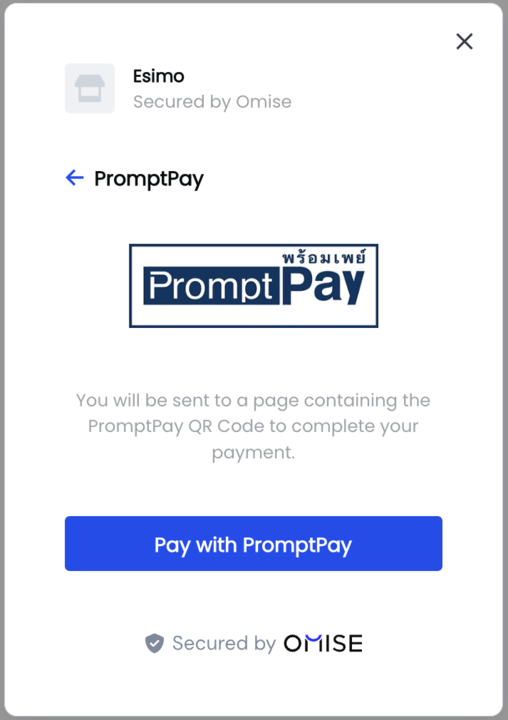
ตัวอย่างแบบหลายวิธีการชำระเงินที่สมบูรณ์
คุณสามารถสร้างฟอร์มแบบกำหนดเองที่รองรับหลายวิธีการชำระเงิน:
<form id="payment-form">
    <div class="payment-method-selector">
        <label>
            <input type="radio" name="method" value="card" checked>
            Credit/Debit Card
        </label>
        <label>
            <input type="radio" name="method" value="promptpay">
            PromptPay
        </label>
        <label>
            <input type="radio" name="method" value="truemoney">
            TrueMoney Wallet
        </label>
    </div>

    <div id="card-fields" class="payment-fields">
        <!-- Card fields here -->
    </div>

    <div id="promptpay-fields" class="payment-fields" style="display: none;">
        <p>Scan QR code to pay</p>
    </div>

    <div id="truemoney-fields" class="payment-fields" style="display: none;">
        <label>Phone Number</label>
        <input type="tel" id="truemoney-phone" placeholder="+66876543210">
    </div>

    <button type="submit">Pay Now</button>
</form>

<script>
    // Show/hide fields based on selection
    document.querySelectorAll('[name="method"]').forEach(radio => {
        radio.addEventListener('change', (e) => {
            document.querySelectorAll('.payment-fields').forEach(el => {
                el.style.display = 'none';
            });
            document.getElementById(e.target.value + '-fields').style.display = 'block';
        });
    });

    // Handle form submission
    document.getElementById('payment-form').addEventListener('submit', (e) => {
        e.preventDefault();

        const method = document.querySelector('[name="method"]:checked').value;

        if (method === 'card') {
            Omise.createToken('card', getCardData(), handleCallback);
        } else if (method === 'promptpay') {
            Omise.createSource('promptpay', {
                amount: 50000,
                currency: 'THB'
            }, handleCallback);
        } else if (method === 'truemoney') {
            Omise.createSource('truemoney', {
                amount: 50000,
                currency: 'THB',
                phone_number: document.getElementById('truemoney-phone').value
            }, handleCallback);
        }
    });

    function handleCallback(statusCode, response) {
        if (statusCode === 200) {
            submitToServer(response.id);
        } else {
            alert('Error: ' + response.message);
        }
    }
</script>
ตัวอย่างคอมโพเนนต์ React
import { useState } from 'react';

function CreditCardForm({ amount, currency, onSuccess }) {
    const [cardData, setCardData] = useState({
        name: '',
        number: '',
        expiryMonth: '',
        expiryYear: '',
        cvv: ''
    });
    const [errors, setErrors] = useState({});
    const [processing, setProcessing] = useState(false);

    const handleInputChange = (field, value) => {
        setCardData(prev => ({ ...prev, [field]: value }));

        // Clear error when user types
        if (errors[field]) {
            setErrors(prev => ({ ...prev, [field]: '' }));
        }
    };

    const formatCardNumber = (value) => {
        return value
            .replace(/\s/g, '')
            .match(/.{1,4}/g)
            ?.join(' ') || value;
    };

    const validate = () => {
        const newErrors = {};

        if (!cardData.name.trim()) {
            newErrors.name = 'Cardholder name is required';
        }

        const number = cardData.number.replace(/\s/g, '');
        if (number.length < 13 || number.length > 19) {
            newErrors.number = 'Invalid card number';
        }

        const month = parseInt(cardData.expiryMonth);
        if (month < 1 || month > 12) {
            newErrors.expiryMonth = 'Invalid month';
        }

        const year = parseInt(cardData.expiryYear);
        if (year < new Date().getFullYear()) {
            newErrors.expiryYear = 'Card expired';
        }

        if (cardData.cvv.length < 3) {
            newErrors.cvv = 'Invalid CVV';
        }

        setErrors(newErrors);
        return Object.keys(newErrors).length === 0;
    };

    const handleSubmit = async (e) => {
        e.preventDefault();

        if (!validate()) return;

        setProcessing(true);

        window.Omise.createToken('card', {
            name: cardData.name,
            number: cardData.number.replace(/\s/g, ''),
            expiration_month: parseInt(cardData.expiryMonth),
            expiration_year: parseInt(cardData.expiryYear),
            security_code: cardData.cvv
        }, async (statusCode, response) => {
            if (statusCode === 200) {
                try {
                    const result = await fetch('/api/charge', {
                        method: 'POST',
                        headers: { 'Content-Type': 'application/json' },
                        body: JSON.stringify({
                            token: response.id,
                            amount,
                            currency
                        })
                    });

                    const data = await result.json();

                    if (data.authorize_uri) {
                        window.location.href = data.authorize_uri;
                    } else {
                        onSuccess(data);
                    }
                } catch (error) {
                    alert('Payment error');
                    setProcessing(false);
                }
            } else {
                alert('Card validation failed: ' + response.message);
                setProcessing(false);
            }
        });
    };

    return (
        <form onSubmit={handleSubmit} className="credit-card-form">
            <div className="form-group">
                <label>Cardholder Name</label>
                <input
                    type="text"
                    value={cardData.name}
                    onChange={(e) => handleInputChange('name', e.target.value)}
                    placeholder="John Doe"
                />
                {errors.name && <span className="error">{errors.name}</span>}
            </div>

            <div className="form-group">
                <label>Card Number</label>
                <input
                    type="text"
                    value={cardData.number}
                    onChange={(e) => handleInputChange('number', formatCardNumber(e.target.value))}
                    placeholder="4242 4242 4242 4242"
                    maxLength="19"
                />
                {errors.number && <span className="error">{errors.number}</span>}
            </div>

            <div className="form-row">
                <div className="form-group">
                    <label>Expiry</label>
                    <div style={{ display: 'flex', gap: '10px' }}>
                        <input
                            type="text"
                            value={cardData.expiryMonth}
                            onChange={(e) => handleInputChange('expiryMonth', e.target.value.replace(/\D/g, ''))}
                            placeholder="MM"
                            maxLength="2"
                            style={{ width: '60px' }}
                        />
                        <span>/</span>
                        <input
                            type="text"
                            value={cardData.expiryYear}
                            onChange={(e) => handleInputChange('expiryYear', e.target.value.replace(/\D/g, ''))}
                            placeholder="YYYY"
                            maxLength="4"
                            style={{ width: '80px' }}
                        />
                    </div>
                    {(errors.expiryMonth || errors.expiryYear) && (
                        <span className="error">{errors.expiryMonth || errors.expiryYear}</span>
                    )}
                </div>

                <div className="form-group">
                    <label>CVV</label>
                    <input
                        type="text"
                        value={cardData.cvv}
                        onChange={(e) => handleInputChange('cvv', e.target.value.replace(/\D/g, ''))}
                        placeholder="123"
                        maxLength="4"
                        style={{ width: '80px' }}
                    />
                    {errors.cvv && <span className="error">{errors.cvv}</span>}
                </div>
            </div>

            <button type="submit" disabled={processing}>
                {processing ? 'Processing...' : `Pay ${currency} ${(amount / 100).toFixed(2)}`}
            </button>
        </form>
    );
}

export default CreditCardForm;
แนวทางปฏิบัติด้านความปลอดภัยที่ดีที่สุด
1. การทำความสะอาด Input
// Remove non-numeric characters
const cardNumber = value.replace(/\D/g, '');

// Limit to numeric only
const cvv = value.replace(/[^0-9]/g, '');

// Format card number display
const formatted = cardNumber.match(/.{1,4}/g)?.join(' ') || cardNumber;
2. อย่าบันทึกข้อมูลที่ละเอียดอ่อน
// ❌ DON'T
console.log('Card data:', cardData);

// ✅ DO
console.log('Token created:', token.id);
3. ลบฟอร์มหลังจากสำเร็จ
function clearSensitiveFields() {
    document.getElementById('card-number').value = '';
    document.getElementById('cvv').value = '';
}
4. ใช้ Autocomplete Attributes
<input type="text" autocomplete="cc-name" />
<input type="text" autocomplete="cc-number" />
<input type="text" autocomplete="cc-exp-month" />
<input type="text" autocomplete="cc-exp-year" />
<input type="text" autocomplete="cc-csc" />
คำถามที่พบบ่อย
ฉันจะตรวจสอบหมายเลขบัตรได้อย่างไร?
ใช้อัลกอริทึม Luhn:
function isValidCardNumber(number) {
    const digits = number.replace(/\D/g, '');
    let sum = 0;
    let isEven = false;

    for (let i = digits.length - 1; i >= 0; i--) {
        let digit = parseInt(digits[i]);

        if (isEven) {
            digit *= 2;
            if (digit > 9) digit -= 9;
        }

        sum += digit;
        isEven = !isEven;
    }

    return sum % 10 === 0;
}
ฉันสามารถบันทึกบัตรเพื่อใช้ในอนาคตได้หรือไม่?
ได้! สร้างลูกค้าและแนบบัตร:
- สร้าง token ด้วย Omise.js
- สร้างลูกค้าด้วย token บน server
- ใช้ customer ID สำหรับ charges ในอนาคต
ฉันจะจัดการ 3D Secure ได้อย่างไร?
Omise.js จัดการเฉพาะการสร้าง token สำหรับ 3D Secure:
- สร้าง charge บน server
- หาก
authorize_uriถูกส่งคืน ให้เปลี่ยนเส้นทางผู้ใช้ - ผู้ใช้ทำ 3D Secure ให้เสร็จสมบูรณ์
- ผู้ใช้กลับไปยัง
return_uriของคุณ
ฉันสามารถใช้ข้อความตรวจสอบแบบกำหนดเองได้หรือไม่?
ได้! จัดการข้อผิดพลาดใน callback:
Omise.createToken('card', cardData, (statusCode, response) => {
    if (statusCode !== 200) {
        showCustomError(response.code, response.message);
    }
});
ทรัพยากรที่เกี่ยวข้อง
- การติดตั้ง - ตั้งค่า Omise.js
- ฟอร์มสำเร็จรูป - ใช้ UI ที่พร้อมใช้งาน
- API Reference - เอกสาร API แบบสมบูรณ์
- การทดสอบ - บัตรและวิธีการทดสอบ
- 3D Secure - ใช้งาน 3DS
ขั้นตอนถัดไป
- ติดตั้ง Omise.js
- ✅ สร้าง UI แบบกำหนดเอง (คุณอยู่ที่นี่!)
- จัดการ charge ฝั่ง server
- ทดสอบการผสานรวม
- ใช้งาน 3D Secure
- เปิดใช้งานจริง