FPX (Financial Process Exchange)
Accept instant online bank transfers from 19+ Malaysian banks via FPX, Malaysia's national interbank payment gateway with widespread adoption across the country.
Overview
FPX (Financial Process Exchange) is Malaysia's national online banking payment gateway operated by PayNet. It enables customers to pay directly from their bank accounts via online banking, making it one of the most popular payment methods in Malaysia for e-commerce.
Key Features:
- ✅ 19+ banks - All major Malaysian banks supported
- ✅ National system - Malaysia's official interbank gateway
- ✅ Instant confirmation - Real-time payment processing
- ✅ High limits - Up to RM30,000 per transaction
- ✅ No registration - Customers use existing online banking
- ✅ Trusted - Operated by PayNet (Bank Negara Malaysia)
Supported Regions
| Region | Currency | Min Amount | Max Amount | API Version |
|---|---|---|---|---|
| Malaysia | MYR | RM1.00 | RM30,000.00 | 2017-11-02 |
Supported Banks
FPX supports 19+ major Malaysian banks:
Major Banks:
- Affin Bank
- Alliance Bank
- AmBank
- Bank Islam
- Bank Muamalat
- Bank Rakyat
- BSN (Bank Simpanan Nasional)
- CIMB Bank
- Hong Leong Bank
- HSBC Bank
- Kuwait Finance House
- Maybank
- OCBC Bank
- Public Bank
- RHB Bank
- Standard Chartered
- UOB (United Overseas Bank)
How It Works
Customer Experience:
- Customer selects "FPX" at checkout
- Redirected to FPX gateway
- Selects their bank from list
- Redirected to bank's online banking
- Logs in with online banking credentials
- Reviews and authorizes payment
- Returns to merchant site
Typical completion time: 2-5 minutes
Payment Flow Examples
Bank Selection and Login:
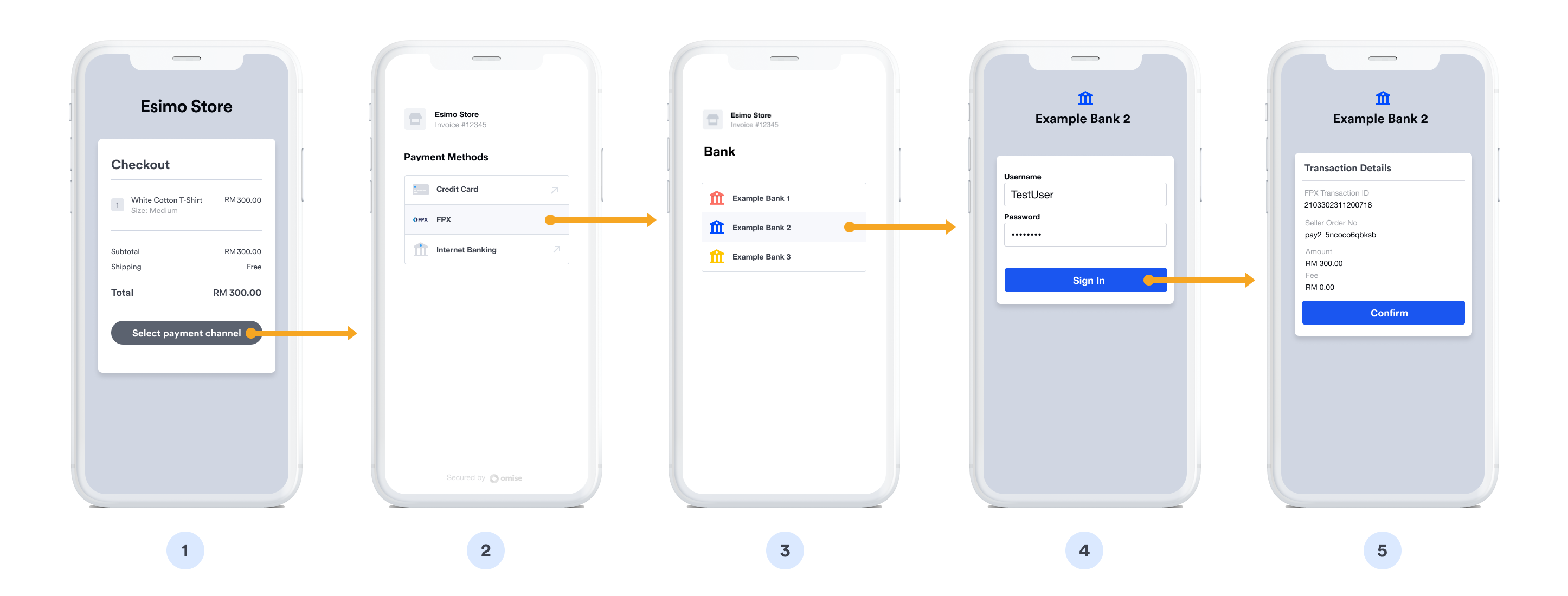
FPX gateway authentication phase:
- ❶ Select FPX - Customer chooses FPX bank transfer at checkout
- ❷ Redirect to FPX - Navigate to Malaysia's FPX payment gateway
- ❸ Choose bank - Select from list of 19+ participating banks
- ❹ Bank redirect - Forward to selected bank's online banking portal
- ❺ Login - Enter online banking username and password
- ❻ 2FA verification - Complete two-factor authentication (TAC/OTP)
- ❼ Authentication complete - Proceed to payment authorization
Payment Confirmation:
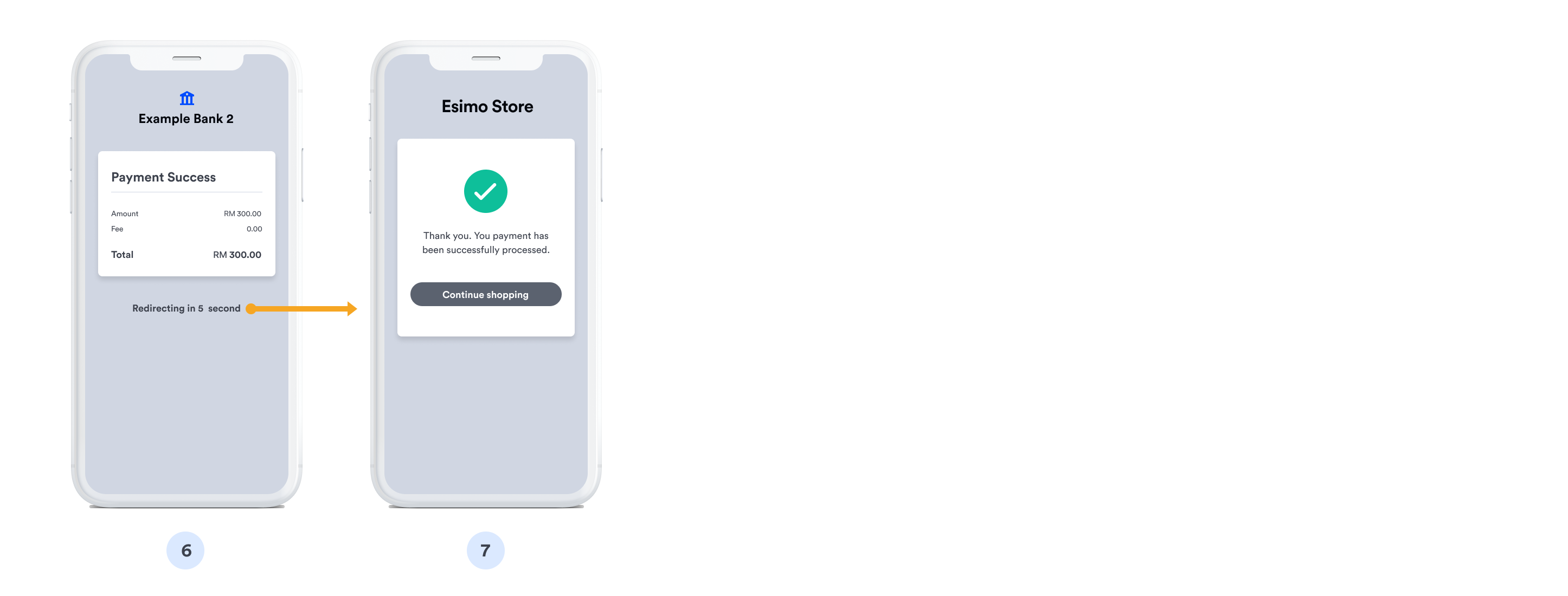
Transaction authorization and completion:
- ❽ Review details - Merchant name, payment amount, and reference number displayed
- ❾ Verify account - Confirm payment source account
- ❿ Authorize payment - Click confirm button to approve transfer
- ⓫ Processing - Bank processes the interbank transfer via FPX
- ⓬ Success confirmation - Payment complete message with transaction ID
- ⓭ Return to merchant - Redirect back to merchant confirmation page
Implementation
Step 1: Create FPX Source
- cURL
- Node.js
- PHP
- Python
- Ruby
- Go
- Java
- C#
curl https://api.omise.co/sources \
  -u skey_test_YOUR_SECRET_KEY: \
  -d "type=fpx" \
  -d "amount=10000" \
  -d "currency=MYR" \
  -d "email=customer@example.com"
const omise = require('omise')({
    secretKey: 'skey_test_YOUR_SECRET_KEY'
});

const source = await omise.sources.create({
    type: 'fpx',
    amount: 10000,  // MYR 100.00
    currency: 'MYR',
    email: 'customer@example.com'  // Optional but recommended
});
<?php
$source = OmiseSource::create(array(
    'type' => 'fpx',
    'amount' => 10000,
    'currency' => 'MYR',
    'email' => 'customer@example.com'
));
?>
import omise

omise.api_secret = 'skey_test_YOUR_SECRET_KEY'

source = omise.Source.create(
    type='fpx',
    amount=10000,
    currency='MYR',
    email='customer@example.com'
)
require 'omise'

Omise.api_key = 'skey_test_YOUR_SECRET_KEY'

source = Omise::Source.create({
  type: 'fpx',
  amount: 10000,
  currency: 'MYR',
  email: 'customer@example.com'
})
source, err := client.Sources().Create(&operations.CreateSource{
    Type:     "fpx",
    Amount:   10000,
    Currency: "MYR",
    Email:    "customer@example.com",
})
Source source = client.sources().create(new Source.CreateParams()
    .type("fpx")
    .amount(10000L)
    .currency("MYR")
    .email("customer@example.com"));
var source = await client.Sources.Create(new CreateSourceRequest
{
    Type = "fpx",
    Amount = 10000,
    Currency = "MYR",
    Email = "customer@example.com"
});
Response:
{
  "object": "source",
  "id": "src_test_5rt6s9vah5lkvi1rh9c",
  "type": "fpx",
  "flow": "redirect",
  "amount": 10000,
  "currency": "MYR",
  "email": "customer@example.com"
}
Step 2: Create Charge
curl https://api.omise.co/charges \
  -u skey_test_YOUR_SECRET_KEY: \
  -d "amount=10000" \
  -d "currency=MYR" \
  -d "source=src_test_5rt6s9vah5lkvi1rh9c" \
  -d "return_uri=https://yourdomain.com/payment/callback"
Step 3: Redirect Customer
app.post('/checkout/fpx', async (req, res) => {
    try {
        const { amount, order_id, customer_email } = req.body;

        // Validate amount
        if (amount < 100 || amount > 3000000) {
            return res.status(400).json({
                error: 'Amount must be between RM1 and RM30,000'
            });
        }

        // Create source
        const source = await omise.sources.create({
            type: 'fpx',
            amount: amount,
            currency: 'MYR',
            email: customer_email
        });

        // Create charge
        const charge = await omise.charges.create({
            amount: amount,
            currency: 'MYR',
            source: source.id,
            return_uri: `${process.env.BASE_URL}/payment/callback`,
            metadata: {
                order_id: order_id
            }
        });

        // Redirect to FPX
        res.redirect(charge.authorize_uri);

    } catch (error) {
        console.error('FPX error:', error);
        res.status(500).json({ error: error.message });
    }
});
Step 4: Handle Return
app.get('/payment/callback', async (req, res) => {
    try {
        const chargeId = req.query.charge_id;
        const charge = await omise.charges.retrieve(chargeId);

        if (charge.status === 'successful') {
            await processOrder(charge.metadata.order_id);
            res.redirect('/payment-success');
        } else if (charge.status === 'failed') {
            res.redirect('/payment-failed?reason=' + charge.failure_message);
        } else {
            res.redirect('/payment-pending');
        }
    } catch (error) {
        res.redirect('/payment-error');
    }
});
Step 5: Handle Webhook
app.post('/webhooks/omise', (req, res) => {
    const event = req.body;

    if (event.key === 'charge.complete' && event.data.source.type === 'fpx') {
        const charge = event.data;

        if (charge.status === 'successful') {
            processOrder(charge.metadata.order_id);
        } else if (charge.status === 'failed') {
            handleFailedPayment(charge.metadata.order_id);
        }
    }

    res.sendStatus(200);
});
Complete Implementation Example
// Express.js server
const express = require('express');
const omise = require('omise')({
    secretKey: process.env.OMISE_SECRET_KEY
});

const app = express();
app.use(express.json());

app.post('/checkout/fpx', async (req, res) => {
    try {
        const { amount, order_id, customer_email } = req.body;

        // Validate amount (RM1 - RM30,000)
        if (amount < 100 || amount > 3000000) {
            return res.status(400).json({
                error: 'Amount must be between RM1 and RM30,000'
            });
        }

        // Validate email
        if (!customer_email || !customer_email.includes('@')) {
            return res.status(400).json({
                error: 'Valid email required for FPX payments'
            });
        }

        // Create source
        const source = await omise.sources.create({
            type: 'fpx',
            amount: amount,
            currency: 'MYR',
            email: customer_email
        });

        // Create charge
        const charge = await omise.charges.create({
            amount: amount,
            currency: 'MYR',
            source: source.id,
            return_uri: `${process.env.BASE_URL}/payment/callback`,
            metadata: {
                order_id: order_id,
                payment_method: 'fpx',
                customer_email: customer_email
            }
        });

        // Return authorization URL
        res.json({
            authorize_uri: charge.authorize_uri,
            charge_id: charge.id
        });

    } catch (error) {
        console.error('FPX error:', error);
        res.status(500).json({ error: error.message });
    }
});

// Callback handler
app.get('/payment/callback', async (req, res) => {
    try {
        const chargeId = req.query.charge_id;
        const charge = await omise.charges.retrieve(chargeId);

        if (charge.status === 'successful') {
            res.redirect(`/order-success?order=${charge.metadata.order_id}`);
        } else {
            res.redirect(`/payment-failed?charge=${chargeId}`);
        }
    } catch (error) {
        res.redirect('/payment-error');
    }
});

// Webhook handler
app.post('/webhooks/omise', (req, res) => {
    const event = req.body;

    if (event.key === 'charge.complete') {
        const charge = event.data;

        if (charge.source.type === 'fpx') {
            if (charge.status === 'successful') {
                updateOrderStatus(charge.metadata.order_id, 'paid');
                sendConfirmation(charge.metadata.customer_email);
            } else {
                updateOrderStatus(charge.metadata.order_id, 'failed');
            }
        }
    }

    res.sendStatus(200);
});

app.listen(3000);
Refund Support
FPX supports full and partial refunds within 6 months:
// Full refund
const fullRefund = await omise.charges.refund('chrg_test_...', {
    amount: 10000
});

// Partial refund
const partialRefund = await omise.charges.refund('chrg_test_...', {
    amount: 5000  // Half refund
});
Refunds are supported within 6 months of the original transaction. Both full and partial refunds are allowed.
Common Issues & Troubleshooting
Issue: Bank not available
Cause: Customer's bank temporarily unavailable or under maintenance
Solution:
- Show real-time bank availability status (if provided by FPX)
- Display alternative payment methods
- Provide estimated downtime information
Issue: Payment timeout
Cause: Customer abandoned payment at bank's online banking page
Solution:
// Set reasonable timeout
const TIMEOUT = 30 * 60 * 1000; // 30 minutes

setTimeout(() => {
    if (!paymentConfirmed) {
        showTimeoutMessage();
        allowRetry();
    }
}, TIMEOUT);
Issue: Transaction limit exceeded
Error: Amount exceeds bank's limit
Solution:
- Show clear limit information (RM30,000 maximum)
- Suggest splitting into multiple transactions
- Offer alternative high-value payment methods
Issue: Customer closed browser
Cause: Return URI not called
Solution:
- Implement webhook handling (more reliable)
- Provide order status check page
- Send email confirmation
Best Practices
1. Display Bank Selection
<div class="fpx-instructions">
    <h3>Pay with FPX Online Banking</h3>
    <p>You'll be able to select from these banks:</p>
    <ul class="bank-list">
        <li>Maybank</li>
        <li>CIMB Bank</li>
        <li>Public Bank</li>
        <li>RHB Bank</li>
        <li>Hong Leong Bank</li>
        <li>AmBank</li>
        <li>and 13 more banks...</li>
    </ul>
    <p><strong>Requirements:</strong></p>
    <ul>
        <li>Online banking enabled on your account</li>
        <li>Sufficient balance</li>
        <li>Transaction amount: RM1 - RM30,000</li>
    </ul>
</div>
2. Collect Email Address
// Email is optional but recommended for receipts
function validateCheckout(data) {
    if (!data.email || !data.email.includes('@')) {
        throw new Error('Please provide a valid email address');
    }

    return true;
}
3. Validate Amount
function validateFPXAmount(amount) {
    const MIN = 100;  // RM1.00
    const MAX = 3000000;  // RM30,000.00

    if (amount < MIN) {
        return 'Minimum amount is RM1.00';
    }

    if (amount > MAX) {
        return 'Maximum amount is RM30,000.00';
    }

    return null; // Valid
}
4. Use Webhooks
// Webhook is primary notification method
app.post('/webhooks/omise', handleWebhook);

// Callback is backup
app.get('/payment/callback', handleCallback);
5. Handle Bank Maintenance
// Check for known maintenance windows
const MAINTENANCE_SCHEDULE = {
    'maybank': { day: 'sunday', time: '00:00-06:00' },
    'cimb': { day: 'sunday', time: '01:00-05:00' }
};

function checkMaintenanceWindow(bank) {
    const now = new Date();
    // Check if current time falls in maintenance window
    // Show warning to customer
}
FAQ
What is FPX?
FPX (Financial Process Exchange) is Malaysia's national online banking payment gateway operated by PayNet. It connects 19+ Malaysian banks for instant online payments.
Do customers need to register for FPX?
No, customers use their existing online banking accounts. No separate FPX registration required.
What are the transaction limits?
- Minimum: RM1.00
- Maximum: RM30,000 per transaction
- Daily limits: Vary by bank (typically RM30,000-RM100,000)
How long does settlement take?
FPX payments are processed instantly, but settlement to your merchant account typically occurs within 1-3 business days. Check your Omise dashboard for settlement schedules.
Can I refund FPX payments?
Yes, FPX supports both full and partial refunds within 6 months of the original transaction.
What if customer's bank is under maintenance?
Banks occasionally have scheduled maintenance (usually Sunday mornings). Customers can:
- Wait for bank to be available
- Use a different bank
- Choose an alternative payment method
Is FPX available 24/7?
FPX gateway is available 24/7, but individual banks may have maintenance windows (typically Sunday early morning). Most banks are available 24/7.
Testing
Test Mode
FPX can be tested using your test API keys. In test mode:
Test Credentials:
- Use test API keys (skey_test_xxx)
- Currency: MYR (Malaysian Ringgit)
- Email field is recommended for testing
- No actual bank account required
Test Flow:
- Create source and charge with test API keys
- Customer redirects to test
authorize_uri - Test page simulates FPX bank selection and authorization
- Use Omise Dashboard Actions to mark charge as successful/failed
- Verify webhook and return_uri handling
Testing Implementation:
// Test FPX payment
const source = await omise.sources.create({
    type: 'fpx',
    amount: 10000,  // RM100.00
    currency: 'MYR',
    email: 'customer@example.com'
});

const charge = await omise.charges.create({
    amount: 10000,
    currency: 'MYR',
    source: source.id,
    return_uri: 'https://example.com/callback'
});

console.log('Test authorize URL:', charge.authorize_uri);
Test Scenarios:
- Successful payment: Complete redirect flow and order processing
- Failed payment: Test error handling and user messaging
- Amount limits: Test RM1 minimum and RM30,000 maximum
- Bank selection: Test different bank flows
- Timeout: Test abandoned payment scenarios (customer doesn't complete)
- Return URI: Verify proper return after payment
- Webhook delivery: Verify all webhook events are received
Important Notes:
- Test mode doesn't connect to real FPX or bank servers
- Use dashboard to simulate payment status changes
- Test the complete redirect flow
- Verify webhook handling for all charge statuses
- Test both successful and failed scenarios
- Validate email field collection
For comprehensive testing guidelines, see the Testing Documentation.
Related Resources
- Bank Transfers Overview - All bank transfer options
- DuitNow - Alternative Malaysia method
- Mobile Banking - Thailand options
- Testing - Test FPX integration
- Refunds - Refund policies