Omise.js
ไลบรารี JavaScript ฝั่งไคลเอนต์ที่ปลอดภัยสำหรับการสร้าง token การชำระเงินโดยตรงในเบราว์เซอร์ ช่วยให้ข้อมูลบัตรไม่ต้องผ่านเซิร์ฟเวอร์ของคุณและลดข้อกำหนดด้าน PCI compliance
ภาพรวม
Omise.js เป็นไลบรารี JavaScript ที่จัดการการเก็บข้อมูลการชำระเงินและการสร้าง token ทั้งหมดในเบราว์เซอร์ ข้อมูลบัตรที่ละเอียดอ่อนจะถูกส่งโดยตรงจากอุปกรณ์ของลูกค้าไปยังเซิร์ฟเวอร์ที่ได้รับการรับรอง PCI ของ Omise โดยไม่ต้องผ่าน backend ของคุณเลย
คุณสมบัติหลัก:
- ✅ PCI compliance ที่ง่ายขึ้น - ข้อมูลบัตรไม่ต้องผ่านเซิร์ฟเวอร์ของคุณ
- ✅ ฟอร์มการชำระเงินสำเร็จรูป - UI พร้อมใช้งานพร้อม validation
- ✅ การผสานรวมแบบกำหนดเอง - ควบคุม UI และ UX ได้อย่างเต็มที่
- ✅ วิธีการชำระเงิน 50+ แบบ - บัตร, กระเป๋าเงิน, QR, ธนาคาร และอื่นๆ
- ✅ เหมาะสำหรับมือถือ - ใช้งานได้บนทุกอุปกรณ์
- ✅ ปลอดภัยโดยค่าเริ่มต้น - ต้องใช้ HTTPS และมี validation อัตโนมัติ
การทำงาน
Omise.js ให้กระบวนการที่ปลอดภัยในการเก็บข้อมูลการชำระเงินโดยที่ข้อมูลบัตรไม่ต้องผ่านเซิร์ฟเวอร์ของคุณ:
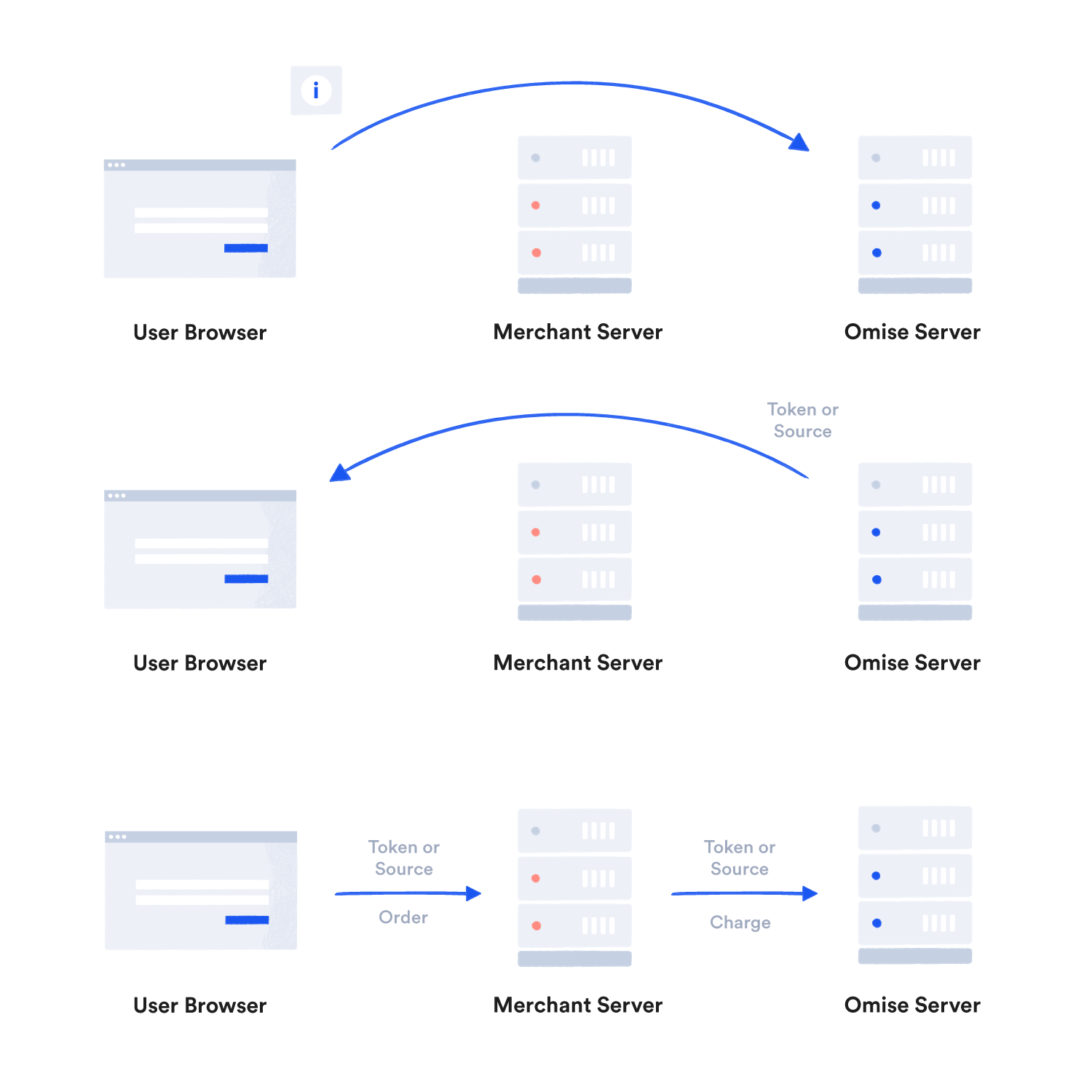
ข้อมูลบัตรจะถูกส่งโดยตรงจากเบราว์เซอร์ของลูกค้าไปยังเซิร์ฟเวอร์ของ Omise ซึ่งจะส่งคืน token ที่ปลอดภัยที่คุณสามารถใช้ใน backend ของคุณได้อย่างปลอดภัย
การติดตั้ง
CDN (แนะนำ)
<script src="https://cdn.omise.co/omise.js"></script>
เพิ่มโค้ดนี้ก่อนแท็ก </body> ปิด ไลบรารีจะพร้อมใช้งานเป็นตัวแปร global Omise และ OmiseCard
Omise.js ทำงานได้เฉพาะบนหน้า HTTPS เท่านั้น ใช้ TLS 1.2 หรือสูงกว่า
วิธีการผสานรวม
Omise.js มีสองวิธีในการผสานรวม:
1. ฟอร์มการชำระเงินสำเร็จรูป (เร็วที่สุด)
ใช้ OmiseCard สำหรับฟอร์มการชำระเงินที่พร้อมใช้งานพร้อม validation ในตัว:
วิธี Data Attributes
<form id="checkoutForm">
  <script
    src="https://cdn.omise.co/omise.js"
    data-key="pkey_test_YOUR_PUBLIC_KEY"
    data-amount="10025"
    data-currency="THB"
    data-default-payment-method="credit_card"
    data-button-label="Pay Now">
  </script>
</form>
วิธี JavaScript
OmiseCard.configure({
    publicKey: "pkey_test_YOUR_PUBLIC_KEY",
    amount: 10025,
    currency: "THB",
    defaultPaymentMethod: "credit_card",
    onCreateTokenSuccess: (nonce) => {
        if (nonce.startsWith('tokn_')) {
            // Card token created
            submitPayment(nonce);
        } else {
            // Source created (for non-card payments)
            submitPayment(nonce);
        }
    },
    onFormClosed: () => {
        console.log('Payment form closed');
    }
});

OmiseCard.open();
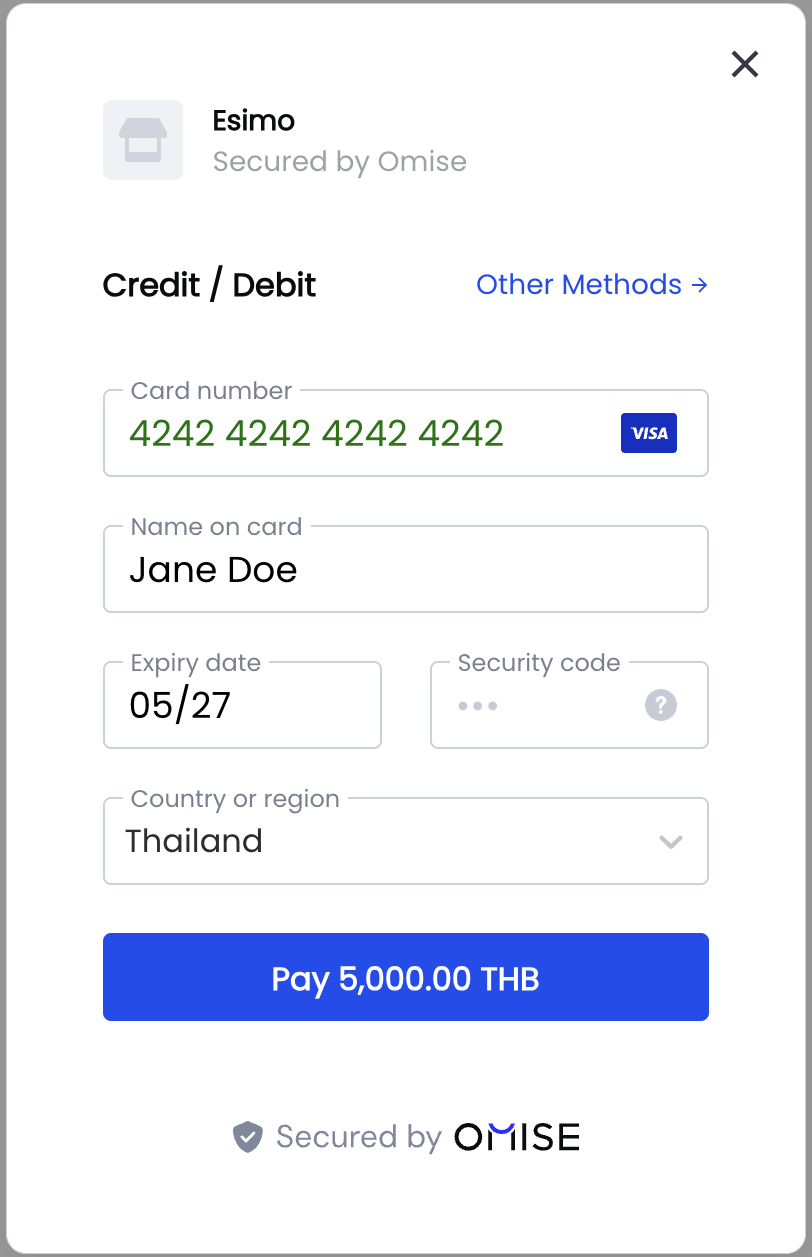
ผลลัพธ์: ฟอร์มการชำระเงินแบบ modal ที่มีคุณภาพพร้อม:
- ช่องกรอกข้อมูลบัตรพร้อม validation
- การเลือกวิธีการชำระเงิน
- การออกแบบที่ปลอดภัย
- รองรับการใช้งานบนมือถือ
- การจัดการข้อผิดพลาดในตัว
2. การผสานรวมแบบกำหนดเอง (ควบคุมเต็มที่)
ใช้ออบเจ็กต์ Omise เพื่อควบคุม UI ของคุณได้อย่างสมบูรณ์:
<form id="payment-form">
    <input type="text" id="card-name" placeholder="Card Holder Name" />
    <input type="text" id="card-number" placeholder="1234 5678 9012 3456" />
    <input type="text" id="expiry-month" placeholder="MM" maxlength="2" />
    <input type="text" id="expiry-year" placeholder="YYYY" maxlength="4" />
    <input type="text" id="cvv" placeholder="123" maxlength="4" />
    <button type="submit">Pay</button>
</form>

<script src="https://cdn.omise.co/omise.js"></script>
<script>
    Omise.setPublicKey("pkey_test_YOUR_PUBLIC_KEY");

    document.getElementById('payment-form').addEventListener('submit', function(e) {
        e.preventDefault();

        Omise.createToken("card", {
            name: document.getElementById('card-name').value,
            number: document.getElementById('card-number').value,
            expiration_month: parseInt(document.getElementById('expiry-month').value),
            expiration_year: parseInt(document.getElementById('expiry-year').value),
            security_code: document.getElementById('cvv').value
        }, function(statusCode, response) {
            if (statusCode === 200) {
                // Success - send token to server
                submitTokenToServer(response.id);
            } else {
                // Error
                alert(response.message);
            }
        });
    });
</script>
เมธอดหลัก
setPublicKey()
เริ่มต้น Omise.js ด้วย public key ของคุณ:
Omise.setPublicKey("pkey_test_YOUR_PUBLIC_KEY");
createToken()
สร้าง token บัตร:
Omise.createToken("card", {
    name: "John Doe",
    number: "4242424242424242",
    expiration_month: 12,
    expiration_year: 2027,
    security_code: "123",
    // Optional but recommended
    city: "Bangkok",
    postal_code: "10110",
    country: "TH"
}, function(statusCode, response) {
    if (statusCode === 200) {
        console.log('Token:', response.id);
        // response.id = "tokn_test_..."
    } else {
        console.error('Error:', response.message);
    }
});
createSource()
สร้าง source สำหรับวิธีการชำระเงินอื่นๆ:
Omise.createSource("truemoney", {
    amount: 35000,
    currency: "THB",
    phone_number: "+66876543210"
}, function(statusCode, response) {
    if (statusCode === 200) {
        console.log('Source:', response.id);
        // response.id = "src_test_..."
    }
});
วิธีการชำระเงินที่รองรับ
บัตรเครดิต/เดบิต
Omise.createToken("card", cardData, callback);
กระเป๋าเงินดิจิทัล
// Google Pay
Omise.createToken("tokenization", {
    method: "googlepay",
    data: googlePayToken
}, callback);

// Apple Pay
Omise.createToken("tokenization", {
    method: "applepay",
    data: applePayToken
}, callback);
การชำระเงินผ่าน QR
// PromptPay
Omise.createSource("promptpay", {
    amount: 50000,
    currency: "THB"
}, callback);

// PayNow
Omise.createSource("paynow", {
    amount: 5000,
    currency: "SGD"
}, callback);
กระเป๋าเงินอิเล็กทรอนิกส์
// TrueMoney
Omise.createSource("truemoney", {
    amount: 30000,
    currency: "THB",
    phone_number: "+66876543210"
}, callback);

// GrabPay
Omise.createSource("grabpay", {
    amount: 10000,
    currency: "SGD"
}, callback);

// ShopeePay
Omise.createSource("shopeepay", {
    amount: 25000,
    currency: "THB"
}, callback);
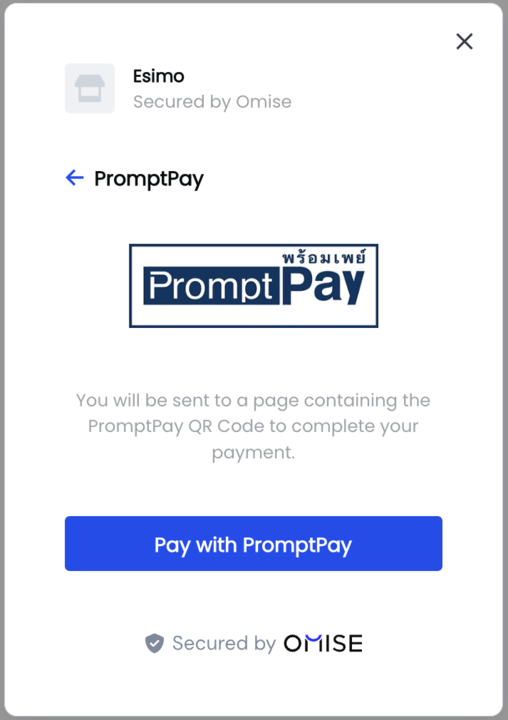
Omise.js รองรับวิธีการชำระเงินทางเลือกที่หลากหลายที่ได้รับความนิยมในประเทศไทยและเอเชียตะวันออกเฉียงใต้:
โมบายแบงก์กิ้ง
// KBank (Thailand)
Omise.createSource("mobile_banking_kbank", {
    amount: 40000,
    currency: "THB"
}, callback);

// SCB Easy
Omise.createSource("mobile_banking_scb", {
    amount: 40000,
    currency: "THB"
}, callback);
ตัวอย่างการใช้งานแบบสมบูรณ์
<!DOCTYPE html>
<html>
<head>
    <title>Omise.js Payment</title>
    <style>
        .payment-form {
            max-width: 400px;
            margin: 50px auto;
            padding: 20px;
            border: 1px solid #ddd;
            border-radius: 8px;
        }
        .form-group {
            margin-bottom: 15px;
        }
        .form-group label {
            display: block;
            margin-bottom: 5px;
            font-weight: bold;
        }
        .form-group input {
            width: 100%;
            padding: 10px;
            border: 1px solid #ccc;
            border-radius: 4px;
        }
        .btn-pay {
            width: 100%;
            padding: 12px;
            background: #1e3a8a;
            color: white;
            border: none;
            border-radius: 4px;
            font-size: 16px;
            cursor: pointer;
        }
        .btn-pay:hover {
            background: #1e40af;
        }
        .btn-pay:disabled {
            background: #ccc;
            cursor: not-allowed;
        }
        .error {
            color: #c92a2a;
            margin-top: 10px;
        }
    </style>
</head>
<body>
    <div class="payment-form">
        <h2>Checkout</h2>
        <p>Amount: <strong>฿100.25</strong></p>

        <form id="payment-form">
            <div class="form-group">
                <label for="card-name">Cardholder Name</label>
                <input type="text" id="card-name" required />
            </div>

            <div class="form-group">
                <label for="card-number">Card Number</label>
                <input type="text" id="card-number" placeholder="4242 4242 4242 4242" required />
            </div>

            <div class="form-group">
                <label>Expiration Date</label>
                <div style="display: flex; gap: 10px;">
                    <input type="text" id="expiry-month" placeholder="MM" maxlength="2" style="width: 70px;" required />
                    <input type="text" id="expiry-year" placeholder="YYYY" maxlength="4" style="width: 100px;" required />
                </div>
            </div>

            <div class="form-group">
                <label for="cvv">CVV</label>
                <input type="text" id="cvv" placeholder="123" maxlength="4" style="width: 100px;" required />
            </div>

            <button type="submit" class="btn-pay" id="pay-button">
                Pay ฿100.25
            </button>

            <div id="error-message" class="error"></div>
        </form>
    </div>

    <script src="https://cdn.omise.co/omise.js"></script>
    <script>
        // Initialize
        Omise.setPublicKey("pkey_test_YOUR_PUBLIC_KEY");

        // Format card number input
        document.getElementById('card-number').addEventListener('input', function(e) {
            let value = e.target.value.replace(/\s/g, '');
            let formatted = value.match(/.{1,4}/g)?.join(' ') || value;
            e.target.value = formatted;
        });

        // Handle form submission
        document.getElementById('payment-form').addEventListener('submit', async function(e) {
            e.preventDefault();

            // Disable button
            const payButton = document.getElementById('pay-button');
            const originalText = payButton.textContent;
            payButton.disabled = true;
            payButton.textContent = 'Processing...';

            // Clear previous errors
            document.getElementById('error-message').textContent = '';

            // Create token
            Omise.createToken("card", {
                name: document.getElementById('card-name').value,
                number: document.getElementById('card-number').value.replace(/\s/g, ''),
                expiration_month: parseInt(document.getElementById('expiry-month').value),
                expiration_year: parseInt(document.getElementById('expiry-year').value),
                security_code: document.getElementById('cvv').value
            }, async function(statusCode, response) {
                if (statusCode === 200) {
                    // Success - send to server
                    try {
                        const result = await fetch('/process-payment', {
                            method: 'POST',
                            headers: { 'Content-Type': 'application/json' },
                            body: JSON.stringify({
                                token: response.id,
                                amount: 10025
                            })
                        });

                        const data = await result.json();

                        if (data.success) {
                            window.location.href = '/payment-success';
                        } else {
                            document.getElementById('error-message').textContent = data.error;
                            payButton.disabled = false;
                            payButton.textContent = originalText;
                        }
                    } catch (error) {
                        document.getElementById('error-message').textContent = 'Network error. Please try again.';
                        payButton.disabled = false;
                        payButton.textContent = originalText;
                    }
                } else {
                    // Token creation failed
                    document.getElementById('error-message').textContent = response.message;
                    payButton.disabled = false;
                    payButton.textContent = originalText;
                }
            });
        });
    </script>
</body>
</html>
แนวทางปฏิบัติด้านความปลอดภัยที่ดีที่สุด
1. อย่าส่งข้อมูลบัตรไปยังเซิร์ฟเวอร์ของคุณ
// ❌ BAD: Don't do this
fetch('/checkout', {
    body: JSON.stringify({
        cardNumber: '4242424242424242',  // DON'T!
        cvv: '123'                         // DON'T!
    })
});

// ✅ GOOD: Only send tokens
fetch('/checkout', {
    body: JSON.stringify({
        token: 'tokn_test_...'  // Safe!
    })
});
2. ใช้ HTTPS
<!-- ✅ ดี -->
<script src="https://cdn.omise.co/omise.js"></script>

<!-- ❌ ไม่ดี -->
<script src="http://cdn.omise.co/omise.js"></script>
3. ตรวจสอบทั้งฝั่ง Client และ Server
// Client-side validation
function validateCard() {
    const number = document.getElementById('card-number').value;
    const month = parseInt(document.getElementById('expiry-month').value);
    const year = parseInt(document.getElementById('expiry-year').value);

    if (number.length < 13) {
        return 'Card number too short';
    }

    if (month < 1 || month > 12) {
        return 'Invalid expiry month';
    }

    const currentYear = new Date().getFullYear();
    if (year < currentYear) {
        return 'Card expired';
    }

    return null; // Valid
}
4. ลบข้อมูลที่ละเอียดอ่อน
function clearForm() {
    document.getElementById('card-number').value = '';
    document.getElementById('cvv').value = '';
    // เก็บชื่อและวันหมดอายุไว้เพื่อความสะดวกของผู้ใช้
}
5. ใช้ CSP Headers
<meta http-equiv="Content-Security-Policy"
      content="script-src 'self' https://cdn.omise.co;">
ปัญหาที่พบบ่อยและการแก้ไข
ปัญหา: "Public key is required"
แก้ไข:
// ต้องเรียก setPublicKey ก่อน createToken
Omise.setPublicKey("pkey_test_YOUR_KEY");
ปัญหา: "Invalid card number"
สาเหตุ:
- มีอักขระที่ไม่ใช่ตัวเลขในหมายเลขบัตร
- แบรนด์บัตรไม่ถูกต้อง
- ใช้บัตรทดสอบในโหมดการใช้งานจริง
แก้ไข:
// ลบช่องว่างและตรวจสอบ
const cardNumber = value.replace(/\s/g, '');
if (!/^\d{13,19}$/.test(cardNumber)) {
    return 'Invalid card number';
}
ปัญหา: การสร้าง token ส่งคืน 400
สาเหตุที่พบบ่อย:
- ขาดฟิลด์ที่จำเป็น
- ประเภทข้อมูลผิด (string vs integer)
- วันหมดอายุไม่ถูกต้อง
แก้ไข:
Omise.createToken("card", {
    name: cardName,  // string
    number: cardNumber.replace(/\s/g, ''),  // string
    expiration_month: parseInt(month),  // integer!
    expiration_year: parseInt(year),    // integer!
    security_code: cvv  // string
}, callback);
คำถามที่พบบ่อย
ฉันสามารถใช้ Omise.js กับ React, Vue หรือ Angular ได้หรือไม่?
ได้! โหลด Omise.js ใน index.html ของคุณและใช้ออบเจ็กต์ global Omise ในคอมโพเนนต์ของคุณ:
// React example
useEffect(() => {
    if (window.Omise) {
        window.Omise.setPublicKey(publicKey);
    }
}, []);

const handleSubmit = () => {
    window.Omise.createToken('card', cardData, callback);
};
Token สามารถใช้ซ้ำได้หรือไม่?
ไม่ได้ token ใช้ได้เพียงครั้งเดียวเท่านั้น แต่ละ charge ต้องใช้ token ใหม่ หากต้องการบันทึกบัตร ใช้ Customers API
Token มีอายุการใช้งานนานแค่ไหน?
Token บัตรจะหมดอายุหลังจาก 10 นาทีหากไม่ได้ใช้งาน ควรสร้าง token ก่อนทำการ charge
ฉันสามารถปรับแต่งรูปแบบฟอร์มการชำระเงินสำเร็จรูปได้หรือไม่?
ฟอร์มสำเร็จรูปมีตัวเลือกการปรับแต่งที่จำกัด หากต้องการควบคุมรูปลักษณ์อย่างเต็มที่ ให้ใช้วิธีการผสานรวมแบบกำหนดเอง
Omise.js ทำงานแบบออฟไลน์ได้หรือไม่?
ไม่ได้ Omise.js ต้องการการเชื่อมต่ออินเทอร์เน็ตเพื่อสื่อสารกับเซิร์ฟเวอร์ของ Omise สำหรับการสร้าง token
ฉันจะทดสอบ Omise.js ได้อย่างไร?
ใช้โหมดทดสอบกับบัตรทดสอบ:
- สำเร็จ: 4242 4242 4242 4242
- ปฏิเสธ: 4000 0000 0000 0002
วันหมดอายุในอนาคตใดๆ และ CVV ใดๆ ก็ใช้ได้ในโหมดทดสอบ
ทรัพยากรที่เกี่ยวข้อง
- การเก็บข้อมูลบัตร - คู่มือการผสานรวมโดยละเอียด
- การชำระเงินด้วยบัตรเครดิต - การ charge ฝั่ง server
- แนวทางปฏิบัติด้านความปลอดภัยที่ดีที่สุด
- คู่มือการทดสอบ
- API Reference