Alipay
Accept payments from Alipay, China's largest digital wallet with over 1 billion users globally, enabling seamless cross-border e-commerce transactions.
Payment Flow
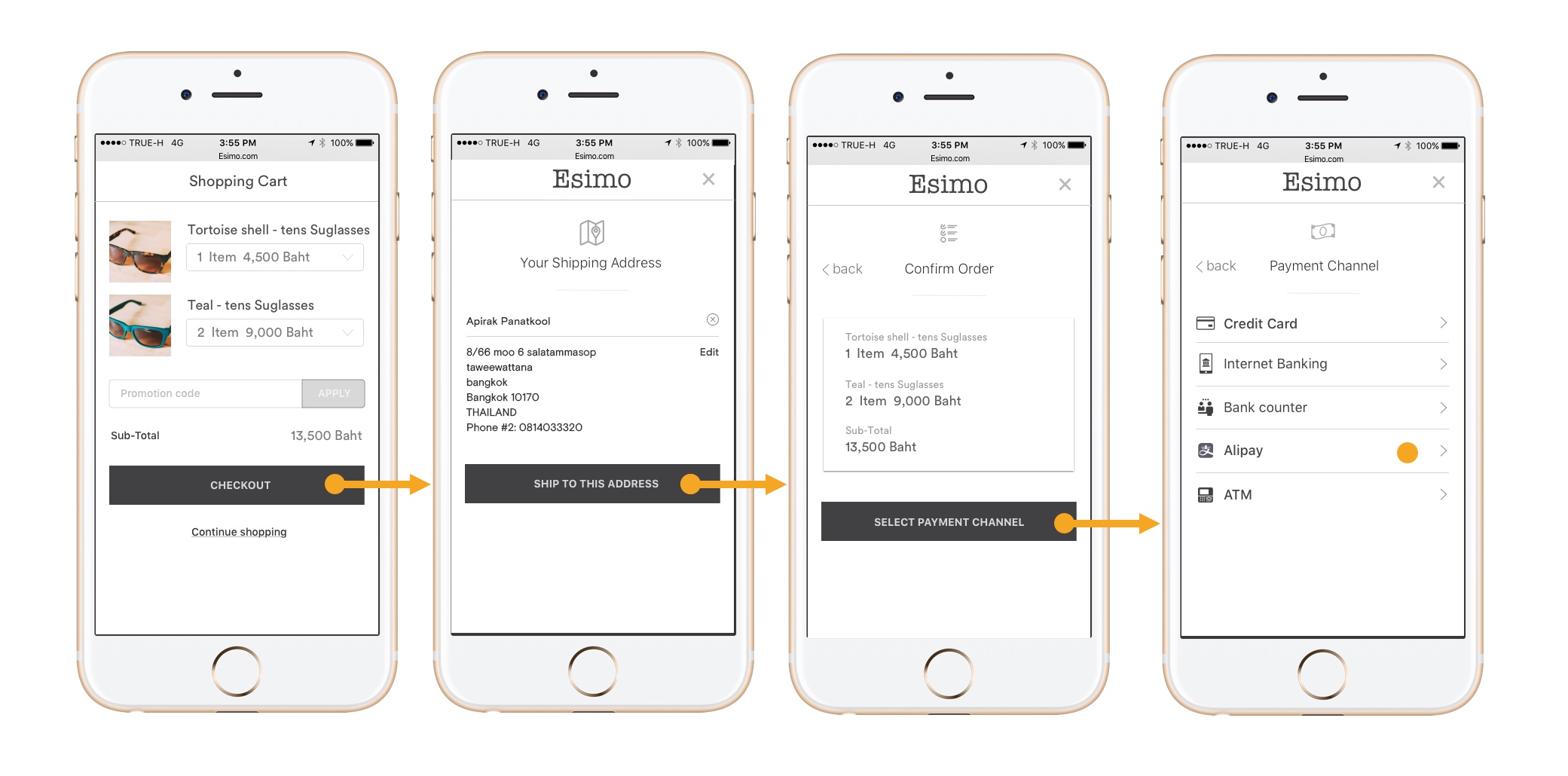
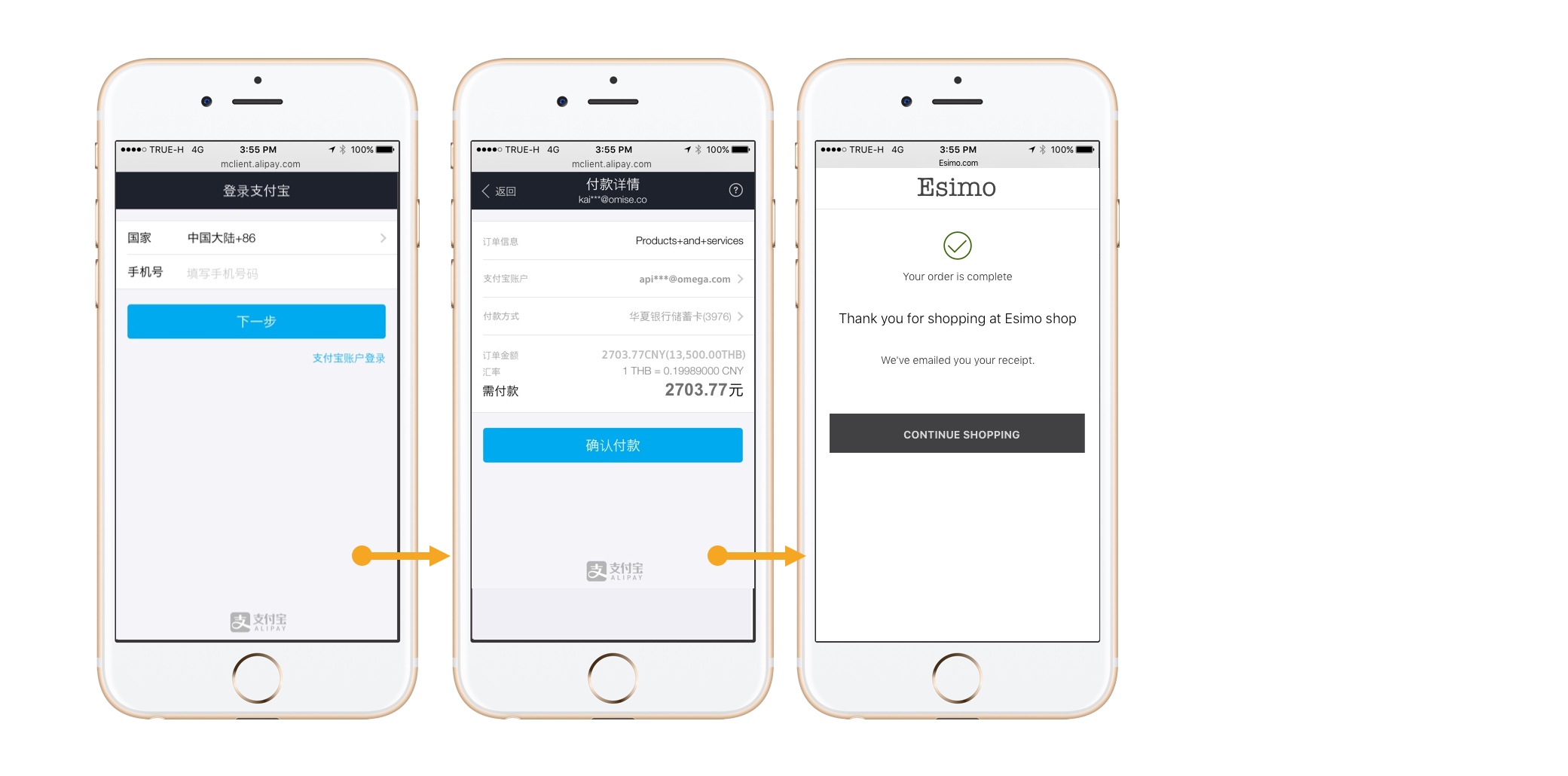
The images above demonstrate the redirect process and customer authorization steps in the Alipay payment flow.
Overview
Alipay is a third-party mobile and online payment platform operated by Ant Group (formerly Ant Financial), an affiliate of Alibaba Group. With over 1 billion active users primarily in China, Alipay has become the world's largest mobile payment platform and a crucial payment method for merchants targeting Chinese consumers.
Key Features:
- ✅ 1+ billion users - One of the world's largest mobile payment platforms
- ✅ Cross-border ready - Built for international e-commerce
- ✅ Chinese market access - Essential for China-focused businesses
- ✅ Instant confirmation - Real-time payment processing
- ✅ Mobile-first - Optimized for smartphone users
- ✅ Trusted brand - Part of Alibaba/Ant Group ecosystem
Supported Regions
| Region | Currency | Min Amount | Max Amount | API Version |
|---|---|---|---|---|
| Thailand | THB | ฿20.00 | ฿49,000.00 | 2017-11-02 |
How It Works
Customer Experience:
- Customer selects "Alipay" at checkout
- Redirected to Alipay authorization page
- Opens Alipay app (mobile) or scans QR code (desktop)
- Authenticates with password/fingerprint/Face ID
- Reviews and confirms payment
- Returns to merchant site
Typical completion time: 30 seconds - 2 minutes
Implementation
Step 1: Create Alipay Source
- cURL
- Node.js
- PHP
- Python
- Ruby
- Go
- Java
- C#
curl https://api.omise.co/sources \
  -u skey_test_YOUR_SECRET_KEY: \
  -d "type=alipay" \
  -d "amount=50000" \
  -d "currency=THB"
const omise = require('omise')({
    secretKey: 'skey_test_YOUR_SECRET_KEY'
});

const source = await omise.sources.create({
    type: 'alipay',
    amount: 50000,  // THB 500.00
    currency: 'THB'
});
<?php
$source = OmiseSource::create(array(
    'type' => 'alipay',
    'amount' => 50000,
    'currency' => 'THB'
));
?>
import omise

omise.api_secret = 'skey_test_YOUR_SECRET_KEY'

source = omise.Source.create(
    type='alipay',
    amount=50000,
    currency='THB'
)
require 'omise'

Omise.api_key = 'skey_test_YOUR_SECRET_KEY'

source = Omise::Source.create({
  type: 'alipay',
  amount: 50000,
  currency: 'THB'
})
source, err := client.Sources().Create(&operations.CreateSource{
    Type:     "alipay",
    Amount:   50000,
    Currency: "THB",
})
Source source = client.sources().create(new Source.CreateParams()
    .type("alipay")
    .amount(50000L)
    .currency("THB"));
var source = await client.Sources.Create(new CreateSourceRequest
{
    Type = "alipay",
    Amount = 50000,
    Currency = "THB"
});
Response:
{
  "object": "source",
  "id": "src_test_5rt6s9vah5lkvi1rh9c",
  "type": "alipay",
  "flow": "redirect",
  "amount": 50000,
  "currency": "THB"
}
Step 2: Create Charge
curl https://api.omise.co/charges \
  -u skey_test_YOUR_SECRET_KEY: \
  -d "amount=50000" \
  -d "currency=THB" \
  -d "source=src_test_5rt6s9vah5lkvi1rh9c" \
  -d "return_uri=https://yourdomain.com/payment/callback"
Step 3: Redirect Customer
app.post('/checkout/alipay', async (req, res) => {
    try {
        const { amount, currency, order_id } = req.body;

        // Validate currency
        const supportedCurrencies = ['THB', 'SGD', 'MYR', 'JPY'];
        if (!supportedCurrencies.includes(currency)) {
            return res.status(400).json({
                error: 'Alipay supports THB, SGD, MYR, and JPY only'
            });
        }

        // Validate amount by currency
        const limits = {
            THB: { min: 2000, max: 15000000 },
            SGD: { min: 100, max: 2000000 },
            MYR: { min: 100, max: 3000000 },
            JPY: { min: 100, max: 600000000 }
        };

        const { min, max } = limits[currency];
        if (amount < min || amount > max) {
            return res.status(400).json({
                error: `Amount must be between ${min} and ${max} ${currency}`
            });
        }

        // Create source
        const source = await omise.sources.create({
            type: 'alipay',
            amount: amount,
            currency: currency
        });

        // Create charge
        const charge = await omise.charges.create({
            amount: amount,
            currency: currency,
            source: source.id,
            return_uri: `${process.env.BASE_URL}/payment/callback`,
            metadata: {
                order_id: order_id
            }
        });

        // Redirect to Alipay
        res.redirect(charge.authorize_uri);

    } catch (error) {
        console.error('Alipay error:', error);
        res.status(500).json({ error: error.message });
    }
});
Step 4: Handle Return
app.get('/payment/callback', async (req, res) => {
    try {
        const chargeId = req.query.charge_id;
        const charge = await omise.charges.retrieve(chargeId);

        if (charge.status === 'successful') {
            await processOrder(charge.metadata.order_id);
            res.redirect('/payment-success');
        } else if (charge.status === 'failed') {
            res.redirect('/payment-failed?reason=' + charge.failure_message);
        } else {
            res.redirect('/payment-pending');
        }
    } catch (error) {
        res.redirect('/payment-error');
    }
});
Step 5: Handle Webhook
app.post('/webhooks/omise', (req, res) => {
    const event = req.body;

    if (event.key === 'charge.complete' && event.data.source.type === 'alipay') {
        const charge = event.data;

        if (charge.status === 'successful') {
            processOrder(charge.metadata.order_id);
        } else if (charge.status === 'failed') {
            handleFailedPayment(charge.metadata.order_id);
        }
    }

    res.sendStatus(200);
});
Complete Implementation Example
// Express.js server
const express = require('express');
const omise = require('omise')({
    secretKey: process.env.OMISE_SECRET_KEY
});

const app = express();
app.use(express.json());

// Amount limits by currency
const LIMITS = {
    THB: { min: 2000, max: 15000000 },
    SGD: { min: 100, max: 2000000 },
    MYR: { min: 100, max: 3000000 },
    JPY: { min: 100, max: 600000000 }
};

app.post('/checkout/alipay', async (req, res) => {
    try {
        const { amount, currency, order_id } = req.body;

        // Validate currency
        if (!['THB', 'SGD', 'MYR', 'JPY'].includes(currency)) {
            return res.status(400).json({
                error: 'Alipay only supports THB, SGD, MYR, and JPY'
            });
        }

        // Validate amount
        const { min, max } = LIMITS[currency];
        if (amount < min || amount > max) {
            return res.status(400).json({
                error: `Amount must be between ${min} and ${max} ${currency}`
            });
        }

        // Create source
        const source = await omise.sources.create({
            type: 'alipay',
            amount: amount,
            currency: currency
        });

        // Create charge
        const charge = await omise.charges.create({
            amount: amount,
            currency: currency,
            source: source.id,
            return_uri: `${process.env.BASE_URL}/payment/callback`,
            metadata: {
                order_id: order_id,
                payment_method: 'alipay'
            }
        });

        // Return authorization URL
        res.json({
            authorize_uri: charge.authorize_uri,
            charge_id: charge.id
        });

    } catch (error) {
        console.error('Alipay error:', error);
        res.status(500).json({ error: error.message });
    }
});

// Callback handler
app.get('/payment/callback', async (req, res) => {
    try {
        const chargeId = req.query.charge_id;
        const charge = await omise.charges.retrieve(chargeId);

        if (charge.status === 'successful') {
            res.redirect(`/order-success?order=${charge.metadata.order_id}`);
        } else {
            res.redirect(`/payment-failed?charge=${chargeId}`);
        }
    } catch (error) {
        res.redirect('/payment-error');
    }
});

// Webhook handler
app.post('/webhooks/omise', (req, res) => {
    const event = req.body;

    if (event.key === 'charge.complete') {
        const charge = event.data;

        if (charge.source.type === 'alipay') {
            if (charge.status === 'successful') {
                updateOrderStatus(charge.metadata.order_id, 'paid');
                sendConfirmation(charge.metadata.customer_email);
            } else {
                updateOrderStatus(charge.metadata.order_id, 'failed');
            }
        }
    }

    res.sendStatus(200);
});

app.listen(3000);
Refund Support
Alipay supports full and partial refunds within 90 days:
// Full refund
const fullRefund = await omise.charges.refund('chrg_test_...', {
    amount: 50000
});

// Partial refund
const partialRefund = await omise.charges.refund('chrg_test_...', {
    amount: 25000  // Half refund
});
Refunds are supported within 90 days of the original transaction. Both full and partial refunds are allowed.
Refund windows and policies are subject to change. Always verify current refund capabilities via the Omise API documentation or your merchant dashboard.
Common Issues & Troubleshooting
Issue: Customer doesn't have Alipay app
Cause: Customer selected Alipay but doesn't have app (primarily Chinese customers)
Solution:
- Clearly indicate Alipay is for Chinese customers
- Provide app download links
- Show QR code option for desktop users
function checkAlipayAvailability() {
    // Detect if user is likely from China
    const userLocale = navigator.language;
    const isChineseLocale = /^zh/i.test(userLocale);

    if (!isChineseLocale) {
        showWarning('Alipay is primarily for customers in China. Do you have an Alipay account?');
    }
}
Issue: Currency conversion confusion
Cause: Customer sees different amount in their Alipay app
Solution:
// Display amount in customer's currency
function displayAlipayAmount(amount, currency) {
    return `
        <div class="payment-amount">
            <p>You will pay: ${amount / 100} ${currency}</p>
            <p class="note">Amount will be converted to CNY in Alipay app at current exchange rate</p>
        </div>
    `;
}
Issue: Payment timeout
Solution:
const TIMEOUT = 15 * 60 * 1000; // 15 minutes

setTimeout(() => {
    if (!paymentConfirmed) {
        showTimeoutMessage();
        allowRetry();
    }
}, TIMEOUT);
Best Practices
1. Target Chinese Customers
<div class="alipay-info">
    <h3>Pay with Alipay (支付宝)</h3>
    <p>Alipay is a digital wallet popular in China with 1+ billion users.</p>
    <p><strong>Requirements:</strong></p>
    <ul>
        <li>Alipay account (Chinese phone number typically required)</li>
        <li>Alipay app installed or desktop browser access</li>
        <li>Sufficient balance or linked payment method</li>
    </ul>
    <p class="chinese">支付宝是中国领先的数字钱包,拥有超过10亿用户。</p>
</div>
2. Display in Chinese (Optional)
const ALIPAY_LABELS = {
    en: {
        title: 'Pay with Alipay',
        button: 'Continue to Alipay'
    },
    zh: {
        title: '使用支付宝支付',
        button: '前往支付宝'
    }
};

function getAlipayLabel(locale = 'en') {
    return ALIPAY_LABELS[locale] || ALIPAY_LABELS.en;
}
3. Handle Mobile vs Desktop
function openAlipay(authorizeUri) {
    const isMobile = /Android|iPhone|iPad|iPod/i.test(navigator.userAgent);

    if (isMobile) {
        // Mobile: Try to open app
        window.location = authorizeUri;
    } else {
        // Desktop: Show QR code
        showQRCode(authorizeUri);
    }
}
4. Validate Currency
function validateAlipayPayment(amount, currency) {
    const limits = {
        THB: { min: 2000, max: 15000000, symbol: '฿' },
        SGD: { min: 100, max: 2000000, symbol: '$' },
        MYR: { min: 100, max: 3000000, symbol: 'RM' },
        JPY: { min: 100, max: 600000000, symbol: '¥' }
    };

    if (!limits[currency]) {
        return { valid: false, error: 'Currency not supported' };
    }

    const { min, max, symbol } = limits[currency];

    if (amount < min || amount > max) {
        return {
            valid: false,
            error: `Amount must be between ${symbol}${min / 100} and ${symbol}${max / 100}`
        };
    }

    return { valid: true };
}
5. Cross-Border Considerations
// For international merchants targeting Chinese customers
const CROSS_BORDER_CONFIG = {
    displayChineseInterface: true,
    showExchangeRate: true,
    supportCNYDisplay: true,
    provideChineseSupport: true
};

// Show exchange rate estimate
async function displayExchangeRate(amount, currency) {
    // Note: Actual rate determined by Alipay
    const estimatedRate = await getEstimatedExchangeRate(currency, 'CNY');
    const cnyAmount = (amount / 100) * estimatedRate;

    return `
        Approximately ¥${cnyAmount.toFixed(2)} CNY
        (Exchange rate determined by Alipay at payment time)
    `;
}
FAQ
What is Alipay?
Alipay is China's largest digital wallet with over 1 billion users globally. It's operated by Ant Group (Alibaba affiliate) and is the dominant payment method for Chinese consumers shopping online.
Do customers need to be in China?
No, but they need an Alipay account. Most Alipay users are Chinese nationals or residents, as registration typically requires a Chinese phone number and ID verification.
What currencies does Alipay support?
Through Omise, Alipay supports:
- THB (Thailand Baht)
- SGD (Singapore Dollar)
- MYR (Malaysian Ringgit)
- JPY (Japanese Yen)
The amount is converted to CNY (Chinese Yuan) within Alipay at their exchange rate.
How long does settlement take?
Alipay settlements typically occur within 1-3 business days. Check your Omise dashboard for settlement schedules.
Can I refund Alipay payments?
Yes, Alipay supports both full and partial refunds within 90 days of the original transaction.
Is Alipay suitable for non-Chinese customers?
No, Alipay is primarily for Chinese customers. For other markets, consider:
- Thailand: PromptPay, TrueMoney
- Singapore: PayNow, GrabPay
- Malaysia: Touch 'n Go, Boost
- International: Credit cards, PayPal
Does Alipay work on desktop?
Yes, desktop users can scan a QR code with their Alipay mobile app or use Alipay's web interface if available.
Testing
Test Mode
Alipay can be tested in test mode using your test API keys. In test mode:
Test Credentials:
- Use test API keys (skey_test_xxx)
- All supported currencies can be tested (THB, SGD, MYR, JPY)
- No actual Alipay account needed for testing
Test Flow:
- Create source and charge using test API keys
- You'll receive an
authorize_urifor redirect - Test redirect flow opens test authorization page
- In test mode, use dashboard Actions to mark charge as successful/failed
- Verify webhook notifications are received
Testing Implementation:
// Create test Alipay charge
const source = await omise.sources.create({
    type: 'alipay',
    amount: 50000,
    currency: 'THB'
});

const charge = await omise.charges.create({
    amount: 50000,
    currency: 'THB',
    source: source.id,
    return_uri: 'https://example.com/callback'
});

console.log('Test authorize URL:', charge.authorize_uri);

// Manually mark as successful/failed in dashboard
// Then verify webhook handling
Test Scenarios:
- Successful payment: Complete redirect flow, verify order processing
- Failed payment: Test error handling and customer messaging
- Currency validation: Test all supported currencies
- Amount limits: Verify min/max enforcement per currency
- Timeout handling: Test abandoned payment scenarios
Important Notes:
- Test mode won't connect to real Alipay servers
- Use dashboard to simulate payment status changes
- Test all supported currencies before going live
- Verify webhook handling for all status outcomes
- Test both mobile and desktop flows
For detailed testing procedures, see the Testing Documentation.
Related Resources
- Digital Wallets Overview - All wallet options
- WeChat Pay - Alternative Chinese wallet
- Alipay+ Wallets - Regional wallets
- Multi-Currency - Currency handling
- Testing - Test Alipay integration