Omise.js
Secure client-side JavaScript library for tokenizing payments directly in the browser. Keep card data off your servers and reduce PCI compliance requirements.
Overview
Omise.js is a JavaScript library that handles payment collection and tokenization entirely in the browser. Sensitive card data goes directly from the customer's device to Omise's PCI-certified servers, never touching your backend.
Key Features:
- ✅ PCI compliance made easy - Card data never reaches your server
- ✅ Pre-built payment form - Ready-to-use UI with validation
- ✅ Custom integration - Full control over UI and UX
- ✅ 50+ payment methods - Cards, wallets, QR, banking, and more
- ✅ Mobile optimized - Works on all devices
- ✅ Secure by default - HTTPS required, automatic validation
How It Works
Omise.js provides a secure flow for collecting payment information without card data touching your servers:
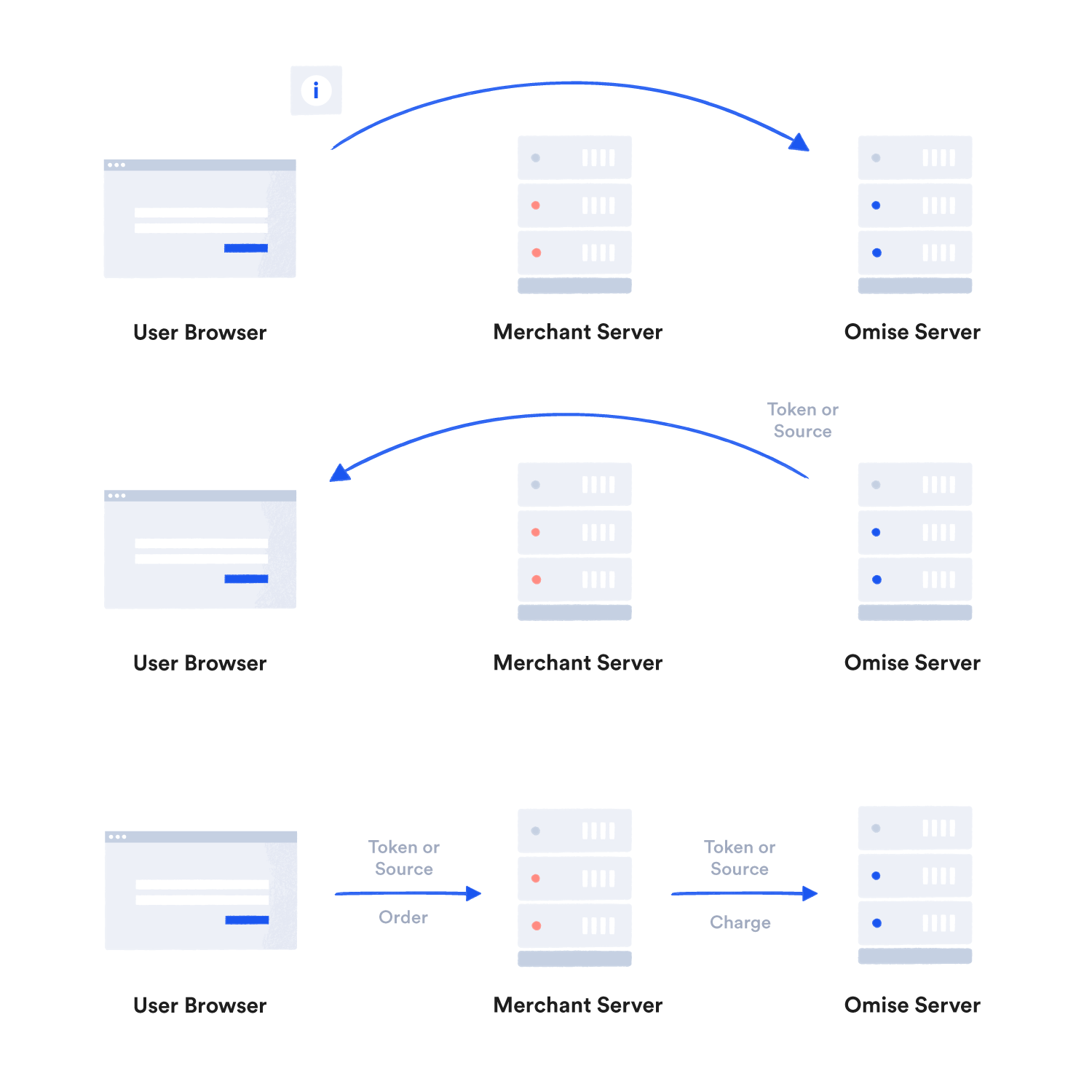
Card data goes directly from the customer's browser to Omise's servers, which return a secure token that you can safely use on your backend.
Installation
CDN (Recommended)
<script src="https://cdn.omise.co/omise.js"></script>
Add this before your closing </body> tag. The library will be available as Omise and OmiseCard globals.
Omise.js only works on HTTPS pages. Use TLS 1.2 or higher.
Integration Methods
Omise.js offers two integration approaches:
1. Pre-Built Payment Form (Fastest)
Use OmiseCard for a ready-made payment form with built-in validation:
Data Attributes Method
<form id="checkoutForm">
  <script
    src="https://cdn.omise.co/omise.js"
    data-key="pkey_test_YOUR_PUBLIC_KEY"
    data-amount="10025"
    data-currency="THB"
    data-default-payment-method="credit_card"
    data-button-label="Pay Now">
  </script>
</form>
JavaScript Method
OmiseCard.configure({
    publicKey: "pkey_test_YOUR_PUBLIC_KEY",
    amount: 10025,
    currency: "THB",
    defaultPaymentMethod: "credit_card",
    onCreateTokenSuccess: (nonce) => {
        if (nonce.startsWith('tokn_')) {
            // Card token created
            submitPayment(nonce);
        } else {
            // Source created (for non-card payments)
            submitPayment(nonce);
        }
    },
    onFormClosed: () => {
        console.log('Payment form closed');
    }
});

OmiseCard.open();
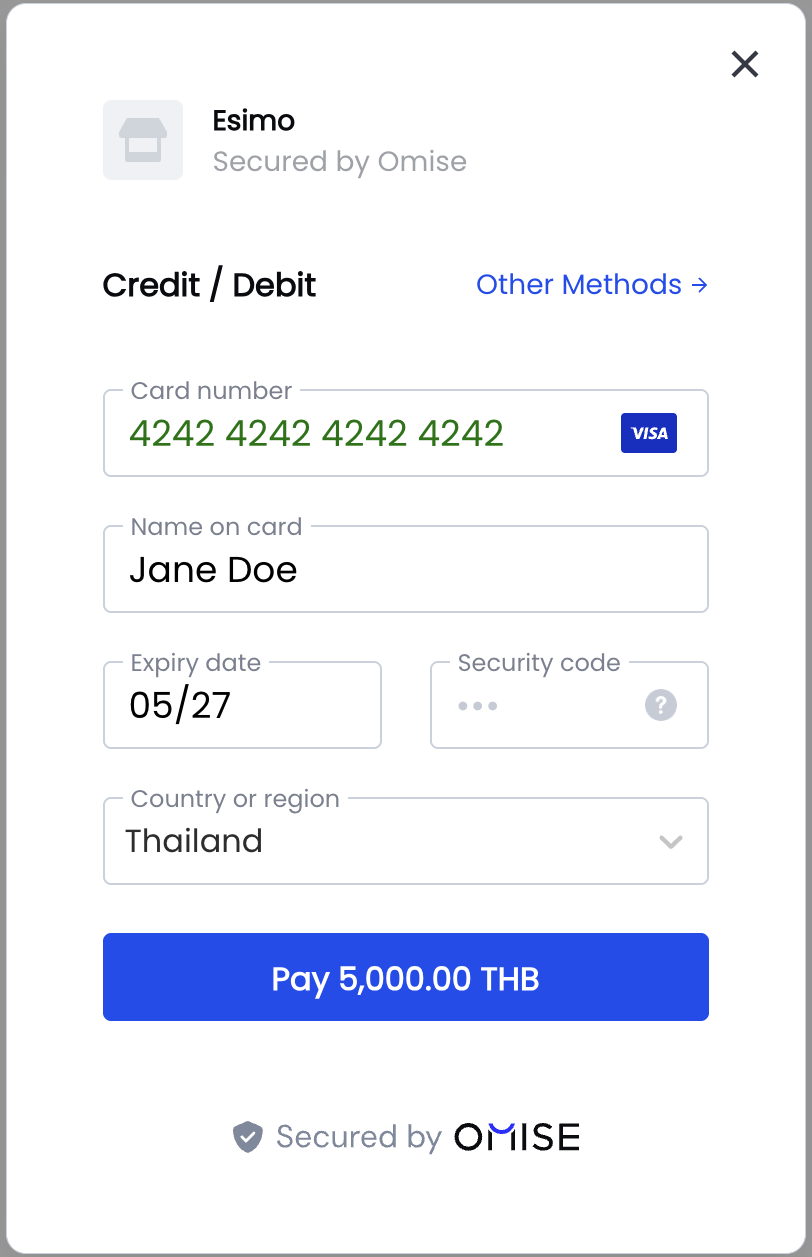
Result: A professional payment form modal with:
- Card input fields with validation
- Payment method selection
- Secure styling
- Mobile responsive design
- Built-in error handling
2. Custom Integration (Full Control)
Use Omise object for complete control over your UI:
<form id="payment-form">
    <input type="text" id="card-name" placeholder="Card Holder Name" />
    <input type="text" id="card-number" placeholder="1234 5678 9012 3456" />
    <input type="text" id="expiry-month" placeholder="MM" maxlength="2" />
    <input type="text" id="expiry-year" placeholder="YYYY" maxlength="4" />
    <input type="text" id="cvv" placeholder="123" maxlength="4" />
    <button type="submit">Pay</button>
</form>

<script src="https://cdn.omise.co/omise.js"></script>
<script>
    Omise.setPublicKey("pkey_test_YOUR_PUBLIC_KEY");

    document.getElementById('payment-form').addEventListener('submit', function(e) {
        e.preventDefault();

        Omise.createToken("card", {
            name: document.getElementById('card-name').value,
            number: document.getElementById('card-number').value,
            expiration_month: parseInt(document.getElementById('expiry-month').value),
            expiration_year: parseInt(document.getElementById('expiry-year').value),
            security_code: document.getElementById('cvv').value
        }, function(statusCode, response) {
            if (statusCode === 200) {
                // Success - send token to server
                submitTokenToServer(response.id);
            } else {
                // Error
                alert(response.message);
            }
        });
    });
</script>
Core Methods
setPublicKey()
Initialize Omise.js with your public key:
Omise.setPublicKey("pkey_test_YOUR_PUBLIC_KEY");
createToken()
Create a card token:
Omise.createToken("card", {
    name: "John Doe",
    number: "4242424242424242",
    expiration_month: 12,
    expiration_year: 2027,
    security_code: "123",
    // Optional but recommended
    city: "Bangkok",
    postal_code: "10110",
    country: "TH"
}, function(statusCode, response) {
    if (statusCode === 200) {
        console.log('Token:', response.id);
        // response.id = "tokn_test_..."
    } else {
        console.error('Error:', response.message);
    }
});
createSource()
Create a source for alternative payment methods:
Omise.createSource("truemoney", {
    amount: 35000,
    currency: "THB",
    phone_number: "+66876543210"
}, function(statusCode, response) {
    if (statusCode === 200) {
        console.log('Source:', response.id);
        // response.id = "src_test_..."
    }
});
Supported Payment Methods
Credit/Debit Cards
Omise.createToken("card", cardData, callback);
Digital Wallets
// Google Pay
Omise.createToken("tokenization", {
    method: "googlepay",
    data: googlePayToken
}, callback);

// Apple Pay
Omise.createToken("tokenization", {
    method: "applepay",
    data: applePayToken
}, callback);
QR Payments
// PromptPay
Omise.createSource("promptpay", {
    amount: 50000,
    currency: "THB"
}, callback);

// PayNow
Omise.createSource("paynow", {
    amount: 5000,
    currency: "SGD"
}, callback);
E-Wallets
// TrueMoney
Omise.createSource("truemoney", {
    amount: 30000,
    currency: "THB",
    phone_number: "+66876543210"
}, callback);

// GrabPay
Omise.createSource("grabpay", {
    amount: 10000,
    currency: "SGD"
}, callback);

// ShopeePay
Omise.createSource("shopeepay", {
    amount: 25000,
    currency: "THB"
}, callback);
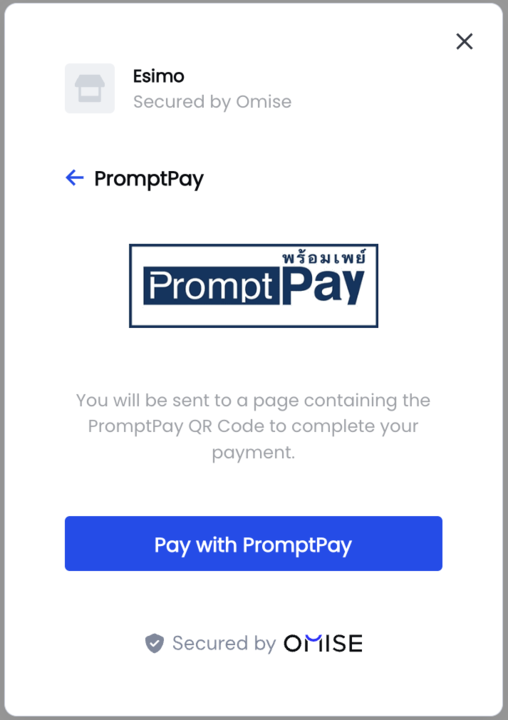
Omise.js supports a wide range of alternative payment methods popular in Thailand and Southeast Asia:
Mobile Banking
// KBank (Thailand)
Omise.createSource("mobile_banking_kbank", {
    amount: 40000,
    currency: "THB"
}, callback);

// SCB Easy
Omise.createSource("mobile_banking_scb", {
    amount: 40000,
    currency: "THB"
}, callback);
Complete Implementation Example
<!DOCTYPE html>
<html>
<head>
    <title>Omise.js Payment</title>
    <style>
        .payment-form {
            max-width: 400px;
            margin: 50px auto;
            padding: 20px;
            border: 1px solid #ddd;
            border-radius: 8px;
        }
        .form-group {
            margin-bottom: 15px;
        }
        .form-group label {
            display: block;
            margin-bottom: 5px;
            font-weight: bold;
        }
        .form-group input {
            width: 100%;
            padding: 10px;
            border: 1px solid #ccc;
            border-radius: 4px;
        }
        .btn-pay {
            width: 100%;
            padding: 12px;
            background: #1e3a8a;
            color: white;
            border: none;
            border-radius: 4px;
            font-size: 16px;
            cursor: pointer;
        }
        .btn-pay:hover {
            background: #1e40af;
        }
        .btn-pay:disabled {
            background: #ccc;
            cursor: not-allowed;
        }
        .error {
            color: #c92a2a;
            margin-top: 10px;
        }
    </style>
</head>
<body>
    <div class="payment-form">
        <h2>Checkout</h2>
        <p>Amount: <strong>฿100.25</strong></p>

        <form id="payment-form">
            <div class="form-group">
                <label for="card-name">Cardholder Name</label>
                <input type="text" id="card-name" required />
            </div>

            <div class="form-group">
                <label for="card-number">Card Number</label>
                <input type="text" id="card-number" placeholder="4242 4242 4242 4242" required />
            </div>

            <div class="form-group">
                <label>Expiration Date</label>
                <div style="display: flex; gap: 10px;">
                    <input type="text" id="expiry-month" placeholder="MM" maxlength="2" style="width: 70px;" required />
                    <input type="text" id="expiry-year" placeholder="YYYY" maxlength="4" style="width: 100px;" required />
                </div>
            </div>

            <div class="form-group">
                <label for="cvv">CVV</label>
                <input type="text" id="cvv" placeholder="123" maxlength="4" style="width: 100px;" required />
            </div>

            <button type="submit" class="btn-pay" id="pay-button">
                Pay ฿100.25
            </button>

            <div id="error-message" class="error"></div>
        </form>
    </div>

    <script src="https://cdn.omise.co/omise.js"></script>
    <script>
        // Initialize
        Omise.setPublicKey("pkey_test_YOUR_PUBLIC_KEY");

        // Format card number input
        document.getElementById('card-number').addEventListener('input', function(e) {
            let value = e.target.value.replace(/\s/g, '');
            let formatted = value.match(/.{1,4}/g)?.join(' ') || value;
            e.target.value = formatted;
        });

        // Handle form submission
        document.getElementById('payment-form').addEventListener('submit', async function(e) {
            e.preventDefault();

            // Disable button
            const payButton = document.getElementById('pay-button');
            const originalText = payButton.textContent;
            payButton.disabled = true;
            payButton.textContent = 'Processing...';

            // Clear previous errors
            document.getElementById('error-message').textContent = '';

            // Create token
            Omise.createToken("card", {
                name: document.getElementById('card-name').value,
                number: document.getElementById('card-number').value.replace(/\s/g, ''),
                expiration_month: parseInt(document.getElementById('expiry-month').value),
                expiration_year: parseInt(document.getElementById('expiry-year').value),
                security_code: document.getElementById('cvv').value
            }, async function(statusCode, response) {
                if (statusCode === 200) {
                    // Success - send to server
                    try {
                        const result = await fetch('/process-payment', {
                            method: 'POST',
                            headers: { 'Content-Type': 'application/json' },
                            body: JSON.stringify({
                                token: response.id,
                                amount: 10025
                            })
                        });

                        const data = await result.json();

                        if (data.success) {
                            window.location.href = '/payment-success';
                        } else {
                            document.getElementById('error-message').textContent = data.error;
                            payButton.disabled = false;
                            payButton.textContent = originalText;
                        }
                    } catch (error) {
                        document.getElementById('error-message').textContent = 'Network error. Please try again.';
                        payButton.disabled = false;
                        payButton.textContent = originalText;
                    }
                } else {
                    // Token creation failed
                    document.getElementById('error-message').textContent = response.message;
                    payButton.disabled = false;
                    payButton.textContent = originalText;
                }
            });
        });
    </script>
</body>
</html>
Security Best Practices
1. Never Send Card Data to Your Server
// ❌ BAD: Don't do this
fetch('/checkout', {
    body: JSON.stringify({
        cardNumber: '4242424242424242',  // DON'T!
        cvv: '123'                         // DON'T!
    })
});

// ✅ GOOD: Only send tokens
fetch('/checkout', {
    body: JSON.stringify({
        token: 'tokn_test_...'  // Safe!
    })
});
2. Use HTTPS
<!-- ✅ GOOD -->
<script src="https://cdn.omise.co/omise.js"></script>

<!-- ❌ BAD -->
<script src="http://cdn.omise.co/omise.js"></script>
3. Validate on Client and Server
// Client-side validation
function validateCard() {
    const number = document.getElementById('card-number').value;
    const month = parseInt(document.getElementById('expiry-month').value);
    const year = parseInt(document.getElementById('expiry-year').value);

    if (number.length < 13) {
        return 'Card number too short';
    }

    if (month < 1 || month > 12) {
        return 'Invalid expiry month';
    }

    const currentYear = new Date().getFullYear();
    if (year < currentYear) {
        return 'Card expired';
    }

    return null; // Valid
}
4. Clear Sensitive Data
function clearForm() {
    document.getElementById('card-number').value = '';
    document.getElementById('cvv').value = '';
    // Keep name and expiry for user convenience
}
5. Implement CSP Headers
<meta http-equiv="Content-Security-Policy"
      content="script-src 'self' https://cdn.omise.co;">
Common Issues & Troubleshooting
Issue: "Public key is required"
Solution:
// Must call setPublicKey before createToken
Omise.setPublicKey("pkey_test_YOUR_KEY");
Issue: "Invalid card number"
Causes:
- Non-numeric characters in card number
- Invalid card brand
- Test card in live mode
Solution:
// Remove spaces and validate
const cardNumber = value.replace(/\s/g, '');
if (!/^\d{13,19}$/.test(cardNumber)) {
    return 'Invalid card number';
}
Issue: Token creation returns 400
Common Causes:
- Missing required fields
- Wrong data types (string vs integer)
- Invalid expiration date
Solution:
Omise.createToken("card", {
    name: cardName,  // string
    number: cardNumber.replace(/\s/g, ''),  // string
    expiration_month: parseInt(month),  // integer!
    expiration_year: parseInt(year),    // integer!
    security_code: cvv  // string
}, callback);
FAQ
Can I use Omise.js with React, Vue, or Angular?
Yes! Load Omise.js in your index.html and use the global Omise object in your components:
// React example
useEffect(() => {
    if (window.Omise) {
        window.Omise.setPublicKey(publicKey);
    }
}, []);

const handleSubmit = () => {
    window.Omise.createToken('card', cardData, callback);
};
Are tokens reusable?
No, tokens are single-use only. Each charge requires a new token. To save cards, use the Customers API.
How long are tokens valid?
Card tokens expire after 10 minutes if unused. Create tokens just before charging.
Can I style the pre-built payment form?
The pre-built form has limited styling options. For full control over appearance, use the custom integration method.
Does Omise.js work offline?
No, Omise.js requires internet connection to communicate with Omise servers for tokenization.
How do I test Omise.js?
Use test mode with test cards:
- Success: 4242 4242 4242 4242
- Decline: 4000 0000 0000 0002
Any future expiration date and any CVV work in test mode.
Related Resources
- Collecting Card Information - Detailed integration guide
- Credit Card Payments - Server-side charging
- Security Best Practices
- Testing Guide
- API Reference